# The rules of easing for motion video
> Twelve rules of easing for motion video, each with a reason, a number and the code: land entrances, launch exits, overshoot only for mass, speed bands.
Canonical: https://vawe.dev/blog/easing
Last updated: 2026-11-04
An easing is the rule for how fast a move goes at each moment: where it starts fast, where it slows, where it stops. A straight line (linear) is the same speed all the way, and it reads as a machine. Every rule below is a choice of curve and time for one kind of move. Each has a reason, a number from our code or our measurements, a short example and the case where you break it. The curves are named in `core/motion/presets.js` as `EASE`, and each has its own page at [/easing](https://vawe.dev/easing).
Every curve below also has its own page at [/easing](https://vawe.dev/easing), with a live demo and the CSS to copy. The ten vawe curves ship as `EASE` in `core/motion/presets.js` of [vawe](https://github.com/vawe-hq/vawe).
## What the rules look like together
| Rule | Number |
| --- | --- |
| Entrances land | `EASE.land`, 39.5% of the distance in the first 10% of the time |
| Exits are shorter and accelerate | 0.35 to 0.6 of the entrance |
| Overshoot is a claim about mass | none on text, UI or counts; about 1 arrival in 3 elsewhere |
| Use named eases | no CSS keyword as a default, no linear over 0.3 s |
| Speed bands | the slowest move at least 3 times the fastest |
| Follow-through | the trailing property ends 0.05 to 0.15 s later |
| Anticipation | hero moves only, a 2 to 4 percent dip |
| Stagger | 30 to 80 ms apart, the whole run within 0.5 s |
| Camera flights | constant speed in the middle, eased ends |
| One hero motion | one mover owns the beat |
| No dead stops | nothing sits still for more than 0.5 s |
| Real surfaces | move as the real product does |
## 1. An entrance lands
A thing that arrives should move most of its distance at once and then settle, because the eye is watching that moment. A slow start wastes it. So `EASE.land` leaves fast and stops softly. At 10 percent of the time it has covered 39.5 percent of the distance, and its peak speed is 4.8 times the average.
Never start from `scale(0)`: nothing grows from nothing. Start at 0.9 to 0.97 of the size with opacity 0. The `enter()` preset uses 0.96.
```js
import { EASE } from "./core/motion/presets.js";
el.animate(
[{ translate: "0 40px", opacity: 0 }, { translate: "0 0", opacity: 1 }],
{ duration: 700, easing: EASE.land, fill: "both" },
);
```
On a move under 0.4 s, `land` jumps: at 0.3 s and 30 frames a second the first frame already covers 43 percent. Use `landSoft`, which covers 30 percent and peaks at 2.81 times the average. Break the rule for a handover between two positions the viewer already sees. `land` would slow down through the whole trip and read as two objects. Use `carry` or `glide`.
land against ease-in-out, both 0.7 s: land covers 39.5% of the distance in the first 10% of the time.
## 2. An exit is shorter, and it accelerates
An entrance is an introduction. An exit is over: the viewer has seen the thing and wants the next one. So an exit runs 0.35 to 0.6 of its entrance, and `leave()` in the presets uses 0.6. A card that takes 0.5 s to appear leaves in 0.3 s. When you do not know the entrance length, use 0.18 to 0.3 s, which is 0.6 of the professional band. A real product window fades out in 0.3 s.
An exit also speeds up, on `EASE.launch`. An exit on the entrance's own ease arrives while it is leaving. Our first `launch` ended at 4.8 times the average speed at the cut, and it read as a vanish, so it is capped at 3 times. Outside our own work, none of 57 Lottie exits ended at 1.5 times the average speed or more.
```js
import { leave } from "./core/motion/presets.js";
leave(card, { end: 2.0 });
```
Break the rule when the exit is a settle or a hand-off into the next shot and the page says so. Then `EASE.leave`, which slows into its end, is allowed.
launch: the right exit takes 0.3 s, 0.6 of the 0.5 s entrance. The left exit runs the full 0.5 s.
## 3. Overshoot is a claim about mass
When a thing passes its mark and comes back, the viewer reads weight. Text, a panel and a number have none. So type and UI do not overshoot, and a count never passes its final figure. A film that says 1,822 and paints 1,900 on the way shows a number that is not true. Ease a count with an expo-out over 0.8 to 1.4 s, where the slow end is the weight.
The opposite fault is real too. Across 22 reference films, 21 to 41 percent of arrivals overshoot (p10 to p90), against 0 to 11 percent in our early films. A film where nothing springs reads stiff. So give about 1 arrival in 3 a spring: `EASE.nudge` passes by 6.34 percent, and `EASE.pop` passes by 15.3 percent for the one arrival that matters, on a thing that then holds still.
```js
import { stagger, enter } from "./core/motion/presets.js";
stagger(cards, { at: 1, band: "energy", nudgeEvery: 3 });
enter(cta, { at: 1.6, ease: "pop" });
```
```js
import { easeOutExpo } from "./core/motion/curves.js";
window.seek = (t) => {
const u = easeOutExpo(Math.min(1, t / 1.1));
count.textContent = Math.round(1822 * u).toLocaleString("en-US");
};
```
Break the rule for a playful brand, which wants more. Break it the other way for a copy of a real surface that does not overshoot, such as a terminal. The method for the 22 films is in [motion graphics benchmark: 167 cuts measured](https://vawe.dev/blog/watch-a-film).
Left: the text bounces and the count passes 1,822. Right: the card springs on EASE.pop (15.3% overshoot) and the count stops on 1,822.
## 4. Use a named ease, not a keyword
The CSS words `ease`, `ease-out` and `ease-in-out` are what a browser picks when you pick nothing. A hand-fitted `cubic-bezier` is worse: it starts too hard and stops too early. So take every curve from the `EASE` names, which are exact `linear()` strings, and use one or two eases per scene. Do not run a move longer than 0.3 s on `linear`.
```js
// wrong: the browser default on every element
el.animate(frames, { duration: 600, easing: "ease-out" });
// right: the curve has a job
el.animate(frames, { duration: 600, easing: EASE.land });
```
Break the rule on the interior legs of a camera path, where constant speed is the point (rule 9). A loop between two resting positions can use `ease-in-out`. Two layers that move in one beat should differ in duration or start time, or they move in lockstep.
linear against EASE.land over 0.6 s. The outlines are 75 ms apart: linear spaces them evenly, land bunches them at the end.
## 5. Speed is a voice: use bands
If every move takes 0.45 s, the film reads as one flat tone. So each move sits in a named band, and the slowest move runs at least 3 times the fastest.
| Band | Seconds |
| --- | --- |
| energy | 0.15 to 0.3 |
| professional | 0.3 to 0.5 |
| gravity | 0.5 to 0.8 |
| cinematic | 0.8 to 2 |
Give the hero gravity or cinematic and the payoff energy. A 0.25 s hook entrance followed by a 1.0 s reveal is right. Every entrance at 0.45 s is wrong. Speed has a ceiling: a card that slides 40 percent of the frame in 0.25 s peaks near 6 frame heights per second, and in 0.1 s near 15. Reference films peak at 4 to 13 frame heights per second and our limit is 12.6. Our early films ran at 14 to 30. Break the rule for one deliberate tempo that the brief names, such as a metric-cut list.
Left: every move 0.45 s. Right: 0.25, 0.8 and 0.25 s, so the slowest move is 3.2 times the fastest.
## 6. Follow-through: the trailing part finishes later
A card whose every property stops on one frame reads as a slide changing. When the scale settles after the position, the card has weight. Delay the trailing property by 0.05 to 0.15 s. The draft check fires when all properties end within one frame (0.017 s at 60 fps).
```js
card.animate([{ translate: "0 40px" }, { translate: "0 0" }], { duration: 600, easing: EASE.land, fill: "both" });
card.animate([{ scale: 0.96 }, { scale: 1 }], { duration: 700, easing: EASE.land, fill: "both" });
```
Break it for rigid things: a card that drags reads as jelly. Follow-through is not stagger. Stagger delays siblings, and follow-through delays the parts of one element.
The shadow plate ends 0.12 s after the card on the right (0.72 s against 0.6 s). On the left both stop on one frame.
## 7. Anticipation: on the hero move only
A small opposite move readies the eye for a big one. Use a scale dip of 2 to 4 percent for about 4 frames, or a counter-move of 10 to 20 percent of the travel. `enter(el, { anticipate: 0.12 })` does the second in one call. A wind-up on every move reads as a wobble, so keep it for the one move near the spectacle second. Skip it on information and on anything the viewer already looks at.
The right card first moves back 20% of its travel, then lands: enter(el, { anticipate: 0.2 }).
## 8. Stagger: one beat with an inner rhythm
A group that lands on one frame pops like a screenshot. A group that queues is slow. So siblings start 30 to 80 ms apart (50 ms by default, 80 to 120 ms for a calm film), and the whole run takes at most 0.5 s. Six chips at 50 ms run 0.25 s. Eight items at 0.10 s run 0.7 s, over the cap. Past about 7 items, stagger a few and bring the rest as a block. No 3 or more elements land on one frame.
```js
stagger(document.querySelectorAll(".facts li"), { at: 2.0, band: "energy", from: "0.6em 0" });
```
Break it when the group must read as one object, such as a logo that locks. Use 0 ms and say so in the page.
Six rows, 0.3 s each on landSoft. Left: all start on one frame. Right: 50 ms apart, the last row starts 0.26 s after the first.
## 9. A camera flight is constant in the middle
A flight through one space replaces a cut. If every key eases to rest, three keys read as two moves with a full stop between. So keep constant speed on the interior legs and ease only the first start and the last stop. Give layers different depths, or the flight reads as a slide.
```js
import { keys } from "./core/motion/presets.js";
keys(camera, "translate", [
[0, "0 0", "easyEase"],
[1, "-400px 0"],
[2, "-800px 0"],
[3, "-1200px 0", "easyEase"],
]);
```
A camera move under 2 s takes `land`. `settle` and `glide` reach 5 percent of the travel only after 20 percent and 14 percent of the time, so a 1.6 s pull-back sits dead for its first 0.33 s. Use `glide` for a push or a drift of 2 s or more, and `settle` for a pull of 2 s or more that starts and ends at rest. If the beats are unrelated claims, use cuts instead.
Three legs of 0.7 s. Left: every key eased, so the camera stops twice. Right: eased ends and constant speed in the middle.
## 10. One hero motion per beat
One element owns the motion in a beat. The rest support it quietly, with at most one secondary motion that is lower in contrast and offset in time. Two animations that compete read as none. Slide up plus fade is one claim, arriving. Rise plus rotate is two claims about one object, so drop one. The draft check fires on 4 or more movers that start within 0.03 s when the top mover holds under 30 percent of the motion. In practice: the card slides in, and its shadow settles a beat later.
Left: five parts move at once. Right: the card leads, the rest holds still, and one chip fades in behind it.
## 11. No dead stops
A hold keeps one part alive: a line that types, a counter that ticks, a glint. A frozen frame is not a hold. No span longer than 0.5 s should sit still unless the page declares it, for example the held wordmark on the last beat. A camera drift does not count as life, because the camera holds still by default. A dead stop is also a speed jump: a move that stops within one step from over 600 px per second reads as a jolt. Fix it at the curve. End the move on `EASE.land` or a spring, and rest 0.4 to 0.6 s after it settles.
Left: ease-in ends a 0.5 s slide at full speed (1,530 px/s on a 1080p frame) and stops in one frame. Right: EASE.land slows into the stop and rests.
## 12. A real surface moves as the real product does
A film often shows a chat, a terminal or a dashboard. A copy of one should keep the product's own motion, so a viewer who knows the product sees nothing strange. We measured ChatGPT and Vercel Analytics clips at 30 fps (plus or minus 33 ms) and keep the numbers in `core/motion/ui.js`.
| Part | Value |
| --- | --- |
| Typing | 30 ms a character, 70 ms more after a space, 25 percent jitter |
| Stream | a chunk of 1 to 3 words every 55 to 110 ms, 200 ms fade |
| Panel in | 220 ms fade, 0.8vh rise, no scale |
| Row in | 300 ms fade, 1vh rise, 70 ms apart |
| Digit roll | 150 ms out, 260 ms in, in its own clipped slot |
| Send | spring `k` 500, `d` 25: 12 percent overshoot, settled in 0.39 s |
| Exit | 300 ms fade to the empty ground |
```js
import { UI, EASE } from "./core/motion/presets.js";
panel.animate(
[{ opacity: 0, translate: `0 ${UI.panel.rise}` }, { opacity: 1, translate: "0 0" }],
{ duration: UI.panel.fadeMs, easing: EASE.land, fill: "both" },
);
```
A panel fades and does not scale. A counter never springs. A terminal never eases its text: characters and lines appear on a frame, with no slide or fade. Only a small, fast item takes the send spring, a bubble or a chip with 3 to 20 px of travel. A real surface covers 27 to 39 percent of the way in its first frame. Pick the ease whose first frame lands in that band at your duration: `land` at 0.4 s gives 34 percent, `landSoft` at 0.3 s gives 30. Break this rule only when someone asks for creative motion on a real surface.
Left: terminal rows fade in over 0.3 s. Right: whole rows on one frame, 70 ms apart, as a real terminal prints them.
## Pick by job
When you know the job and not the rule, use the table at [/easing](https://vawe.dev/easing#jobs). The durations in it come from the same code.
| Job | Ease | Time |
| --- | --- | --- |
| Title or text entrance | `land` | 0.5 to 0.8 s |
| UI panel or card in | `land` | 0.22 to 0.5 s |
| Value change | `swap` | 0.15 s out, 0.26 s in |
| List stagger | `landSoft`, `nudge` | 0.15 to 0.3 s a row, 30 to 80 ms apart |
| Pop or corner notification | `pop` | 0.5 to 0.8 s |
| Exit | `launch` | 0.35 to 0.6 of the entrance |
| Camera under 2 s | `land` | 0.5 to 2 s |
| Camera of 2 s or more | `glide`, `settle` | 2 s or more |
| Scan or wipe travel | `settle` | 0.5 to 1 s |
## Four questions people get wrong
**Does a corner notification take pop or the send spring?** It takes `pop` when it slides in over more than 20 px, in 0.5 to 0.8 s. A pop under 0.35 s leaves 2.4 frames of settle at 30 fps. A small item that moves 3 to 20 px takes the send spring.
**How long is an exit when I do not know the entrance?** Use 0.18 to 0.3 s.
**Is `settle` a camera ease?** Only for a pull of 2 s or more that starts and ends at rest. A camera move under 2 s takes `land`.
**What is the difference between `launch`, `leave` and `carry`?** `launch` is the house exit and it speeds up (peak 3x). `leave` slows into its end (peak 1.95x) for a settle or a hand-off. `carry` is not an exit: it ends still moving fast (peak 4.79x), so the next key or the next shot takes over the speed.
## The ten curves
Peak speed is the top speed of the curve compared with a straight line over the same time. Every value comes from `site/lib/easing.json`, which a script builds from the motion library.
| Name | Job | Peak speed | Overshoot |
| --- | --- | --- | --- |
| [`land`](https://vawe.dev/easing/land) | entrance: fast start, long soft stop | 4.8x | none |
| [`landSoft`](https://vawe.dev/easing/land-soft) | entrance under 0.4 s | 2.81x | none |
| [`settle`](https://vawe.dev/easing/settle) | heavy object that starts and ends at rest | 2.5x | none |
| [`swap`](https://vawe.dev/easing/swap) | replace one thing with another | 4x | none |
| [`glide`](https://vawe.dev/easing/glide) | slow drift, such as a camera push | 1.47x | none |
| [`carry`](https://vawe.dev/easing/carry) | a move that runs into a cut or the next key | 4.79x | none |
| [`leave`](https://vawe.dev/easing/leave) | exit that settles | 1.95x | none |
| [`launch`](https://vawe.dev/easing/launch) | exit that accelerates, capped at the cut | 3x | none |
| [`pop`](https://vawe.dev/easing/pop) | arrival that overshoots its mark | 4.79x | 15.3% |
| [`nudge`](https://vawe.dev/easing/nudge) | the same shape as `pop`, less of it | 4.79x | 6.34% |
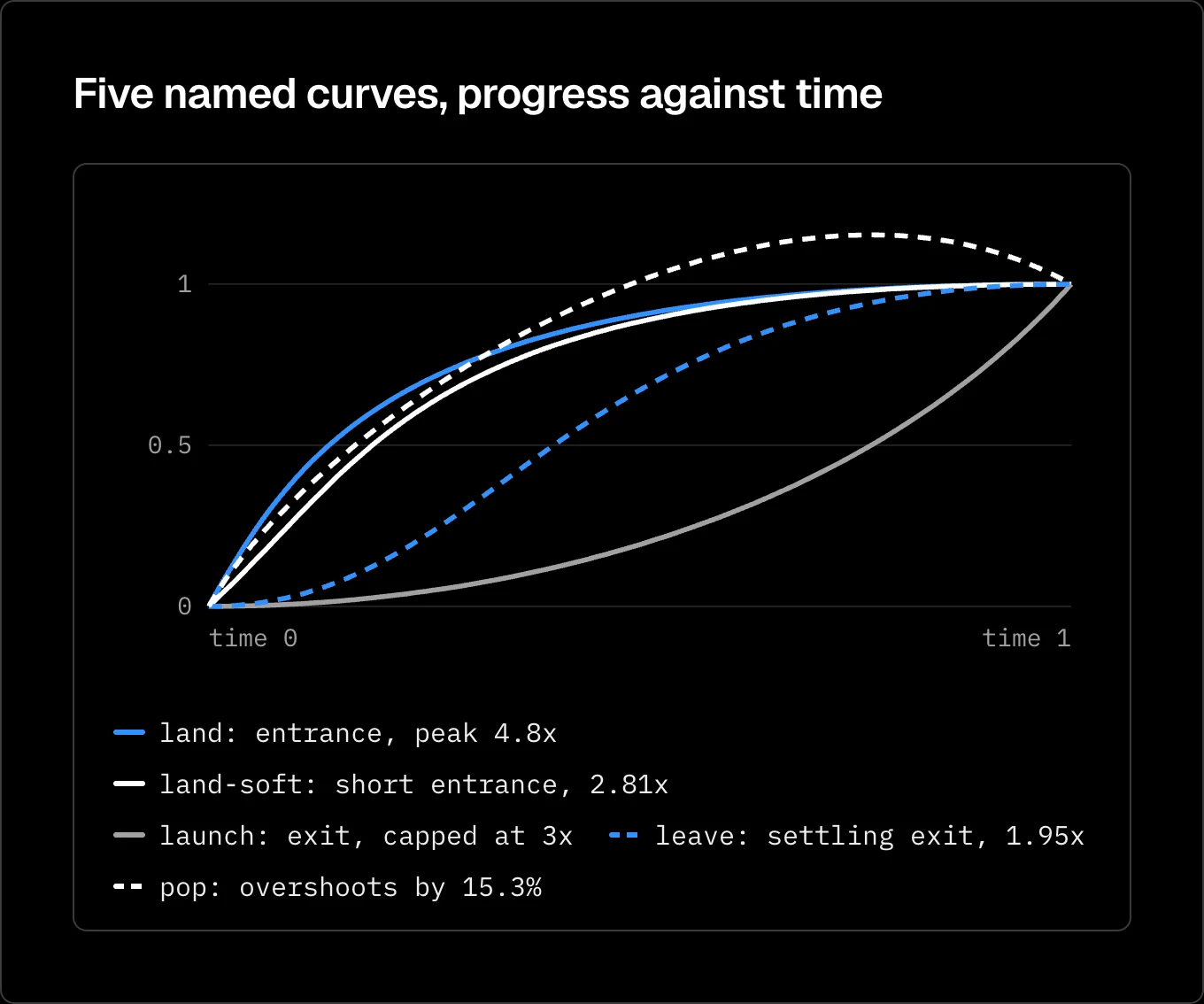
Each name is two After Effects keyframe handles. A handle has an influence (how far along the time axis it reaches) and a speed (how steep the curve is at the key). The whole vocabulary lives in `core/motion/presets.js`, and each curve converts to a CSS `linear()` string. We did not pick the handles by taste. We measured 1,339 animation segments from open-source Lottie projects and 27 from HyperFrames carousels, and 65.05 percent of the Lottie segments kept the default handles. We have no before-and-after score for named curves against ad hoc ones. The short-move fix came from a measurement, and no number says how much better the films got.
Why names? Our video components and the agents that wrote them used to type `cubic-bezier` numbers by hand. Short pops landed too hard, exits ran as long as entrances, and two components that should feel alike used unrelated curves. An agent that sees `EASE.launch` chooses better than one that sees four floats, because the name carries the purpose.
## The classic eases, by family
The Penner eases most libraries ship. The percent is how far through the time each curve reaches half its travel: lower means a faster start. Each name opens its page with the cubic-bezier or linear() value.
| Family | In | Out | In-out |
| --- | --- | --- | --- |
| sine | [`easeInSine`](https://vawe.dev/easing/ease-in-sine), half at 67% | [`easeOutSine`](https://vawe.dev/easing/ease-out-sine), half at 33% | [`easeInOutSine`](https://vawe.dev/easing/ease-in-out-sine), half at 50% |
| quad | [`easeInQuad`](https://vawe.dev/easing/ease-in-quad), half at 71% | [`easeOutQuad`](https://vawe.dev/easing/ease-out-quad), half at 29% | [`easeInOutQuad`](https://vawe.dev/easing/ease-in-out-quad), half at 50% |
| cubic | [`easeInCubic`](https://vawe.dev/easing/ease-in-cubic), half at 79% | [`easeOutCubic`](https://vawe.dev/easing/ease-out-cubic), half at 21% | [`easeInOutCubic`](https://vawe.dev/easing/ease-in-out-cubic), half at 50% |
| quart | [`easeInQuart`](https://vawe.dev/easing/ease-in-quart), half at 84% | [`easeOutQuart`](https://vawe.dev/easing/ease-out-quart), half at 16% | [`easeInOutQuart`](https://vawe.dev/easing/ease-in-out-quart), half at 50% |
| quint | [`easeInQuint`](https://vawe.dev/easing/ease-in-quint), half at 87% | [`easeOutQuint`](https://vawe.dev/easing/ease-out-quint), half at 13% | [`easeInOutQuint`](https://vawe.dev/easing/ease-in-out-quint), half at 50% |
| expo | [`easeInExpo`](https://vawe.dev/easing/ease-in-expo), half at 90% | [`easeOutExpo`](https://vawe.dev/easing/ease-out-expo), half at 10% | [`easeInOutExpo`](https://vawe.dev/easing/ease-in-out-expo), half at 50% |
| circ | [`easeInCirc`](https://vawe.dev/easing/ease-in-circ), half at 87% | [`easeOutCirc`](https://vawe.dev/easing/ease-out-circ), half at 13% | [`easeInOutCirc`](https://vawe.dev/easing/ease-in-out-circ), half at 50% |
| back | [`easeInBack`](https://vawe.dev/easing/ease-in-back), half at 87% | [`easeOutBack`](https://vawe.dev/easing/ease-out-back), half at 13% | [`easeInOutBack`](https://vawe.dev/easing/ease-in-out-back), half at 50% |
| elastic | [`easeInElastic`](https://vawe.dev/easing/ease-in-elastic), half at 96% | [`easeOutElastic`](https://vawe.dev/easing/ease-out-elastic), half at 4% | [`easeInOutElastic`](https://vawe.dev/easing/ease-in-out-elastic), half at 50% |
| bounce | [`easeInBounce`](https://vawe.dev/easing/ease-in-bounce), half at 74% | [`easeOutBounce`](https://vawe.dev/easing/ease-out-bounce), half at 26% | [`easeInOutBounce`](https://vawe.dev/easing/ease-in-out-bounce), half at 50% |
## Match speed across a cut with ramp()
`ramp()` is a speed ramp across a cut. The outgoing element accelerates into the cut. The incoming element leaves the cut at the same speed and slows down. So the velocity matches on both sides, which is the part people get wrong by eye. See [the speed-ramp video component](https://vawe.dev/video-components/speed-ramp), and read [motion graphics transitions](https://vawe.dev/blog/transitions) for other ways to carry motion over a seam.
## Spring animation in CSS
CSS has no spring keyword. It has `linear()`, an easing function that takes a list of points. Sample a spring at 40 points, and CSS draws the spring. The result is a plain CSS value, so a Web Animation or a CSS `transition` can use it.
```js
function spring(t, k, d) {
if (t <= 0) return 0;
const w = Math.sqrt(k), z = d / (2 * w);
if (z >= 1) return 1 - Math.exp(-w * t) * (1 + w * t);
const wd = w * Math.sqrt(1 - z * z);
return 1 - Math.exp(-z * w * t) * (Math.cos(wd * t) + ((z * w) / wd) * Math.sin(wd * t));
}
function springEasing(k, d, seconds, samples = 40) {
const pts = Array.from({ length: samples + 1 }, (_, i) =>
i === 0 ? 0 : i === samples ? 1 : Math.round(spring((i / samples) * seconds, k, d) * 1e4) / 1e4);
return `linear(${pts.join(", ")})`;
}
el.animate([{ transform: "scale(0)" }, { transform: "scale(1)" }],
{ duration: 1040, easing: springEasing(220, 12, 1.04), fill: "both" });
```
Here `k` is the stiffness and `d` is the damping. A higher `d` removes the bounce. We ran this in headless Chrome with `k` 220 and `d` 12. The easing string is 319 characters, and the scale peaks at 1.248 before it settles at 1. The four springs in `core/motion/springs.js` settle in 0.43 s (snappy), 0.71 s (default), 1.34 s (heavy) and 1.04 s (playful). Only snappy (1.015) and playful (1.249) overshoot by more than 0.1 percent. This sample starts at `scale(0)` to show the spring, which rule 1 forbids for an entrance in a film: start at 0.9 to 0.97.
The five CSS keywords reach half their travel at these points: [`ease`](https://vawe.dev/easing/ease) 29%; [`ease-in`](https://vawe.dev/easing/ease-in) 66%; [`ease-out`](https://vawe.dev/easing/ease-out) 34%; [`ease-in-out`](https://vawe.dev/easing/ease-in-out) 50%; [`linear`](https://vawe.dev/easing/linear) 50%. `ease-in-out` and `linear` both reach half at 50%, but `ease-in-out` starts and ends slow.
## Spring presets from each library
The same spring math, run on each library's own preset values. Settle is the time to stay within the threshold of the end. Each name opens its page with the CSS linear() string.
| Preset | Library | Settle | Overshoot |
| --- | --- | --- | --- |
| [vawe snappy](https://vawe.dev/springs/vawe-snappy) | vawe house springs | 425 ms | 1.5% |
| [vawe default](https://vawe.dev/springs/vawe-default) | vawe house springs | 705 ms | 0% |
| [vawe heavy](https://vawe.dev/springs/vawe-heavy) | vawe house springs | 1345 ms | 0% |
| [vawe playful](https://vawe.dev/springs/vawe-playful) | vawe house springs | 1040 ms | 24.9% |
| [react-spring default](https://vawe.dev/springs/react-spring-default) | react-spring | 705 ms | 0% |
| [react-spring gentle](https://vawe.dev/springs/react-spring-gentle) | react-spring | 945 ms | 7.4% |
| [react-spring wobbly](https://vawe.dev/springs/react-spring-wobbly) | react-spring | 1140 ms | 20.8% |
| [react-spring stiff](https://vawe.dev/springs/react-spring-stiff) | react-spring | 715 ms | 5% |
| [react-spring slow](https://vawe.dev/springs/react-spring-slow) | react-spring | 1375 ms | 0% |
| [react-spring molasses](https://vawe.dev/springs/react-spring-molasses) | react-spring | 2915 ms | 0% |
| [Motion default spring](https://vawe.dev/springs/motion-default) | Motion (Framer Motion) | 1275 ms | 16.3% |
| [Motion x, y and rotate default](https://vawe.dev/springs/motion-transform) | Motion (Framer Motion) | 565 ms | 12% |
| [Motion scale default](https://vawe.dev/springs/motion-scale) | Motion (Framer Motion) | 445 ms | 7.3% |
| [SwiftUI spring()](https://vawe.dev/springs/swiftui-spring) | SwiftUI | 690 ms | 1% |
| [SwiftUI .smooth](https://vawe.dev/springs/swiftui-smooth) | SwiftUI | 735 ms | 0% |
| [SwiftUI .snappy](https://vawe.dev/springs/swiftui-snappy) | SwiftUI | 700 ms | 0.6% |
| [SwiftUI .bouncy](https://vawe.dev/springs/swiftui-bouncy) | SwiftUI | 820 ms | 4.6% |
| [Compose spring() default](https://vawe.dev/springs/compose-no-bouncy-medium) | Jetpack Compose | 240 ms | 0% |
| [Compose NoBouncy with StiffnessMediumLow](https://vawe.dev/springs/compose-no-bouncy-medium-low) | Jetpack Compose | 465 ms | 0% |
| [Compose MediumBouncy with StiffnessLow](https://vawe.dev/springs/compose-medium-bouncy-low) | Jetpack Compose | 900 ms | 16.3% |
| [Compose HighBouncy with StiffnessMediumLow](https://vawe.dev/springs/compose-high-bouncy-medium-low) | Jetpack Compose | 1655 ms | 52.7% |
| [Material 3 Expressive fast spatial](https://vawe.dev/springs/material-expressive-fast-spatial) | Material 3 | 360 ms | 9.5% |
| [Material 3 Expressive default spatial](https://vawe.dev/springs/material-expressive-default-spatial) | Material 3 | 435 ms | 1.5% |
| [Material 3 Expressive slow spatial](https://vawe.dev/springs/material-expressive-slow-spatial) | Material 3 | 600 ms | 1.5% |
| [Material 3 Standard default spatial](https://vawe.dev/springs/material-standard-default-spatial) | Material 3 | 320 ms | 0.2% |
## The 45 easing pages
A script reads the motion library and writes one JSON file per curve. Each holds the curve, its velocity, the `linear()` string, a cubic-bezier fit and the After Effects handle values. The site renders 45 pages from it: the ten vawe curves, 30 classic ones (ten families, each in, out and in-out) and the 5 CSS keywords including `linear`. The looks that dress a clip are in [CSS animation library: 126 copyable video components](https://vawe.dev/video-components).
| File | What it holds |
| --- | --- |
| `core/motion/presets.js` | the `EASE` vocabulary, `enter()`, `leave()` and `ramp()` |
| `core/motion/ui.js` | the measured product UI numbers |
| `scripts/site/easing.mjs` | builds the easing page data from the motion library |
| `scripts/site/easing-rule-clips.mjs` | renders the twelve rule clips above, wrong on the left and right on the right |
| `site/app/easing/` | the 45 pages and [the index](https://vawe.dev/easing) |
| `taste/rules/` | one file per rule above, with its numbers |
## FAQ
**How do I make a spring animation in CSS?**
Sample a spring formula at about 40 points and put the numbers in a `linear()` easing. The code above does this, and it works in a Web Animation and in a CSS `transition`.
**What is the best easing for UI animation?**
Use a fast start and a long soft stop for things that arrive, such as `land` here. Make exits shorter than entrances and let them accelerate. For a copy of a real product, follow the product: a panel only fades.
**Should I use ease-out or ease-in-out in CSS?**
`ease-out` is fine for a quick reply to a click under 300 ms. For a film entrance, take `land`. `ease-in-out` fits a move between two resting positions or a loop, and it is wrong for an entrance, because the first frames barely move.
**What is the difference between cubic-bezier and linear() in CSS?**
`cubic-bezier()` describes one smooth curve with four numbers. `linear()` lists many points. So it can draw an overshoot or a bounce that one bezier cannot.
**How long should an exit take compared with an entrance?**
We use 0.35 to 0.6 of the entrance time. A card that takes 0.5 s to appear leaves in 0.3 s. With no entrance to compare, use 0.18 to 0.3 s.
**How do I use After Effects easing in CSS?**
Treat each keyframe handle as an influence and a speed, then convert the curve to a `linear()` string. The pages at [/easing](https://vawe.dev/easing) show the handle values and the matching `linear()` and `cubic-bezier` for each curve.
## Related
- [Cut video to the beat in code: a cut table for HTML video](https://vawe.dev/blog/beat)
- [Depth of field in CSS and WebGL: a measured test](https://vawe.dev/blog/real-lens)
- [Image to particles in three.js: a step-by-step guide](https://vawe.dev/blog/image-points)