
You can lay out one HTML page so it renders as 16:9, 9:16 or 1:1 video. The renderer sets two CSS lengths, --vw and --vh, and an attribute on the root element. You write the layout once and add a rule for each ratio that needs one.
Plain HTML has the same problem as a website on a phone: a layout made for one shape breaks in another. A crop hides content. So vawe never crops. It renders the page again at the new size.
A note on scope: the vawe film pipeline delivers 16:9. The other ratios are a property of the framework, and the page contract keeps your layout ready for them. This post shows that they render. It does not promise vertical delivery.
What the renderer gives your page
The renderer sets three things before your scripts run.
| Name | Value |
|---|---|
<html data-aspect> |
the ratio being rendered, such as 16:9 |
--vw and --vh on :root |
the frame width and height, as pixel lengths |
window.vawe |
an object with aspect, width, height and fps |
Use them in CSS. --vh holds a unit, for example 1080px. Write calc(var(--vh) * 0.09), never * 0.09px. The full list is in the aspect ratios docs.
The test page
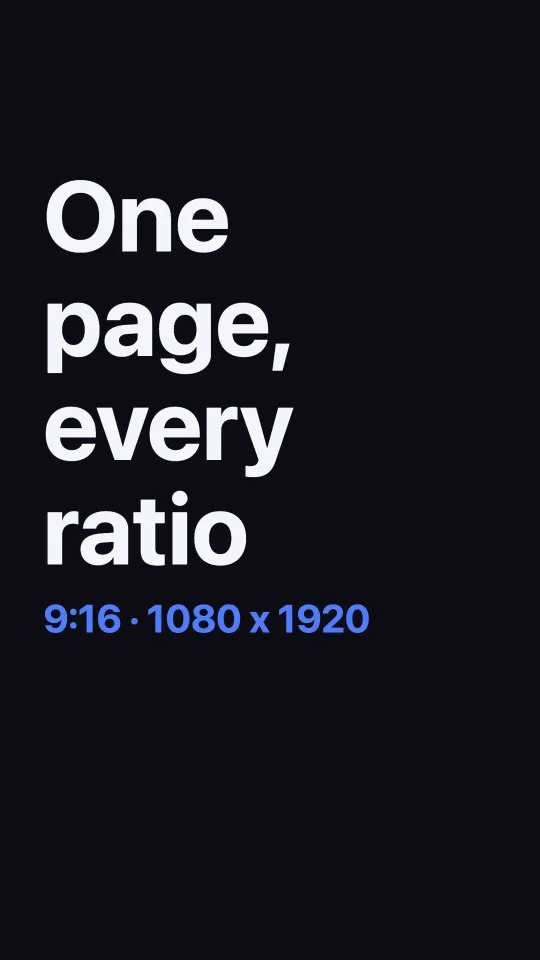
This is the whole page. The font size comes from --vh, so the text scales with the frame. One rule changes the layout for 9:16:
<!doctype html>
<meta charset="utf-8">
<meta name="duration" content="3">
<style>
  body { margin: 0; background: #0b0d12; color: #f4f6fb; font: 700 calc(var(--vh) * 0.09) system-ui; }
  .card { position: absolute; inset: 0; display: grid; place-content: center; padding: 0 8%; }
  h1 { margin: 0; line-height: 1.05; animation: rise 0.6s cubic-bezier(.2,.9,.2,1) both 0.3s; }
  p { margin: 0.4em 0 0; font-size: 0.45em; color: #4f7cff; animation: rise 0.6s cubic-bezier(.2,.9,.2,1) both 0.6s; }
  @keyframes rise { from { transform: translateY(calc(var(--vh) * 0.03)); opacity: 0 } to { transform: none; opacity: 1 } }
  [data-aspect="9:16"] h1 { font-size: 1.15em; }
  [data-aspect="9:16"] .card { place-content: start; padding-top: 30%; }
</style>
<div class="card" data-world="title"><h1>One page,<br>every ratio</h1><p id="r"></p></div>
<script>
  document.getElementById('r').textContent = document.documentElement.dataset.aspect + ' · ' + window.vawe.width + ' x ' + window.vawe.height;
</script>
Add <meta charset="utf-8">. Our first run left it out, and the dot in the label came out as ·.
Render each ratio
Save the page as films/blogtest-aspect/page.html. Then render a draft with the --aspect flag:
bin/vawe dev films/blogtest-aspect/page.html --aspect 9:16We ran this for the four ratios below. Each draft is 90 frames at 30 fps. The command printed these lines:
| Flag | What vawe dev printed |
Time |
|---|---|---|
--aspect 16:9 |
960x540 (16:9) | 4.2 s |
--aspect 9:16 |
540x960 (9:16) | 5.5 s |
--aspect 1:1 |
540x540 (1:1) | 4.0 s |
--aspect 4:3 |
720x540 (4:3) | 4.1 s |
A draft is half size. The label inside the page reads the full size from window.vawe: 1920 × 1080, 1080 × 1920 and 1080 × 1080.
The fifth ratio, 4:5, failed in our first run. Half of 1350 is 675, and the encoder stops on an odd side with “height not divisible by 2”. The renderer now rounds each side of the output to an even number, so a 4:5 draft is 540 by 676 pixels. We checked this with a 1 s test page: bin/vawe dev --aspect 4:5 printed 540x676 (4:5) and exited with success. We did not test a final at 4:5. The table above is from the first run, before the fix.
Three stills
Each still is one frame at 1.8 seconds, cut from the draft with ffmpeg.

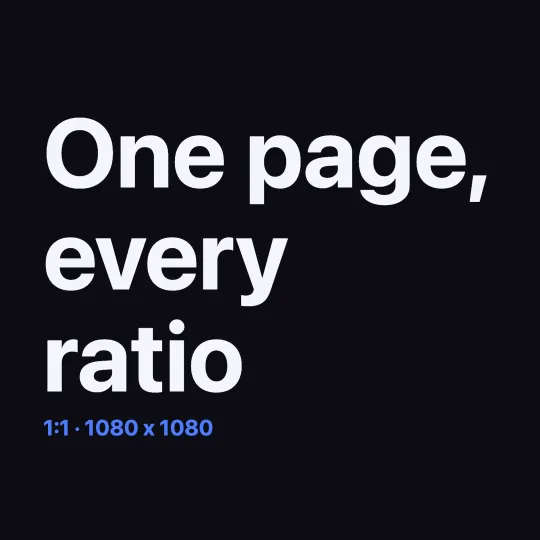
The 1:1 frame needed no rule of its own. The font size follows --vh, and the text wraps inside the padding.
Render every ratio in one command
The docs describe bin/vawe ship <page> --aspect all, which writes one file per ratio. We did not run it: ship needs an approved draft and makes full-size files. We ran drafts only. The page contract lives in the page contract, and each ratio is its own reproducible render (determinism).
FAQ
How do I make a vertical video from HTML?
Render the page with --aspect 9:16, and add a [data-aspect="9:16"] rule for anything that needs a new layout. The renderer sets the frame size to 1080 by 1920 for a final.
Why does --vh not work with px?
--vh already holds the unit, for example 1080px. Write calc(var(--vh) * 0.09).
Does vawe crop the page for other ratios? No. It renders the page again at the new size, so your CSS decides the layout.
Which ratios exist?
16:9, 9:16, 1:1, 4:5 and 4:3. The film pipeline delivers 16:9 only.
Read next

GSAP to MP4: export a timeline as video
Pause a GSAP timeline, call tl.time(t) for each frame and render it to MP4 with vawe or Puppeteer. Code, three traps we hit and a clip.

Three.js to MP4: render a scene frame by frame
Render a three js animation to MP4 with one window.seek(t) function. No real clock, so the same page gives the same frames. Code and tests.

Batch render videos from one HTML template
Batch render videos from a template: fill one HTML page with JSON rows and render a clip per row with a Node loop. We ran three rows.