Photo particles
When to use
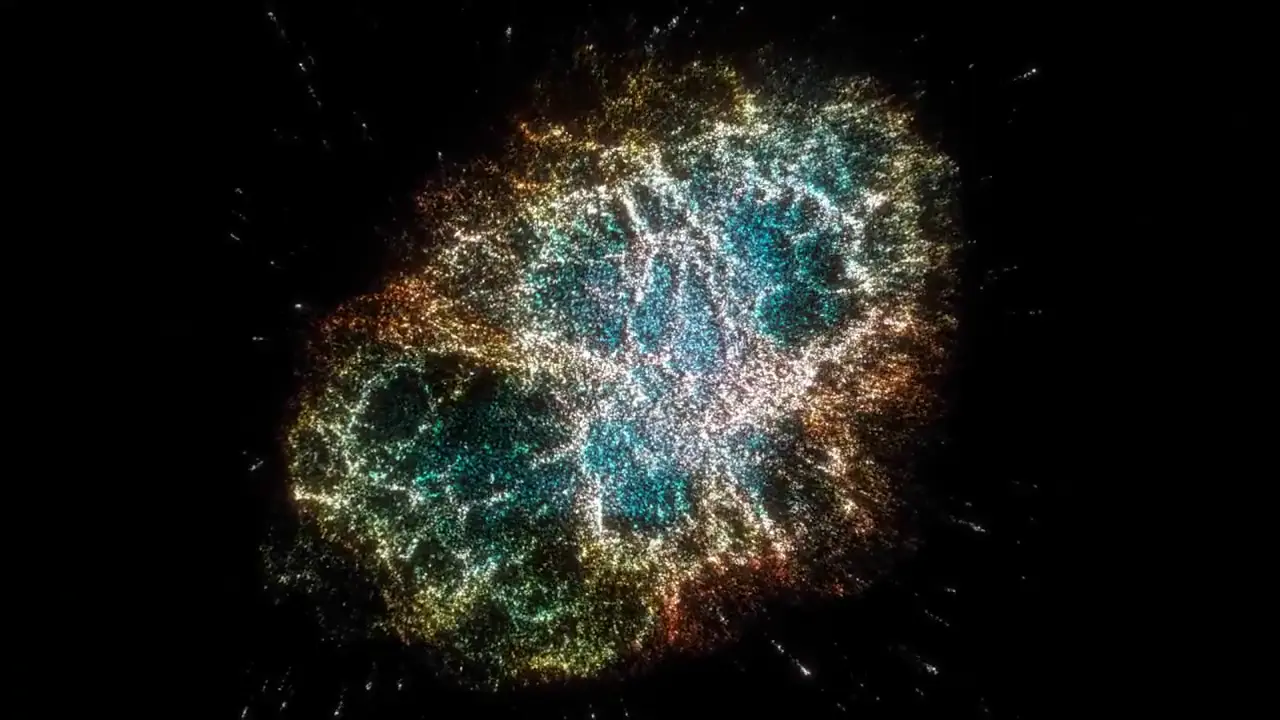
Use when a particle film needs the real detail of a subject (veins, scales, fibres, filaments) that a hand-modelled shape cannot give: sample a photo into 120 000 points, let them gather from a seeded scatter into the photo’s form over 1.5 s, then hold them breathing for 1.5 s. Each point keeps its photo colour and a normal from the luma gradient, so a key light shapes the form.
The code
import { imagePoints, regions } from '/core/surfaces/image-points.js';
const cloud = imagePoints(img, { count: 120000, seed: 7, threshold: 0.03, gamma: 1.0, edgeBoost: 0.6, depthScale: 0.35 });
// cloud.positions x,y,z (long side -1..1, y up)   cloud.colors r,g,b 0..1   cloud.normals unit x,y,z   cloud.luma 0..1
geometry.setAttribute('position', new THREE.BufferAttribute(cloud.positions, 3));
geometry.setAttribute('a_color', new THREE.BufferAttribute(cloud.colors, 3));
geometry.setAttribute('a_normal', new THREE.BufferAttribute(cloud.normals, 3));
// vertex shader: gather by a per-point delay (seeded 0..1), light by the normal, breathe on the seek time
//   float u = clamp((u_progress - delay * 0.4) / 0.6, 0.0, 1.0);
//   vec3 p = mix(start, position, u);
//   float lit = 0.2 + 0.75 * max(dot(normalize(a_normal), normalize(u_key)), 0.0);
vawe.onFrame(async (t) => { u_progress.value = easeFn('land')(Math.min(1, t / 1.5)); render(); await cam.draw(t); });
const cam = lens(canvasSource(renderer.domElement), { look: 'film-halation', grain: 0 });   // film the points through the lens
Easing
Each ease is a pair of After Effects handles from core/motion/presets.js. Every curve as CSS.
| Ease | Leaving a key | Arriving at a key |
|---|---|---|
land | 12% influence, speed 4.8 | 75% influence, speed 0 |
Notes
Options
count(300000),seed: the same inputs give the same cloud. The scatter you gather from comes fromrng(seed)ofcore/motion/springs.js.threshold(0.04): pixels darker than this get no point.gamma(1.6): how strongly bright areas pull points. A nebula wants 1.0 so the faint orange filaments keep points.edgeBoost(0.5): more points on strong luma edges, so silhouettes and veins stay crisp.mask: a second image. Its alpha limits the points when it has any transparent pixel, else its luma does. Use it to cut the subject from its background.depth: a depth image, linear 0 (near) to 1 (far) in red. Without it depth is the luma.depthScale(0.5) sets the z span.jitter(0.6 px): spreads a point off its pixel centre so the points do not line up on the pixel grid.regions(labelImage, ['#ff0000', [0, 0, 255]], cloud): for each point, the index of the label colour under it. A film moves the parts apart: an eye’s lid and iris, a manta’s wings and body. Paint the label image flat, at the aspect of the photo.
Colours are sRGB as stored in the photo, so a shader that outputs them directly shows the photo’s colour. Additive blending sums overlapping points: on a dense photo lower the point size or the light gain, or the filaments burn to white.
The clip is dense, so bin/vawe moves encodes it again at a higher CRF to fit its 2 MB budget (CRF 31, 1.3 MB; the CRF is in clips.lock.json). Grain is off in the demo for the same reason.
Measured: 1 000 000 points from a 2048 by 1536 image take about 0.5 s. The demo builds its cloud on the first seek of each page, so every render slice pays about 1 s once. Load the photo inside the frame hook, not with a top-level await: the renderer seeks the first frame before a module that waits has finished, and that frame is black.
The photo is NASA, ESA, J. Hester and A. Loll (Arizona State University), the Hubble mosaic of the Crab Nebula, public domain. The source is in demo/assets/photos/credits.json.
Sound
Sound: a soft rising swell under the gather that ends on the settle, no hit; the breathing after it is silent.