Motion blur in the browser: spend subframes where it moves
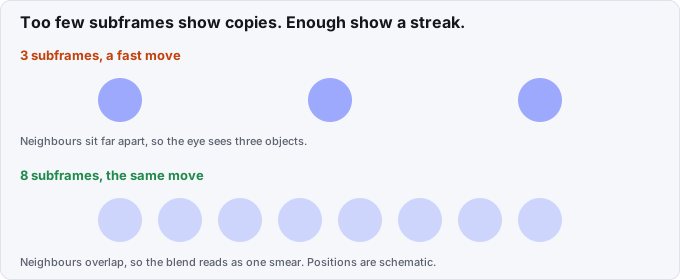
Motion blur in the browser is a budget. A browser has no shutter, so we make one: we capture several subframes per output frame and blend them. The question is how many. Too few and a fast object shows as separate ghost copies. Too many and a still frame costs 16 screenshots for nothing.
The problem
Our first blur used a fixed subframe count. On a fast move, 3 subframes show 3 separate objects, because neighbouring copies sit far apart. On a slow move or a held frame, the same count wastes capture time: the copies are identical.
Capture is the expensive part of a render. Each subframe is a seek, a settle (fonts, image decode, two paints) and a screenshot. We wanted each frame to get what its own motion needs.
What we built
Commit 75fa04dc6 made the count follow each frame's travel. The rule lives in subframesForTravel:
- The blur spans half the frame interval, a 180 degree shutter (
SHUTTER = 0.5). - Neighbouring subframes should sit at most 3 px apart (
STEP_PX = 3). - Start at one subframe and double it while
travel * 0.5 / kis above 3, up to a cap.
For 48 px of travel in a frame, the swept distance is 24 px. One subframe leaves 24 px between neighbours, 2 leave 12, 4 leave 6, and 8 leave 3. So that frame gets 8 subframes. A frame that moves 4 px gets 1.
The travel itself comes from the page. A pre-pass reads the bounding boxes of paused animations at consecutive frame times and takes the largest move or resize over all animated elements. This needs no screenshots. When the boxes cannot be read, a cheaper pixel estimate bands frames by mean luma difference into still (1 subframe), medium (up to 4) and fast (up to 16).
Counts are powers of two and run-length encoded before capture. The ffmpeg filter graph then has one trim, tmix and select chain per run of equal counts, all in one ffmpeg process. If the counts alternate so often that the graph would pass 200 segments, the renderer falls back to one uniform count rather than build the graph.
Reusing captures
Commit 086276b67 raised the cap to 32 subframes and added reuse. After a seek the page reports whether anything still pending can change the pixels: timers, animation frame callbacks, canvas, video, SMIL. If not, two subframes with the same animation state paint the same pixels, and the second one reuses the first capture. A held frame costs one screenshot however many subframes it asks for. A --profile flag prints a table of frames, subframes, screenshots (and how many were reused) and capture seconds per second of film.
The 32 cap and the pixel estimate
The pixel estimate cannot tell a frame that needs 32 subframes from one that needs 16, so its fast band stops at 16. A code comment records the measurement for a 5 second three.js film: 4,017 subframes at 16 and 7,805 at 32.
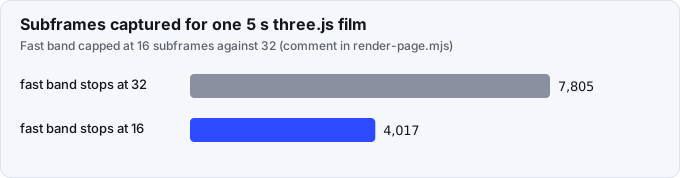
That is a drop of about 49% in subframes. We have not compared the two films side by side for quality, so we cannot claim the 16 band looks the same on every film.
What went wrong: dropped frames
The blended frames are encoded as segments. Each segment restarts its timestamps, so a one-frame segment carries no duration and the next segment overlaps it. With -r set to the frame rate, ffmpeg rate-converted the stream and dropped the overlapped frames. It dropped 7 to 24 frames per 6 seconds. Films came out short and drifted away from their audio.
Commit 3c8d7a692 re-stamps the timestamps after the concat with setpts=N/fps/TB and uses -fps_mode passthrough, so ffmpeg never rate-converts. A later commit (958f17f9d) fixed a similar loss: Chromium saves some frames as RGBA, for example with mix-blend-mode, and a pixel-format change mid-sequence made ffmpeg rebuild its filter graph and drop frames. The encode now keeps one pixel format.
A warning for big finals
Commit cc6c9b05b adds advice on a final with more than 8,000 subframes. It prints the count, an estimate in minutes (1,000 subframes per minute), and the --blur option that lowers the cap. The code comment records one measurement: 19,200 subframes took 15 to 23 minutes.
What we would tell someone building the same thing
- Drive the sample count from measured travel, not from a global setting. The rule fits in six lines.
- Choose the step between neighbouring samples in pixels. A "3 px" target reads better than "16 samples" because it does not depend on the scene.
- Reuse a capture when you can prove time cannot change the page. Held frames are common.
- Count your frames after encoding. We lost 7 to 24 per 6 s and only found out because films drifted off their audio.
- Print a cost table. It showed us which second of a film was expensive.
The smear stretch move is a fast motion to try this on, and the capture loop that spends these subframes is described in four render workers were one worker. For how to ask for blur from the command line, see the CLI docs. Source: github.com/Vandit1604/vawe.
In the code
harness/media/render-page.mjs:subframesForTravel,bucketize,clampSegments,blendGraph.tests/media/render-blur-travel.test.mjsandtests/media/render-reuse.test.mjs.- Commit 75fa04dc6: blur follows each frame's travel.
- Commit 086276b67: the 32 cap, capture reuse and the profile table.
- Commit 3c8d7a692: the pts re-stamp.
- Commit cc6c9b05b: advice on very large finals.