Puppeteer hangs: a 60 s stall watchdog for headless renders
Two of our renders hung with no output, one for 600 seconds and one for 400, and both passed when we ran them again. A Puppeteer hang that fixes itself is the worst kind. You cannot reproduce it, and you cannot tell whether to wait or kill the process. This post covers the watchdog we added and the font bug it exposed.
The problem
Our renderer drives headless Chrome through Puppeteer. A final is cut into slices of frames, and each worker takes a slice and loops over seek, settle and screenshot. Every call to the browser goes through the DevTools protocol, and the only bound on any of them was the protocol timeout, which was 30 minutes.
So when a call never returned, nothing happened for half an hour. An agent waiting on the render saw no output and had no way to know whether it was a slow frame or a dead one. A render that hangs without a word teaches its users to distrust it.
We found one cause quickly. Our font wait, awaitFonts, awaited document.fonts.ready before its own 10-second deadline started. If a face first shown mid-film never arrived, fonts.ready never resolved, so the deadline never ran. A new test showed that the old code sat in seek until the watchdog fired. The fix is to race fonts.ready against the deadline too.
That explained one hang. It did not give us a general answer, because the next hang could come from anywhere.
What we built
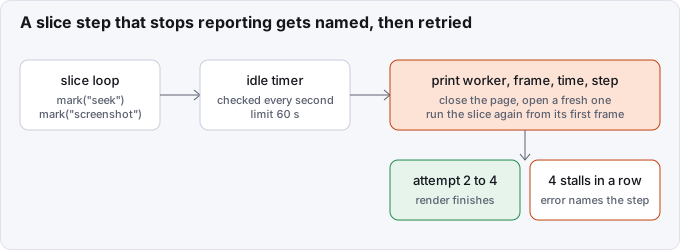
Commit 72a65ec3a adds a watchdog around every slice. Before each await, the slice calls mark('<step>') with a name such as seek, screenshot, settle or open page. A timer checks every second (or a quarter of the limit, if smaller) how long the slice has gone without a new mark.
After 60 seconds with no progress it prints one line:
render stalled: worker 1, frame 6 (0.20 s), in seek for 60 s; retrying slice 0.00-0.50s on a fresh page (attempt 2 of 4)It then closes the stuck page, opens a fresh one and runs the slice again from its first frame. A seek is a pure function of time, so a rerun gives the same pixels. The first version restarted a slice once and made a second stall an error. When we made finals resumable (7fcf92913) the limit became 4 attempts. If every attempt stalls, the render fails with an error that names the step and lists the usual causes: a window.seek or onFrame hook that never resolves, a font or image that never loads, or a starved browser.
Why 60 seconds
We measured before choosing. The slowest legitimate step we saw was 0.38 seconds, a screenshot in a colour-sting draft. A 60-second limit is about 160 times that, so a loaded laptop will not trip it, and it is far below either hang.
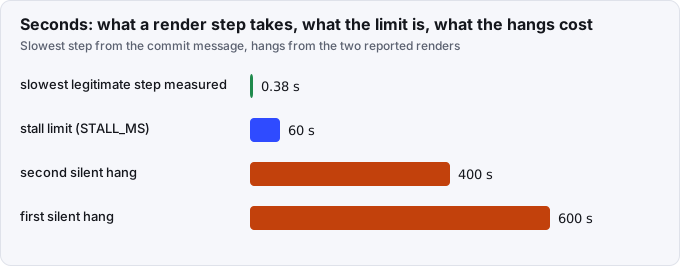
The limit is a default, and renderPage takes a stallMs option. Our stall test renders the same page once with no stall to learn its capture time, then sets its limit to twice that, with a floor of 1.5 seconds. That keeps the test fast on a quick machine and stable on a slow one. See how we made timing tests read the machine.
Two companions
A page with several WebGL canvases slows down over a long render until one protocol call times out. Commit 3df26fcd0 recycles the capture page every 300 subframes and raises the protocol timeout to 30 minutes. A seek is a pure function of time, so a new page produces the same pixels.
The other end of a render has a similar bound. Puppeteer's navigation limit is 30 seconds. On two drafts beside a loaded machine it fired when nothing was wrong. Now gotoLoaded checks why the load stalled. An unfinished request, a blocked main thread or a console error fails at once with the reason. If nothing explains it, the load retries with a 120-second limit. Commit 6bea1e806 added the naming.
Result
- The two hangs, 600 s and 400 s, became a named step and a bounded restart.
- The slowest legitimate step is 0.38 s, so the 60 s limit has wide margin.
- We have no count of how often the watchdog has fired since. The render summary line lists any retried slices, and we have not summed them for this post.
What we would tell someone building the same thing
- Put a progress mark before every await in a long loop, and make the mark carry a name. The name is the whole value of the error message.
- Measure the slowest healthy step first, then set the limit to a large multiple of it.
- Restart from a state you can reproduce. Our slices are pure functions of time, so a retry is safe. If yours are not, a restart will hide the bug.
- Make a second and third failure louder than the first. A silent retry loop only moves the hang.
- Be suspicious of any wait that has no deadline of its own.
document.fonts.readywas one.
If you want to know how this fits with resumable finals, read resumable finals. The page contract that makes a retry possible is in time is the seek and the troubleshooting docs. Source: github.com/Vandit1604/vawe.
In the code
harness/media/render-page.mjs:STALL_MS,SLICE_ATTEMPTS,RECYCLE_SUBFRAMES,runShards,gotoLoaded.core/engine/page-seek.js:awaitFonts.tests/media/render-stall.test.mjs.- Commit 72a65ec3a: the stall watchdog and the font deadline.
- Commit 3df26fcd0: recycle the page every 300 subframes.
- Commit 7fcf92913: 4 attempts per slice.
- Commit 6bea1e806: name why a page never loads.