Pan stations
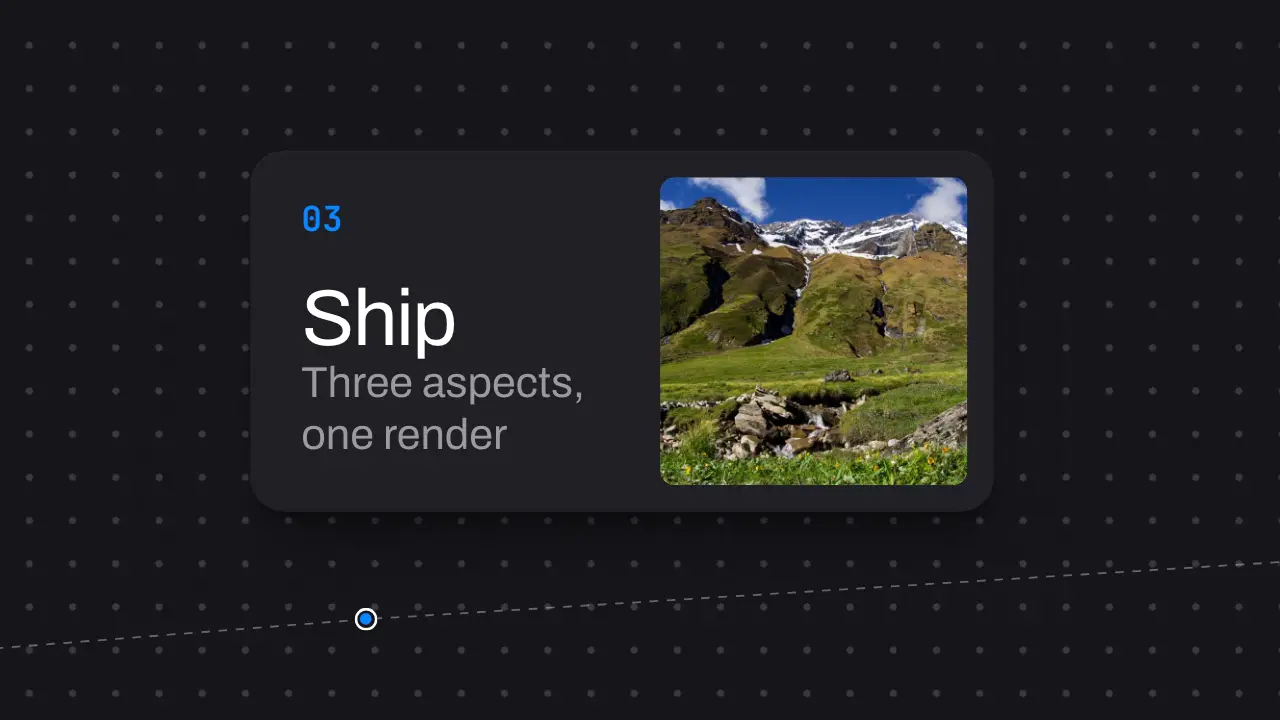
When to use
Use when three to six steps or features should read as one continuous place, with no cuts: they sit on one wide canvas, and the camera pans from station to station and holds at each. The detail that sells the space is what lies between the stations: a dashed rail runs node to node under the cards and past both ends, a dot grid behind moves at 55 percent of the camera (parallax), and each node lights as the camera arrives. Without them the pans read as slides pushed sideways. Clip: pan-stations.mp4. Demo: demo/pan-stations.html.
The code
import '../../core/engine/page-api.js';
const vw = innerWidth / 100, vh = innerHeight / 100;
const at = [{ x: 50, y: 50 }, { x: 150, y: 58 }, { x: 250, y: 44 }];   // station centres on the canvas, vw and vh
const PANS = [0.5, 1.2], PAN = 0.42, DRIFT = 0.8;                       // pan starts (s), pan length (s), drift (vw per s)
const inout = easeFn('settle');                // no jolt at either end
const clamp = (u) => Math.min(1, Math.max(0, u));
const cam = (t) => {
  let k = 0;
  PANS.forEach((s) => { k += inout(clamp((t - s) / PAN)); });           // k: 0 at station 1, 1 at station 2, ...
  const i = Math.min(at.length - 2, Math.floor(k)), f = k - i;
  return { x: at[i].x + (at[i + 1].x - at[i].x) * f + DRIFT * t, y: at[i].y + (at[i + 1].y - at[i].y) * f };
};
vawe.onFrame((t) => {
  const c = cam(t), n = cam(t + 1 / 60);
  const tx = (50 - c.x) * vw, ty = (50 - c.y) * vh;
  world.style.transform = `translate(${tx}px, ${ty}px)`;
  far.style.transform = `translate(${tx * 0.55}px, ${ty * 0.55}px)`;
  blur.setAttribute('stdDeviation', `${Math.abs(n.x - c.x) * vw * 0.35} 0`);   // #motion feGaussianBlur on .world
});
Easing and timing
The clip runs 2 s. The look is vawe.
The clip uses 2 named eases from core/motion/presets.js. Each is a pair of After Effects handles: influence is how far along the segment the handle reaches, and speed is how fast the value moves at the key, as a multiple of the segment's average speed. Motion in the docs explains both.
| Ease | Leaving a key | Arriving at a key |
|---|---|---|
pop | 12% influence, speed 4.8 | 35% influence, speed -1.5 |
settle | 60% influence, speed 0 | 60% influence, speed 0 |
Notes
A pan of 0.42 s over one frame width is fast enough to feel like one space and slow enough to stay readable mid-pan; under 0.3 s it becomes a whip pan. Step the stations up and down a little so the pans are not one flat rail, and let the camera drift slowly through the holds so a held station is never a still. In a film, hold each station for its text (words x 0.6 s, at least 1.2 s); the demo holds shorter to show the move in 2 s.
Looks (ground, type, radius, accent) live in demo/demo.css; this snippet keeps neutral tokens.
Sound
Sound: pluck at 0.92 s and at 1.62 s into the move, when each node lights on the camera's arrival (default gain); nothing on the pans.
Related moves


See all 125 moves. Learn how a page becomes a film in the docs, copy chains of moves from the recipes, or read the motion guide.