Easingvawe After Effects eases
pop
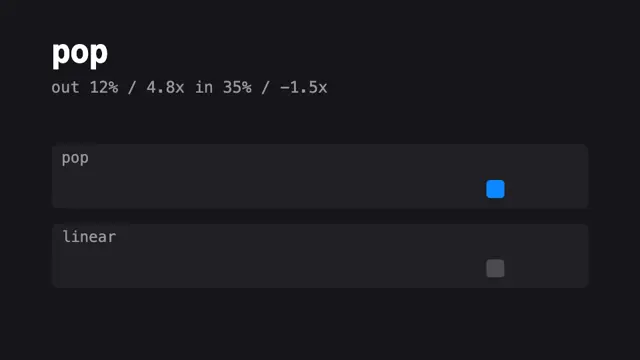
A pop: a fast start, then it passes its mark by about 15 per cent and settles back.
pop reaches 50% of its travel at 17% of the time and 90% at 40%. Its peak speed is 4.79x the average. It passes the end value by up to 15.3%.
Live demo
The blue box uses the exact linear() string below, in your browser. The grey box is linear.
Your system asks for reduced motion, so the boxes rest at the end of the move.
Numbers
- 50% of travel
- 17%of the time
- 90% of travel
- 40%of the time
- After 10% of time
- 33.33%of the travel is done
- Peak speed
- 4.79xtimes the average
- Overshoot
- 15.3%past the end value
- Undershoot
- 0%never below the start
- linear() points
- 81at a 0.002 tolerance
- cubic-bezier
- exactbuilt from two handles
Copy the code
animation-timing-function: linear(0, 0.0553, 0.104, 0.1483, 0.1895, 0.2282, 0.2649, 0.2998, 0.3333, 0.3656, 0.3966, 0.4267, 0.4557, 0.4839, 0.5112, 0.5378, 0.5636, 0.5887, 0.6132, 0.637, 0.6602, 0.6827, 0.7047, 0.7262, 0.747, 0.7674, 0.7872, 0.8064, 0.8252, 0.8434, 0.8611, 0.8783, 0.8951, 0.9113, 0.927, 0.9422, 0.957, 0.9712, 0.9849, 0.9982, 1.0109, 1.0232, 1.0349, 1.0461, 1.0568, 1.067, 1.0767, 1.0858, 1.0944, 1.1025, 1.11, 1.1169, 1.1233, 1.129, 1.1342, 1.1388, 1.1428, 1.1461, 1.1488, 1.1509, 1.1522, 1.1529, 1.1528, 1.1521, 1.1506, 1.1483, 1.1452, 1.1413, 1.1365, 1.1309, 1.1243, 1.1169, 1.1084, 1.0989, 1.0884, 1.0767, 1.0639, 1.0499, 1.0346, 1.018, 1);animation-timing-function: cubic-bezier(0.12, 0.576, 0.65, 1.525);This ease is a cubic bezier by construction: the two After Effects handles are its two control points. The site ships the linear() string above because it is what the renderer and EASE.pop use.
el.animate({ translate: ['0 0', '240px 0'] }, { duration: 600, easing: 'linear(0, 0.0553, 0.104, 0.1483, 0.1895, 0.2282, 0.2649, 0.2998, 0.3333, 0.3656, 0.3966, 0.4267, 0.4557, 0.4839, 0.5112, 0.5378, 0.5636, 0.5887, 0.6132, 0.637, 0.6602, 0.6827, 0.7047, 0.7262, 0.747, 0.7674, 0.7872, 0.8064, 0.8252, 0.8434, 0.8611, 0.8783, 0.8951, 0.9113, 0.927, 0.9422, 0.957, 0.9712, 0.9849, 0.9982, 1.0109, 1.0232, 1.0349, 1.0461, 1.0568, 1.067, 1.0767, 1.0858, 1.0944, 1.1025, 1.11, 1.1169, 1.1233, 1.129, 1.1342, 1.1388, 1.1428, 1.1461, 1.1488, 1.1509, 1.1522, 1.1529, 1.1528, 1.1521, 1.1506, 1.1483, 1.1452, 1.1413, 1.1365, 1.1309, 1.1243, 1.1169, 1.1084, 1.0989, 1.0884, 1.0767, 1.0639, 1.0499, 1.0346, 1.018, 1)', fill: 'both' });import { EASE } from '../../core/motion/presets.js';
el.animate(
[{ translate: '0 4vh', opacity: 0 }, { translate: '0 0', opacity: 1 }],
{ duration: 500, easing: EASE.pop, fill: 'both' },
);
// per-frame code (window.seek, vawe.onFrame): easeFn('pop')(u)After Effects handles
One segment between two keys has two handles. In After Effects, open Keyframe Velocity on each key: the outgoing handle belongs to the first key and the incoming handle to the second. Influence is how far along the segment the handle reaches, in per cent of its duration. Speed is the pace at the key as a multiple of the segment's average (0 stops dead, 1 is straight).
| Handle | Name | Influence | Speed | Real handles near it |
|---|---|---|---|---|
| out (first key) | fling | 12% | 4.8x | 0.37% |
| in (second key) | custom | 35% | -1.5x | 0% |
Measured on 1,339 real segments (2,678 handles) from Lottie files and 27 from HyperFrames blocks. Near means influence within 10 points and speed within 0.3 (25% above 1x). No real Lottie segment has both handles near this pair, so it is a motion-design choice and not an icon default.
import { keys } from '../../core/motion/presets.js';

// out handle on the first key, in handle on the second
keys(el, 'translate', [
  [0, '0 6vh', { out: 'fling' }],
  [0.6, '0 0', { in: { influence: 35, speed: -1.5 } }],
]);
When to use it, and when to avoid it
Use it for
- A call to action, a check mark, a notification: one small thing that must feel alive.
- Scale and position of a single focal element.
Avoid it for
- Text blocks and anything with more than one item moving: overshoot on many things reads as shaking.
- Opacity. A value past 1 is clamped, so the overshoot does nothing.
Related eases
Moves that use pop
19 of the library's motion moves set EASE.pop in their snippet.