Command palette summon
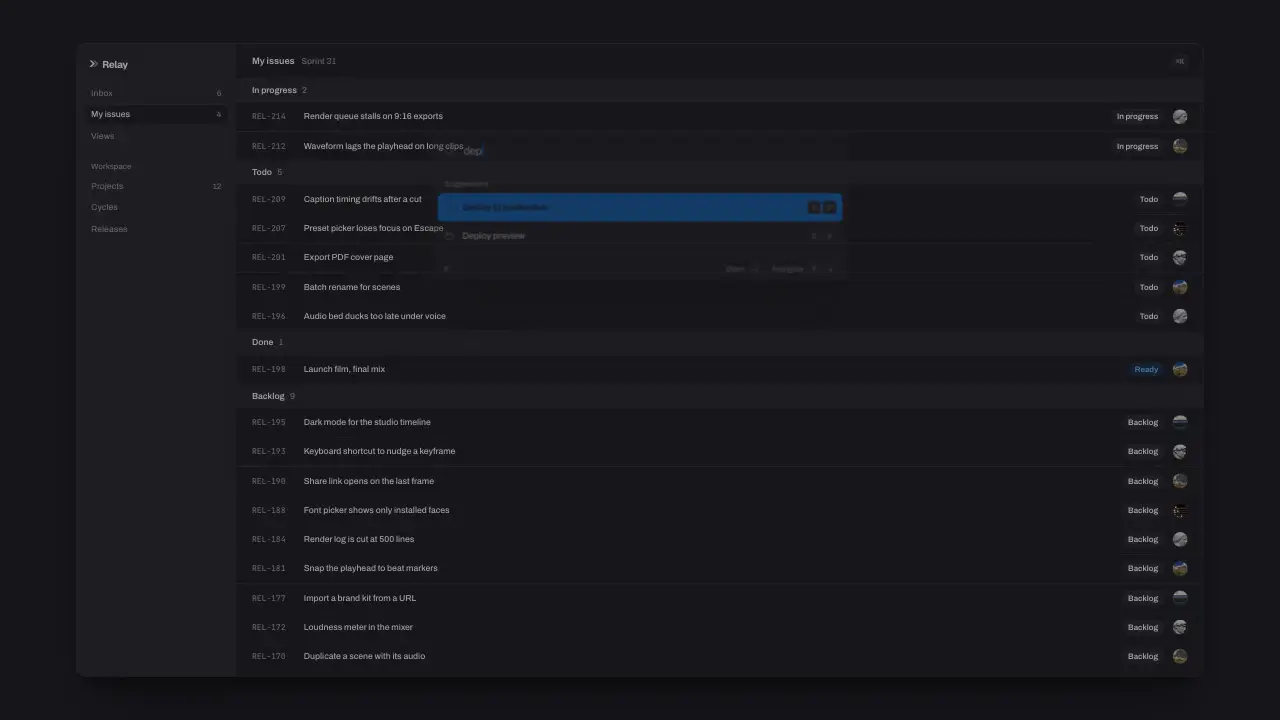
When to use
Use when the product is keyboard first (the Linear and Raycast beat): the app steps back and dims, a Cmd+K palette drops in from above on a pop, its rows rise 40 ms apart, three keys type a query at a real typist's pace, the rows that stop matching collapse to zero height, and Enter turns the chosen row accent before the palette leaves faster than it came. The detail that sells it is the collapse: rows lose their height, so the list squeezes shut under the query; a fade would leave holes. Clip: command-palette-summon.mp4. Demo: demo/command-palette-summon.html.
The code
/* product sizes: --px is one CSS pixel of a 1080 px tall screen; the page and the palette share it */
:root { --px: calc(var(--vh) / 1080); }
.palette { width: calc(var(--px) * 640); top: calc(var(--px) * 196); border-radius: calc(var(--px) * 14); }
.query { height: calc(var(--px) * 56); padding: 0 calc(var(--px) * 18); font-size: calc(var(--px) * 17); }
.list { padding: calc(var(--px) * 8); }
.opt, .opt > div { height: calc(var(--px) * 44); }   /* row text 14, icon 16, kbd 20 tall with 11 mono */
.issue { height: calc(var(--px) * 44); font-size: calc(var(--px) * 13); }   /* the app: 240 sidebar, 52 header, 36 group rows */
Easing and timing
The clip runs 2 s. The look is vawe.
The clip uses 5 named eases from core/motion/presets.js. Each is a pair of After Effects handles: influence is how far along the segment the handle reaches, and speed is how fast the value moves at the key, as a multiple of the segment's average speed. Motion in the docs explains both.
| Ease | Leaving a key | Arriving at a key |
|---|---|---|
land | 12% influence, speed 4.8 | 75% influence, speed 0 |
landSoft | 20% influence, speed 2.5 | 75% influence, speed 0 |
launch | 33% influence, speed 0 | 25% influence, speed 3 |
pop | 12% influence, speed 4.8 | 35% influence, speed -1.5 |
swap | 75% influence, speed 0 | 75% influence, speed 0 |
Notes
import { EASE } from '../../core/motion/presets.js';
const at = { dim: 120, drop: 150, rows: 220, keys: [780, 930, 1080], enter: 1340, exit: 1560 };   // ms
dim.animate([{ opacity: 0 }, { opacity: 0.55 }], { duration: 320, delay: at.dim, easing: EASE.landSoft, fill: 'both' });
palette.animate([{ translate: '0 -4vh', opacity: 0 }, { opacity: 1, offset: 0.25 }, { translate: '0 0', opacity: 1 }],
  { duration: 520, delay: at.drop, easing: EASE.pop, fill: 'both' });
rows.forEach((r, i) => r.animate([{ translate: '0 1.6vh', opacity: 0 }, { translate: '0 0', opacity: 1 }],
  { duration: 360, delay: at.rows + i * 40, easing: EASE.landSoft, fill: 'both' }));
// each typed letter is a span that exists from the start and switches display on its key
letters.forEach((c, i) => c.animate([{ display: 'none' }, { display: 'inline' }], { duration: 1, delay: at.keys[i] - 1, fill: 'both' }));
// a row that stops matching (data-out = the second of the key that drops it) collapses to zero height
misses.forEach((o) => o.animate([{ height: 'calc(var(--px) * 44)', opacity: 1 }, { height: '0px', opacity: 0 }],
  { duration: 280, delay: o.dataset.out * 1000, easing: EASE.swap, fill: 'both' }));
chosen.animate([{ scale: 1 }, { scale: 0.97, offset: 0.4 }, { scale: 1 }], { duration: 320, delay: at.enter, easing: EASE.landSoft, fill: 'both' });
palette.animate([{ scale: 1, opacity: 1 }, { scale: 0.96, opacity: 0 }], { duration: 220, delay: at.exit, easing: EASE.launch, fill: 'forwards' });
Size the app and the palette in one product unit, never in the film's type scale: a palette in film sizes comes out as wide as the page with 50 px rows, and nobody has seen that product. At 1080p the palette is a third of the frame, the way it is on a real screen; fill the page behind it with enough rows that it reads as a working app. Give each row a fixed height and overflow: hidden so the collapse is exact. Keys 150 ms apart read as a fast, real typist; under 100 ms reads as a paste. The caret sits inside the typed text, so it moves with each letter; keep it solid, since a blink never lets the frame settle. The highlight moves to the first match on the key that removes the old first row. Put real feature names in the rows: the list is a free feature menu for the viewer.
Looks (ground, type, radius, accent) live in demo/demo.css; this snippet keeps neutral tokens.
Sound
Sound: pluck at 1.34 s into the move, when Enter presses the chosen row (default gain); no tick per key.
Related moves
See all 125 moves. Learn how a page becomes a film in the docs, copy chains of moves from the recipes, or read the motion guide.