Notification pop
When to use
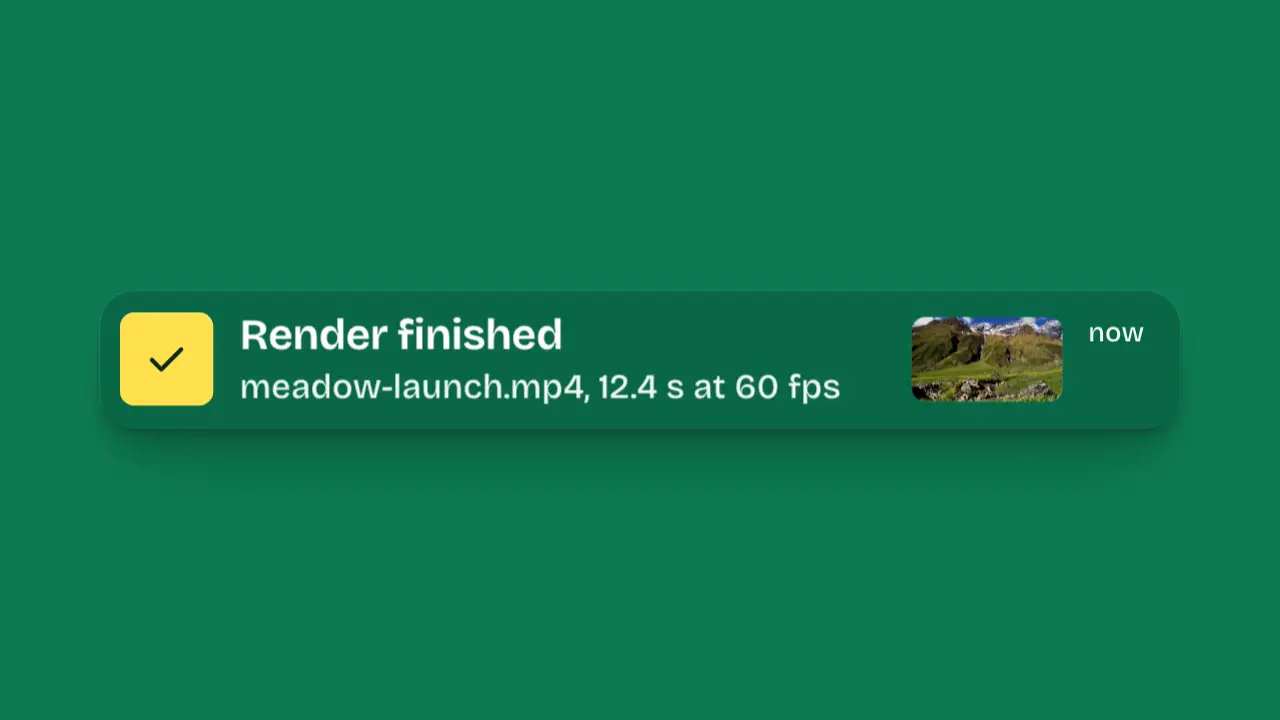
Use when the product tells the user something finished: a render, a payment, a message. The banner drops in from above the frame on the overshoot curve and closes its width from 92 percent, so it lands as an object; the icon pops first and the text resolves 80 ms after it. It holds for about a second so the text can be read, then leaves faster than it came. Clip: notification-pop.mp4. Demo: demo/notification-pop.html.
The code
<div class="note card">
  <div class="chip accent-fill app">...icon...</div>
  <div class="text"><div class="title">Render finished</div><div class="sub">launch-film.mp4, 12.4 s at 60 fps</div></div>
  <div class="when">now</div>
</div>
<style>.note { transform-origin: 50% 0; opacity: 0; }</style>
<script type="module">
import { EASE } from '../../core/motion/presets.js';
note.animate([{ translate: '0 -62vh', scale: '0.92 0.96' }, { translate: '0 0', scale: '1 1' }], { duration: 700, easing: EASE.pop, fill: 'both' });
note.animate([{ opacity: 0 }, { opacity: 1 }], { duration: 90, easing: 'linear', fill: 'both' });
app.animate([{ scale: 0.7, opacity: 0 }, { scale: 1, opacity: 1 }], { duration: 520, delay: 200, easing: EASE.pop, fill: 'both' });
[[text, 280], [when, 340]].forEach(([el, at]) => el.animate([{ translate: '0 1.4vh', opacity: 0, filter: 'blur(4px)' }, { translate: '0 0', opacity: 1, filter: 'blur(0px)' }],
  { duration: 420, delay: at, easing: EASE.land, fill: 'both' }));
note.animate([{ translate: '0 0', opacity: 1 }, { translate: '0 -34vh', opacity: 0 }], { duration: 260, delay: 1740, easing: EASE.launch, fill: 'forwards' });
</script>
Easing and timing
The clip runs 2 s. The look is field.
The clip uses 3 named eases from core/motion/presets.js. Each is a pair of After Effects handles: influence is how far along the segment the handle reaches, and speed is how fast the value moves at the key, as a multiple of the segment's average speed. Motion in the docs explains both.
| Ease | Leaving a key | Arriving at a key |
|---|---|---|
land | 12% influence, speed 4.8 | 75% influence, speed 0 |
launch | 33% influence, speed 0 | 25% influence, speed 3 |
pop | 12% influence, speed 4.8 | 35% influence, speed -1.5 |
Notes
The overshoot curve dips the banner a few percent past its slot and back: that is the pop, and it is the only bouncy thing in the frame. The exit is 260 ms against a 700 ms entrance, cubic in, travelling upward the way it came, and it ends on the last frame, so the clip never ends on a still. Write the text the way the product would: a file name, a length, a rate. Never a message that only fills space. If the film keeps the banner on screen, replace the exit with a slow drift.
Looks (ground, type, radius, accent) live in demo/demo.css; this snippet keeps neutral tokens.
Sound
Sound: droplet at 0.20 s into the move, when the icon pops inside the banner (default gain).
Related moves
See all 125 moves. Learn how a page becomes a film in the docs, copy chains of moves from the recipes, or read the motion guide.