Cursor click
When to use
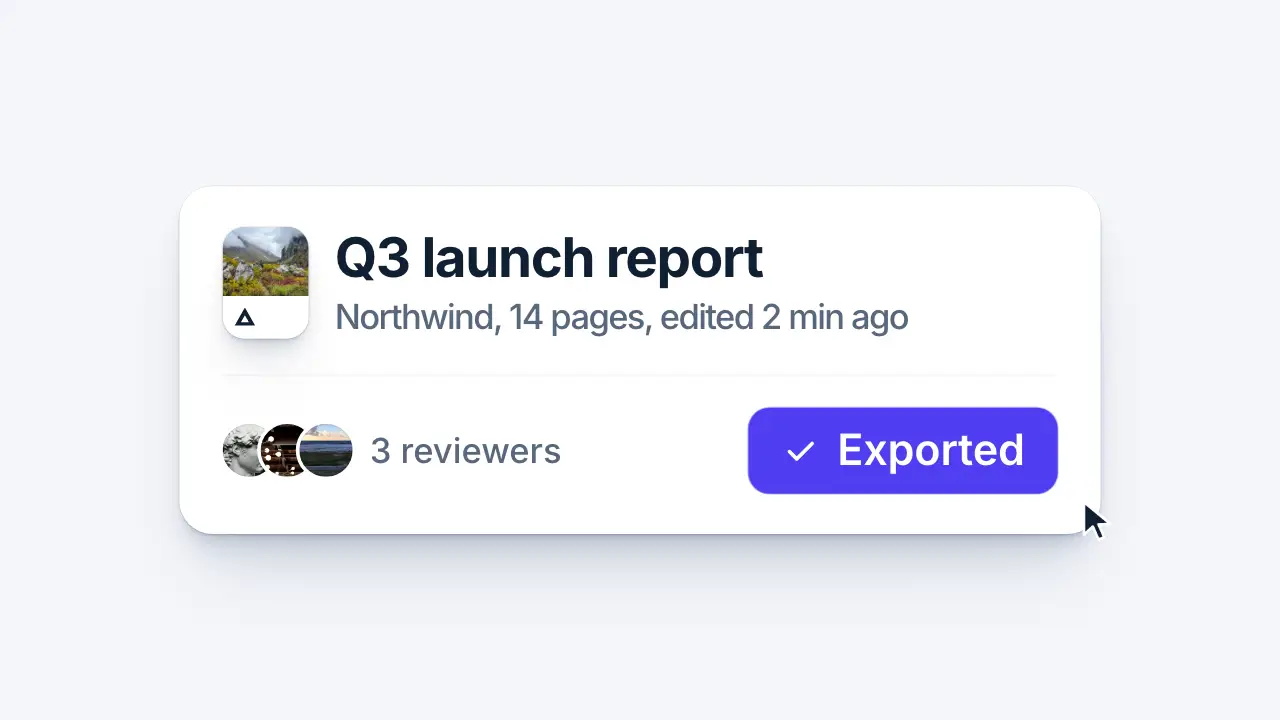
Use when the film shows a product doing its job: a cursor travels to a control, the control answers the click, and the cursor leaves. The path bows like a hand (x and y ease on different curves), the button lights on hover, both dip on the press, and the label rolls into a confirmed state. Clip: cursor-click.mp4. Demo: demo/cursor-click.html.
The code
<div class="btn"><span class="l idle">Export PDF</span><span class="l done">Exported</span></div>
<div class="cur"><div class="x"><div class="y"><svg viewBox="0 0 24 24"><path d="M2 2 L2 19 L6.6 14.8 L9.6 21.6 L12.6 20.3 L9.6 13.6 L15.8 13.4 Z"/></svg></div></div></div>
<script type="module">
import { EASE } from '../../core/motion/presets.js';
const b = btn.getBoundingClientRect();
const from = { x: innerWidth * 0.16, y: innerHeight * 0.9 }, to = { x: b.left + b.width * 0.86, y: b.top + b.height * 0.72 };
x.animate([{ translate: `${from.x}px 0` }, { translate: `${to.x}px 0` }], { duration: 760, delay: 200, easing: EASE.land, fill: 'both' });
y.animate([{ translate: `0 ${from.y}px` }, { translate: `0 ${to.y}px` }], { duration: 760, delay: 200, easing: EASE.settle, fill: 'both' });
btn.animate([{ background: '#2b2a31' }, { background: '#37363e' }], { duration: 160, delay: 780, easing: 'linear', fill: 'both' });
curSvg.animate([{ scale: 1 }, { scale: 0.86 }, { scale: 1 }], { duration: 230, delay: 1080, easing: EASE.landSoft, fill: 'both' });   // transform-origin: 0 0, the tip
btn.animate([{ scale: 1 }, { scale: 0.965, offset: 0.4 }, { scale: 1 }], { duration: 300, delay: 1080, easing: EASE.landSoft, fill: 'both' });
btn.animate([{ background: '#37363e' }, { background: '#0a87ff' }], { duration: 120, delay: 1080, easing: 'linear', fill: 'forwards' });
idle.animate([{ translate: '0 0', opacity: 1 }, { translate: '0 -3.4vh', opacity: 0 }], { duration: 260, delay: 1190, easing: EASE.launch, fill: 'both' });
done.animate([{ translate: '0 3.4vh', opacity: 0 }, { translate: '0 0', opacity: 1 }], { duration: 380, delay: 1230, easing: EASE.landSoft, fill: 'both' });
x.animate([{ translate: `${to.x}px 0` }, { translate: `${innerWidth * 1.06}px 0` }], { duration: 380, delay: 1560, easing: EASE.launch, fill: 'forwards' });
y.animate([{ translate: `0 ${to.y}px` }, { translate: `0 ${innerHeight * 0.86}px` }], { duration: 380, delay: 1560, easing: EASE.launch, fill: 'forwards' });
</script>
Easing and timing
The clip runs 2 s. The look is daylight.
The clip uses 4 named eases from core/motion/presets.js. Each is a pair of After Effects handles: influence is how far along the segment the handle reaches, and speed is how fast the value moves at the key, as a multiple of the segment's average speed. Motion in the docs explains both.
| Ease | Leaving a key | Arriving at a key |
|---|---|---|
land | 12% influence, speed 4.8 | 75% influence, speed 0 |
landSoft | 20% influence, speed 2.5 | 75% influence, speed 0 |
launch | 33% influence, speed 0 | 25% influence, speed 3 |
settle | 60% influence, speed 0 | 60% influence, speed 0 |
Notes
The cursor tip is the origin of the arrow path, so the translate is the point that clicks. Aim at the lower right of the button, not its centre, or the pointer sits on the label and hides it. The arrival is EASE.land (fast in, soft landing); the press dip is 14 percent on the cursor and 3 percent on the button, and it lasts 230 ms on EASE.landSoft. The exit is EASE.launch over 380 ms, half the time of the entrance and accelerating, so the last frames are the cursor leaving. The accent is used once, on the pressed result.
Timing for a scripted demo (Fitts: the move time grows with the log of distance over target size): a short hop 0.4 to 0.6 s, across the screen 0.7 to 1.0 s, in from off-screen about 1.0 s; ballistic, so a fast launch, a deceleration into the target and a slight arc. Dwell 200 to 400 ms on the target before the press, then 100 to 300 ms before the UI reacts (an instant reaction reads fake). After a major action hold 1.0 to 1.4 s so the change registers. Cutting these pauses is the most common demo mistake.
Cause then effect: the answer to the click (a burst, a ring, a pop of the window, the click sound) starts on the press frame or after it, never before. A reference that shows the burst first has another story; when its sound sets your timing, move the effect to your press (taste/rules/cause-first.md). vawe see lists each event beside the nearest sound with the frame offset; a sound before its action reads sound before its action.
Looks (ground, type, radius, accent) live in demo/demo.css; this snippet keeps neutral tokens.
Sound
Sound: pluck at 1.08 s into the move, on the press (default gain); nothing on the travel or the exit.
Related moves
See all 125 moves. Learn how a page becomes a film in the docs, copy chains of moves from the recipes, or read the motion guide.