Count up
When to use
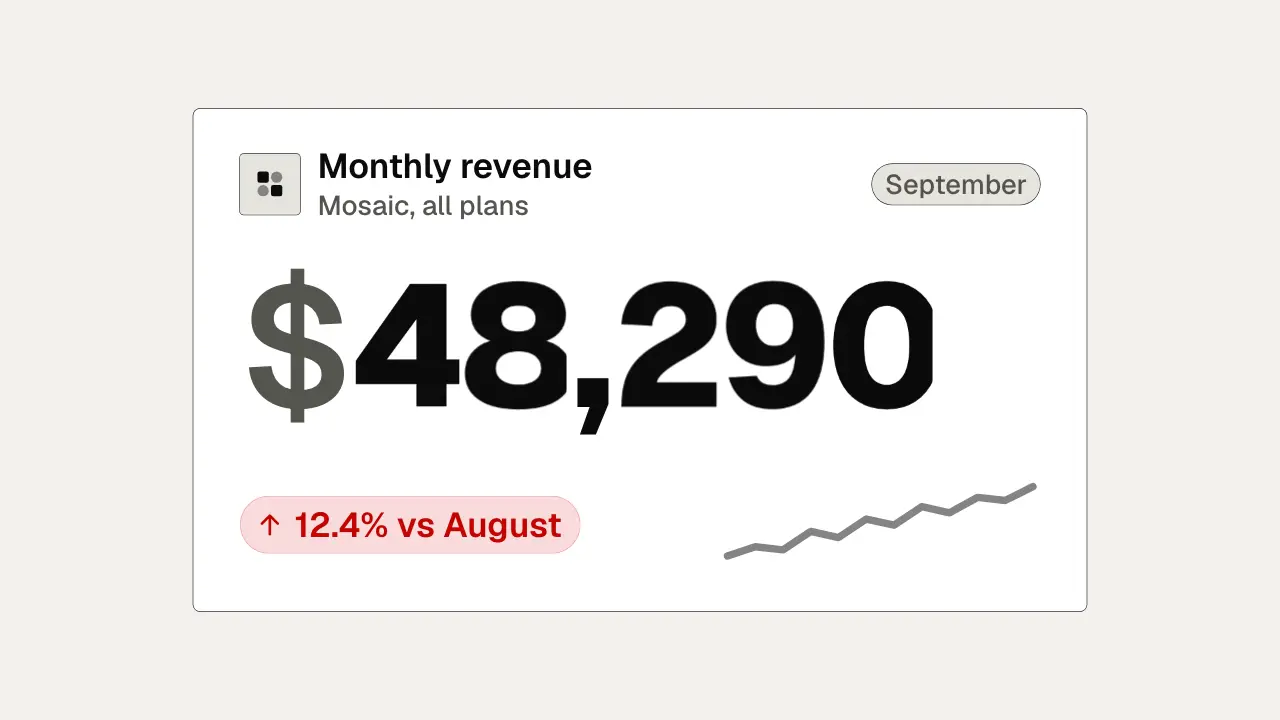
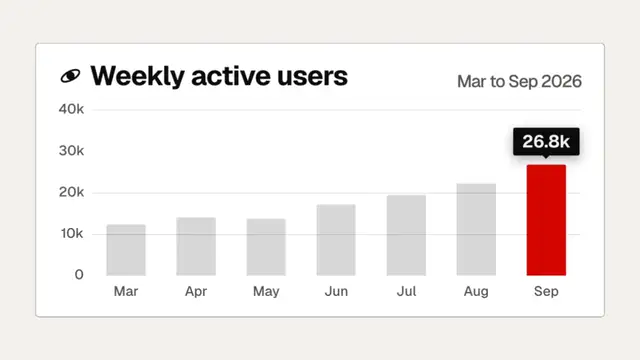
Use when a number is the proof: a revenue, a user count, a render time. Each digit is a wheel that rolls to its value, so the digits never change width and never scramble; the wheels on the right spin further and land last, and each wheel carries a vertical blur that follows its own speed. A delta chip slides in when the number lands and a sparkline draws to the end. Clip: count-up.mp4. Demo: demo/count-up.html.
The code
<div class="num" id="num"><span class="sym">$</span></div>
<style>
.cell { position: relative; width: 0.62em; height: 1.16em; overflow: hidden;
        mask-image: linear-gradient(#0000, #000 14%, #000 86%, #0000); }
.strip { display: flex; flex-direction: column; }
.strip i { display: block; height: 1.16em; line-height: 1.16em; text-align: center; font-style: normal; }
</style>
<script type="module">
import '../../core/engine/page-api.js';
import { EASE, easeFn } from '../../core/motion/presets.js';
const land = easeFn('land');
const loops = [1, 1, 2, 2, 3];   // full turns per digit; more turns on the right
// per digit d: a strip of 10 * (loops + 1) numerals in a clipped cell, and a filter of its own
const steps = loops[d] * 10 + digit, t0 = 0.1 + d * 0.045, dur = 1.15;
strip.animate([{ translate: '0 0' }, { translate: `0 ${-steps * 1.16}em` }], { duration: dur * 1000, delay: t0 * 1000, easing: EASE.land, fill: 'both' });
vawe.onFrame((t) => {   // SVG filters cannot be keyframed: blur y by half a frame of this wheel's travel
  const u = Math.min(1, Math.max(0, (t - t0) / dur)), du = 1 / 240;
  const slope = (land(Math.min(1, u + du)) - land(u)) / du;
  blur.setAttribute('stdDeviation', `0 ${(u > 0 && u < 1 ? (slope / dur) * travel / 60 * 0.5 : 0).toFixed(2)}`);
});
</script>
Easing and timing
The clip runs 2 s. The look is swiss.
The clip uses 2 named eases from core/motion/presets.js. Each is a pair of After Effects handles: influence is how far along the segment the handle reaches, and speed is how fast the value moves at the key, as a multiple of the segment's average speed. Motion in the docs explains both.
| Ease | Leaving a key | Arriving at a key |
|---|---|---|
land | 12% influence, speed 4.8 | 75% influence, speed 0 |
settle | 60% influence, speed 0 | 60% influence, speed 0 |
Notes
travel is steps * 1.16 * fontSize in px. Wheels start 45 ms apart, inside the 30 to 80 ms band, so the group never lands on one frame. The wheels are not a font trick: a plain text counter shifts width as digits change and reads as a glitch, and the wheel keeps every column fixed. The soft mask on the cell edges is what makes a passing digit look like it rolls off, not like it is cut. Commas and the currency sign are static, so the eye tracks only the digits. The chip and the sparkline are the last-frame motion; the number is the only bright thing until it lands.
Looks (ground, type, radius, accent) live in demo/demo.css; this snippet keeps neutral tokens.
Sound
Sound: chime at 0.80 s into the move, when the last wheel reads as settled (default gain); no tick per digit.
Related moves

See all 125 moves. Learn how a page becomes a film in the docs, copy chains of moves from the recipes, or read the motion guide.