Card assemble
When to use
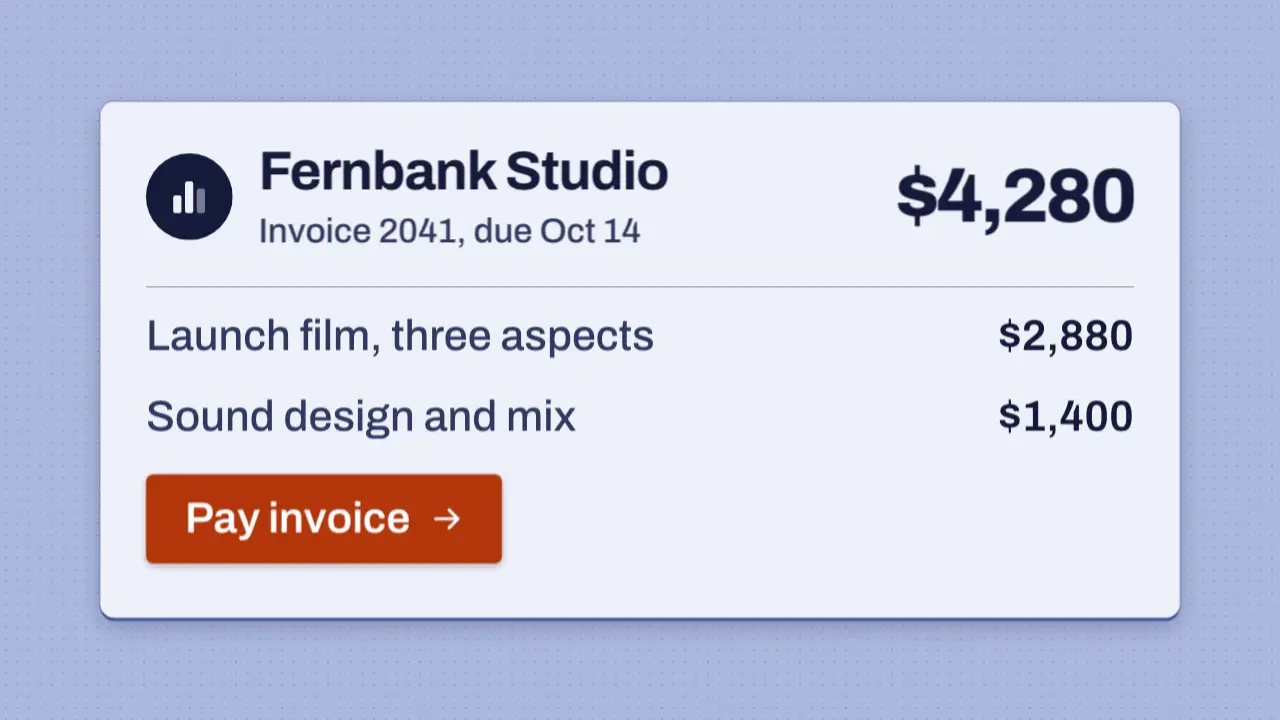
Use when a UI card is the subject and it should build in front of the viewer, not fade in whole. The shell lands first, then each part travels in from the side its slot is on: the avatar and name from the left, the amount from the right, the line items and the button from below. The parts start 80 ms apart, the rule draws, and the accent button lands last on a pop. Clip: card-assemble.mp4. Demo: demo/card-assemble.html.
The code
<div class="card">
  <div class="avatar part" data-from="-14vh 0">...logo...</div>
  <div class="amount part" data-from="14vh 0">$4,280</div>
  <div class="rule part"></div>
  <div class="item part" data-from="0 9vh">...</div>
  <div class="pay part" data-from="0 12vh">Pay invoice</div>
</div>
<script type="module">
import { EASE } from '../../core/motion/presets.js';
card.animate([{ scale: 0.96, translate: '0 3vh' }, { scale: 1, translate: '0 0' }], { duration: 650, easing: EASE.land, fill: 'both' });
card.animate([{ opacity: 0 }, { opacity: 1 }], { duration: 90, easing: 'linear', fill: 'both' });
parts.forEach((el, i) => {
  const at = 350 + i * 80;
  if (el.classList.contains('rule')) { el.animate([{ scale: '0 1' }, { scale: '1 1' }], { duration: 600, delay: at, easing: EASE.land, fill: 'both' }); return; }
  el.animate([{ opacity: 0, translate: el.dataset.from, filter: 'blur(6px)' }, { opacity: 1, translate: '0 0', filter: 'blur(0px)' }],
    { duration: 900, delay: at, easing: el.classList.contains('pay') ? EASE.pop : EASE.land, fill: 'both' });
});
</script>
Easing and timing
The clip runs 1.9 s. The look is chrome.
The clip uses 2 named eases from core/motion/presets.js. Each is a pair of After Effects handles: influence is how far along the segment the handle reaches, and speed is how fast the value moves at the key, as a multiple of the segment's average speed. Motion in the docs explains both.
| Ease | Leaving a key | Arriving at a key |
|---|---|---|
land | 12% influence, speed 4.8 | 75% influence, speed 0 |
pop | 12% influence, speed 4.8 | 35% influence, speed -1.5 |
Notes
Each part has an origin the eye can name, so the build explains the card: the person on the left, the money on the right, the rest stacking up from below. The blur is 6 px and clears as the part lands, so a still part is never soft. The parts are 900 ms long because the travel is 9 to 14vh; a shorter run makes it a pop. The rule is a scale: 0 1 draw with transform-origin: 0 50%. Use real content (a name, a due date, amounts that add up), never lorem ipsum, and keep the accent for the one action.
Looks (ground, type, radius, accent) live in demo/demo.css; this snippet keeps neutral tokens.
Sound
Sound: droplet at 1.00 s into the move, when the pay button (the last part) lands (default gain); no tick per part.
Related moves
See all 125 moves. Learn how a page becomes a film in the docs, copy chains of moves from the recipes, or read the motion guide.