Skeleton reveal
When to use
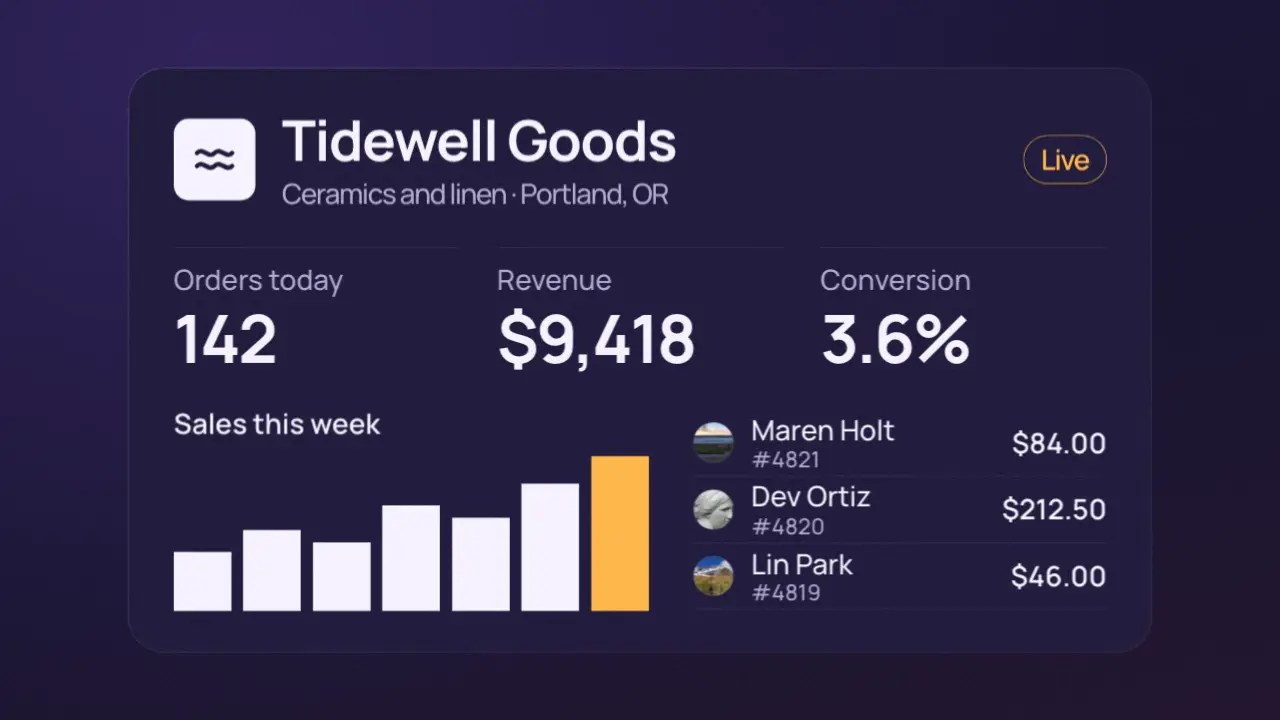
Use when a real UI should arrive without pop-in: grey blocks in the shape of the content shimmer under one moving light, then each region resolves into its real content, one after another. The viewer sees a product loading, then the product. Clip: skeleton-reveal.mp4. Demo: demo/skeleton-reveal.html.
Use once per film: the moving light is a stock device (rule no-tells), never the idea.
The code
<div class="reg head"><div class="real">...avatar, name, status...</div><div class="sk-layer"><i class="sk round"></i>...</div></div>
<script type="module">
import { EASE } from '../../core/motion/presets.js';
const card = document.querySelector('.card'), box = card.getBoundingClientRect();
document.querySelectorAll('.sk').forEach((sk) => {
  const band = Object.assign(document.createElement('i'), { className: 'band' });   // a 26vh wide light gradient
  sk.append(band);
  const left = sk.getBoundingClientRect().left - box.left, w = band.getBoundingClientRect().width;
  band.animate([{ translate: `${-w - left}px 0` }, { translate: `${box.width - left}px 0` }], { duration: 850, iterations: 2, easing: 'linear', fill: 'both' });
});
Object.entries({ '.head': 600, '.stats': 800, '.chart': 1000, '.list': 1200 }).forEach(([sel, t]) => {
  const reg = document.querySelector(sel);
  reg.querySelector('.real').animate([{ opacity: 0, translate: '0 1.4vh', filter: 'blur(5px)' }, { opacity: 1, translate: '0 0', filter: 'blur(0px)' }], { duration: 480, delay: t, easing: EASE.land, fill: 'both' });
  reg.querySelector('.sk-layer').animate([{ opacity: 1 }, { opacity: 0 }], { duration: 200, delay: t, easing: EASE.launch, fill: 'both' });
});
</script>
Easing and timing
The clip runs 2 s. The look is dusk.
The clip uses 3 named eases from core/motion/presets.js. Each is a pair of After Effects handles: influence is how far along the segment the handle reaches, and speed is how fast the value moves at the key, as a multiple of the segment's average speed. Motion in the docs explains both.
| Ease | Leaving a key | Arriving at a key |
|---|---|---|
glide | 33% influence, speed 0 | 33% influence, speed 0.1 |
land | 12% influence, speed 4.8 | 75% influence, speed 0 |
launch | 33% influence, speed 0 | 25% influence, speed 3 |
Notes
Each region is a one-cell grid holding the real content and its skeleton layer, so the two share one box and nothing shifts when they swap. The blocks match the content (a round one for an avatar, bars at the chart's own heights), which is what makes it read as this product loading. Each block plays the same sweep shifted by its own left edge, so the many blocks read as one light crossing the card; the shimmer is a constant-speed scan, so it is the one place linear is right. Regions resolve 200 ms apart, top to bottom; the skeleton leaves in 200 ms, the content arrives in 480 ms and clears its 5 px blur as it lands. A chart also gets a rise on its bars, the last bar in accent.
Looks (ground, type, radius, accent) live in demo/demo.css; this snippet keeps neutral tokens.
Sound
Sound: pluck at 0.60 s (the first region resolves) and at 1.20 s (the last region) into the move (default gain); nothing on the shimmer.
Related moves
 Before and after wipe
 AI stream response
 Chart build
 Overwhelm collapse
 Clip expand from a point
 Card assemble
See all 125 moves. Learn how a page becomes a film in the docs, copy chains of moves from the recipes, or read the motion guide.