Device tilt stage
When to use
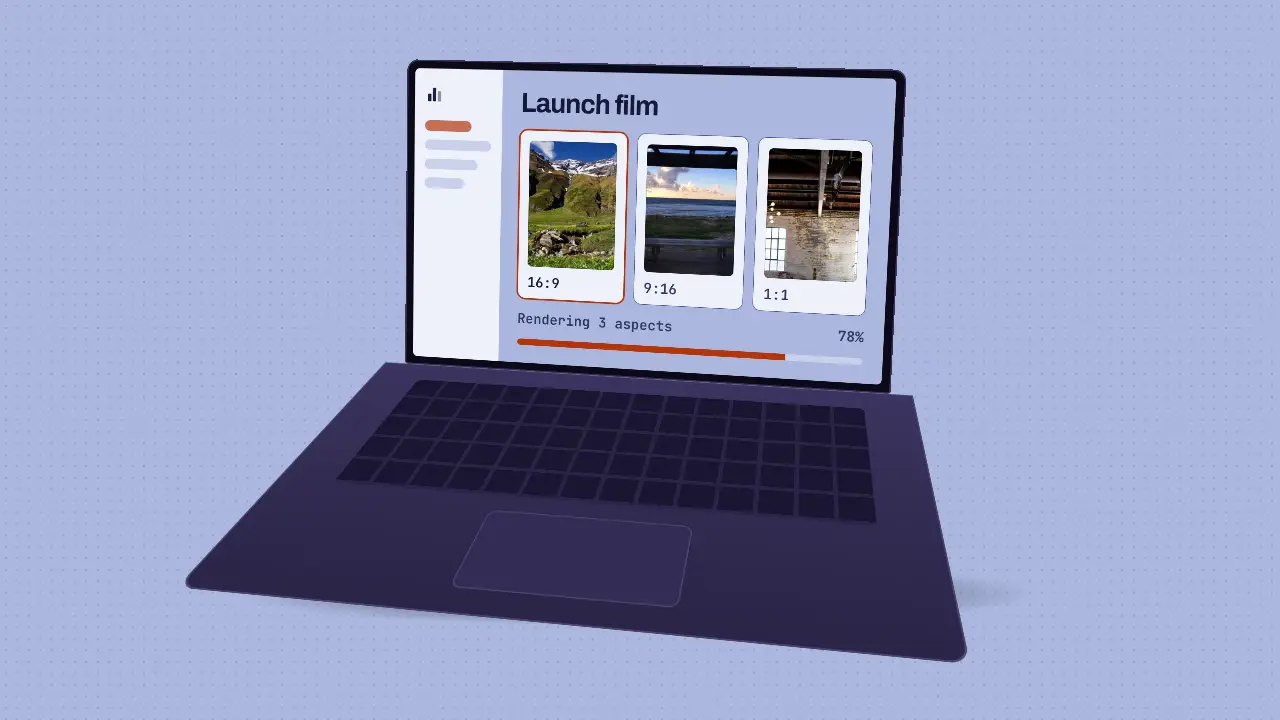
Use when the product should be seen as an object: the UI sits on a laptop screen that rises from a steep top-down angle, turns and settles at a hero three-quarter view on a long ease. It is a real CSS 3D object (a lid with a bezel and a keyboard deck at 90 degrees), so the deck foreshortens as it turns. The detail that sells it is the reflection on the glass: it is driven by the lid's angle, not by time, so it slides across the screen exactly as the lid turns and stops when the lid stops. Clip: device-tilt-stage.mp4. Demo: demo/device-tilt-stage.html.
The code
.stage  { position: absolute; inset: 0; perspective: 150vh; perspective-origin: 50% 30%; }
.device { position: absolute; left: 50%; top: -5vh; width: 92vh; margin-left: -46vh; transform-style: preserve-3d; transform-origin: 50% 100%; }
.lid    { position: relative; height: 58vh; padding: 1.6vh; border-radius: 2.2vh 2.2vh 0.6vh 0.6vh; background: #0b0917; transform-origin: 50% 100%; transform: rotateX(8deg); }
.base   { position: absolute; left: -4vh; right: -4vh; top: 100%; height: 54vh; transform-origin: 50% 0; transform: rotateX(90deg); }
.gloss  { position: absolute; inset: 0; background: linear-gradient(112deg, transparent 38%, rgba(255, 255, 255, 0.1) 47%, transparent 60%) 0 0 / 300% 100% no-repeat; }
Easing and timing
The clip runs 2 s. The look is chrome.
The clip uses one named ease from core/motion/presets.js. Each is a pair of After Effects handles: influence is how far along the segment the handle reaches, and speed is how fast the value moves at the key, as a multiple of the segment's average speed. Motion in the docs explains both.
| Ease | Leaving a key | Arriving at a key |
|---|---|---|
settle | 60% influence, speed 0 | 60% influence, speed 0 |
Notes
import '../../core/engine/page-api.js';
import { easeFn } from '../../core/motion/presets.js';
const from = { y: 30, rx: -62, ry: -38, rz: 5, s: 0.62 }, to = { y: 0, rx: -16, ry: -8, rz: 0, s: 0.74 };   // vh, degrees
const lerp = (a, b, u) => a + (b - a) * u, clamp = (u) => Math.min(1, Math.max(0, u));
vawe.onFrame((t) => {
  const u = easeFn('settle')(clamp((t - 0.05) / 1.45));
  const float = Math.sin(t * 2.4) * 0.5 * clamp((t - 1.2) / 0.4);          // a slow bob once it has landed
  const ry = lerp(from.ry, to.ry, u) + float * 1.2;
  device.style.transform = `translateY(${lerp(from.y, to.y, u) + float}vh) rotateX(${lerp(from.rx, to.rx, u)}deg) rotateY(${ry}deg) rotateZ(${lerp(from.rz, to.rz, u)}deg) scale(${lerp(from.s, to.s, u)})`;
  gloss.style.backgroundPosition = `${20 + (ry - from.ry) * 2.2}% 0`;       // the reflection follows the angle
});
A negative rotateX on the device is a camera above the laptop: the deck comes toward the viewer and down. A positive one flips the deck up over the screen. Start at least 40 degrees from the rest pose or the turn reads as a wobble; rest a little off face-on (-16 and -8) so the deck stays visible. Keep the screen content alive (a progress bar, a cursor) while the device settles, and put a soft contact shadow under it that tightens as it lands.
Looks (ground, type, radius, accent) live in demo/demo.css; this snippet keeps neutral tokens.
Sound
Sound: bloom at 0.05 s into the move, as the device starts to rise (default gain); nothing on the settle or the bob.
Related moves
See all 125 moves. Learn how a page becomes a film in the docs, copy chains of moves from the recipes, or read the motion guide.