Bracket callout
When to use
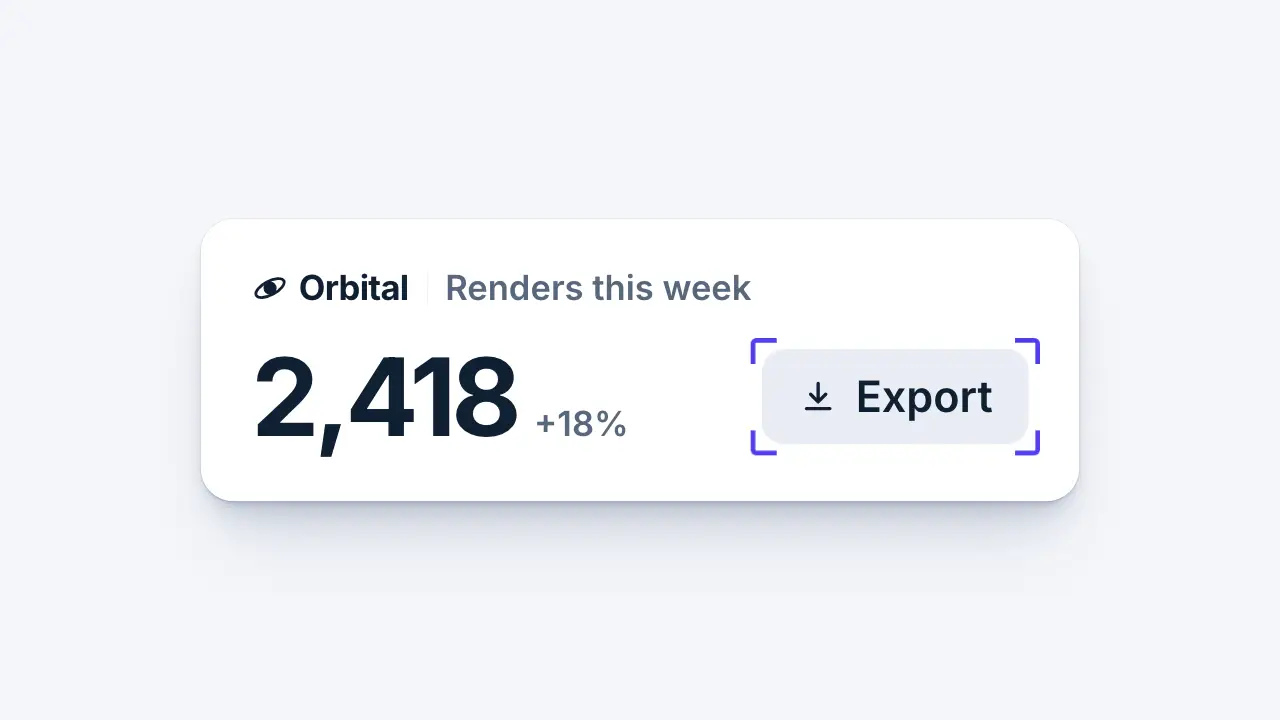
Use when the eye must go to one word or one part of a UI: four corner brackets fly in from outside, snap onto the target box and land with a small overshoot. Clip: bracket-callout.mp4. Demo: demo/bracket-callout.html.
The code
.frame { position: absolute; inset: calc(var(--u) * -1.6); --far: calc(var(--u) * 13); --arm: calc(var(--u) * 3.6); --w: calc(var(--u) * 0.7); --rad: calc(var(--u) * 0.8); }
.c { position: absolute; width: var(--arm); height: var(--arm); border: 0 solid var(--accent); opacity: 0;
     animation-duration: 0.55s; animation-delay: var(--beat-1);
     animation-timing-function: var(--land); animation-fill-mode: both; }
.tl { left: 0; top: 0; border-width: var(--w) 0 0 var(--w); border-top-left-radius: var(--rad); animation-name: tl; }
/* tr, bl, br: the same with the other two borders and the other two corners */
@keyframes tl { from { translate: calc(var(--far) * -1) calc(var(--far) * -1); opacity: 0; }
                12% { opacity: 1; } to { translate: 0 0; opacity: 1; } }
Easing and timing
The clip runs 1.4 s. The look is daylight.
The clip uses one named ease from core/motion/presets.js. Each is a pair of After Effects handles: influence is how far along the segment the handle reaches, and speed is how fast the value moves at the key, as a multiple of the segment's average speed. Motion in the docs explains both.
| Ease | Leaving a key | Arriving at a key |
|---|---|---|
pop | 12% influence, speed 4.8 | 35% influence, speed -1.5 |
Notes
<span class="target">Export<span class="frame"><i class="c tl"></i><i class="c tr"></i><i class="c bl"></i><i class="c br"></i></span></span>--land is EASE.pop. The curve passes 1, so each corner travels 5 to 10 percent past the box (toward the target's centre) and comes back.
The numbers that make it look expensive
- Each corner travels
--far(13u) along the diagonal, in 0.55 s. All four run at once, so the frame looks like one object closing in. - The overshoot dips the brackets inside the frame for about 60 ms: this is the "snap".
- The frame sits 1.6u outside the target's own box (u is 1 percent of frame height), so it never touches the text. Arms are 3.6u, about a third of the target height, with a 0.8u corner radius.
- Opacity reaches 1 in the first 12 percent, so the brackets are never seen fading.
- Only the accent draws. The target does not change colour; the brackets are the whole signal.
The common mistake
Scaling one bordered box down onto the target. The stroke shrinks with the scale, the corner radius distorts, and the four sides are visible the whole way. Move four separate corners instead: strokes stay one width and only the corners travel.
Looks (ground, type, radius, accent) live in demo/demo.css; this snippet keeps neutral tokens.
Sound
Sound: pluck at --beat-1 + 0.20 s, when the corners first reach the box and snap (default gain).
Related moves


See all 125 moves. Learn how a page becomes a film in the docs, copy chains of moves from the recipes, or read the motion guide.