Spotlight dim
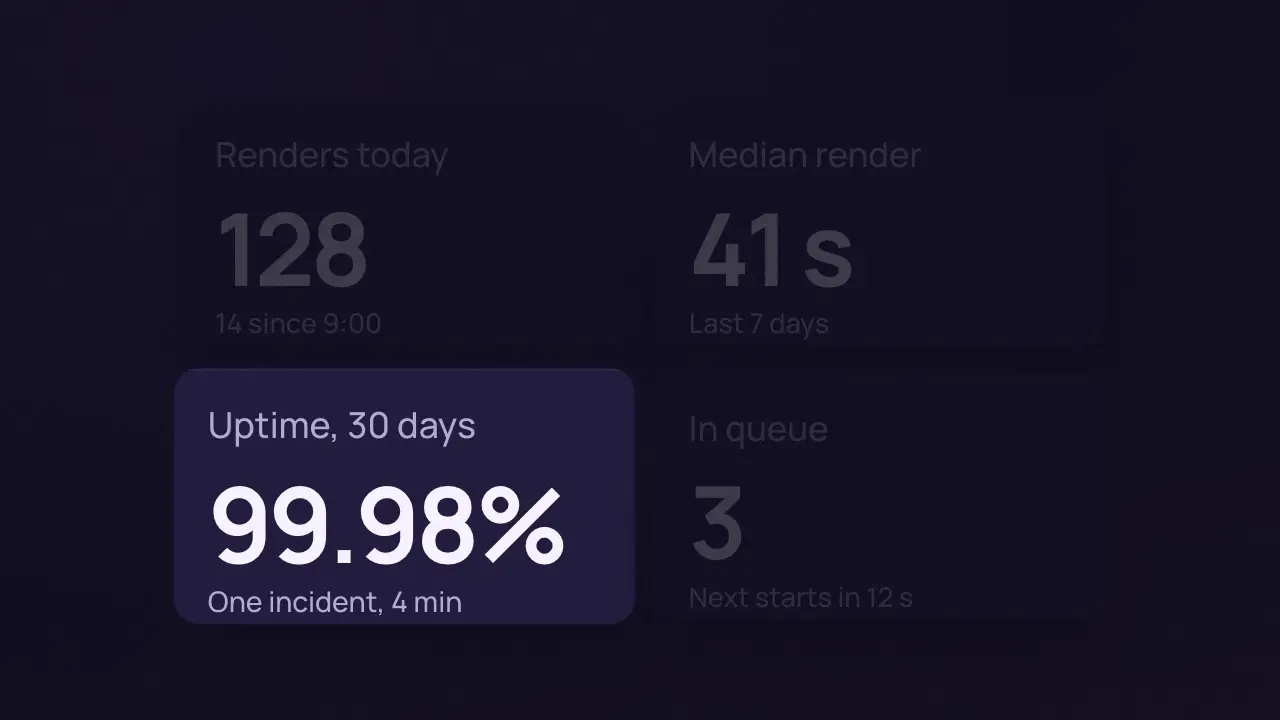
When to use
Status: a UI scrim, not a light. The hole is a dim over a screen that points the eye (its box-shadow is a veil, not light). For a real lit-screen look (bloom, depth of field on a tilted screen) use the lens: lens, core/surfaces/lens.js.
Use when a screen with several parts is on and one of them is the point. A rounded hole starts as the whole frame and closes onto the target; its own box-shadow is the dim, so everything outside the hole falls to 20 percent and the target is the only thing lit. The target leans in 4 percent on the same curve. Clip: spotlight-dim.mp4. Demo: demo/spotlight-dim.html.
The code
.hole { position: absolute; left: 0; top: 0; width: 100vw; height: 100vh; border-radius: 0;
        box-shadow: 0 0 0 100vmax rgba(10, 9, 13, 0.8); pointer-events: none; }
Easing and timing
The clip runs 1.1 s. The look is dusk.
The clip uses one named ease from core/motion/presets.js. Each is a pair of After Effects handles: influence is how far along the segment the handle reaches, and speed is how fast the value moves at the key, as a multiple of the segment's average speed. Motion in the docs explains both.
| Ease | Leaving a key | Arriving at a key |
|---|---|---|
landSoft | 20% influence, speed 2.5 | 75% influence, speed 0 |
Notes
import { EASE } from '../../core/motion/presets.js';
const pad = '0.6vh';
hole.animate([
  { left: '0px', top: '0px', width: '100vw', height: '100vh', borderRadius: '0px' },
  { left: `calc(14vw - ${pad})`, top: `calc(52vh - ${pad})`, width: `calc(35vw + 2 * ${pad})`, height: `calc(34vh + 2 * ${pad})`, borderRadius: '3.6vh' }],
  { duration: 800, delay: 150, easing: EASE.landSoft, fill: 'both' });
target.animate([{ scale: 1 }, { scale: 1.04 }], { duration: 800, delay: 150, easing: EASE.landSoft, fill: 'both' });
The hole closes from the whole frame, so the dim arrives as the light narrows and never fades in as a flat veil. Match the hole radius to the target radius plus its padding (3 vh + 0.6 vh here) or a lit corner shows. Keep the dim at 0.75 to 0.85: lower and the rest still competes, higher and the context is lost. A padding over 1.5 vh reads as a frame border, which is banned. Use calc() with literal lengths in the keyframes; var() in a keyframe does not interpolate.
Looks (ground, type, radius, accent) live in demo/demo.css; this snippet keeps neutral tokens.
Sound
Sound: none; the dim points the eye without a sound.
Related moves



See all 125 moves. Learn how a page becomes a film in the docs, copy chains of moves from the recipes, or read the motion guide.