Text on path
When to use
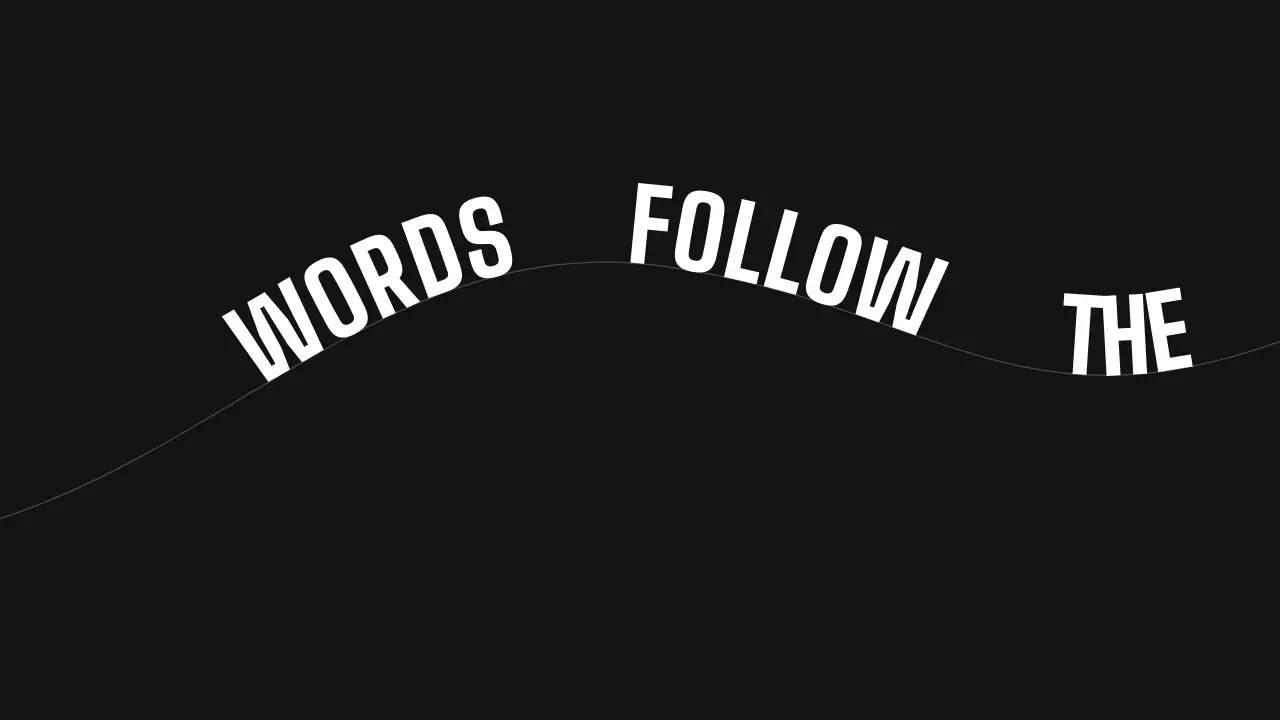
Use when a line must travel and settle on a curve: words ride an SVG path like beads on a wire, the lead word first, and stop where the line reads. The path is a rail, so the move gives a long S-curve to a title without a camera. Clip: text-on-path.mp4. Demo: demo/text-on-path.html.
startOffset is an attribute, not a CSS property, so Web Animations cannot drive it. Set it from window.seek(t), a pure function of the time. Each word is its own <text> on the same path.
The code
<svg viewBox="0 0 1920 1080">
  <path id="p" fill="none" stroke="var(--line)" d="M -260 820 C 260 820, 520 330, 1000 400 S 1560 740, 2200 380"/>
  <text><textPath href="#p">curve</textPath></text>   <!-- one text per word -->
</svg>
Easing and timing
The clip runs 3 s. The look is signal.
The clip uses 2 named eases from core/motion/presets.js. Each is a pair of After Effects handles: influence is how far along the segment the handle reaches, and speed is how fast the value moves at the key, as a multiple of the segment's average speed. Motion in the docs explains both.
| Ease | Leaving a key | Arriving at a key |
|---|---|---|
land | 12% influence, speed 4.8 | 75% influence, speed 0 |
launch | 33% influence, speed 0 | 25% influence, speed 3 |
Notes
await document.fonts.load('800 150px "Big Shoulders"');        // measure after the face is in
const widths = els.map((tp) => tp.parentNode.getComputedTextLength());
let x = 420 + (pathLen - 560 - run) / 2;                       // run = widths + gaps: the settled train, centred
const REST = widths.map((w) => { const s = x; x += w + GAP; return s; });
const land = easeFn('land'), arrive = (p) => land(clamp01(p));   // easeFn, not EASE: this is seek, not an easing string
const launch = easeFn('launch'), leave = (p) => launch(clamp01(p));
window.seek = (t) => els.forEach((tp, i) => {
  const lead = WORDS.length - 1 - i;                           // the front word goes first, so the train never overlaps
  const a = arrive((t - 0.15 - lead * 0.14) / 1.15), l = leave((t - 2.55 - lead * 0.04) / 0.3);
  tp.setAttribute('startOffset', (REST[i] - (1 - a) * 1500 + l * 1500).toFixed(2));
});
window.seek(0);
The numbers that make it look expensive
- 1.15 s on
EASE.land, 1500 units of travel: most of the distance is covered in the first quarter, and the last words glide in. - The front word starts first and the others follow 140 ms apart, so the gaps open as they enter and close as they settle, and no two words ever overlap.
- The exit is 0.3 s on
EASE.launch, in the same direction along the rail, again front word first and 40 ms apart: faster than the arrival. - Keep the slope under about 30 degrees where the line settles, or it will not read. The settled line sits in the flattest stretch of the path.
- The rail is a hairline in
--line, a guide rather than a device; drop it if the film already has a rule. - One word in the accent; contrast of every word is 4.5:1 or more on the ground.
The common mistake
Driving startOffset with a CSS animation or WAAPI: it does nothing, because the attribute is not animatable that way. Also a single <text> for the whole line moves all words as one rigid train and cannot stagger. Text beyond the end of the path is not drawn: start words off the path, not past it.
Looks (ground, type, radius, accent) live in demo/demo.css; this snippet keeps neutral tokens.
Sound
Sound: none; or a rising swish across 0.15 to 1.3 s, ending on the settle.
Related moves
See all 125 moves. Learn how a page becomes a film in the docs, copy chains of moves from the recipes, or read the motion guide.