Video componentsProduct moments
AI stream response
When to use
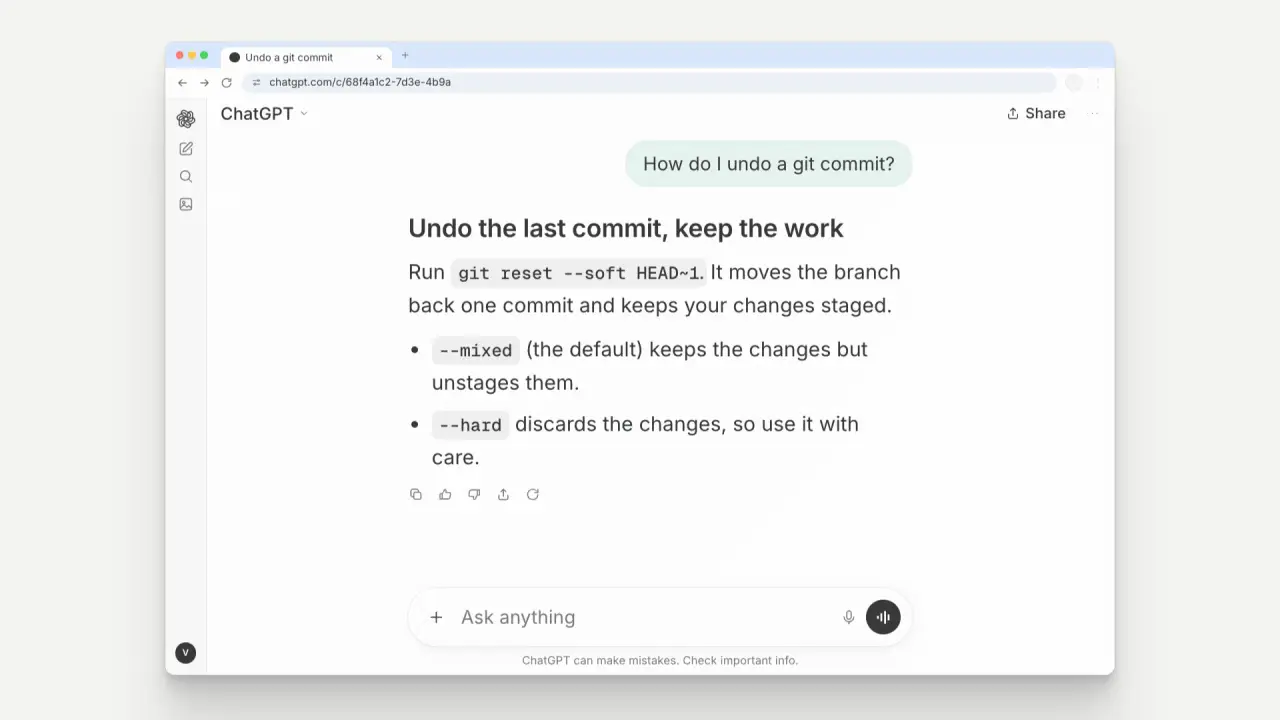
Use when an AI product answers a question. A copy of the real ChatGPT screen inside a Chrome window: the prompt is typed in the centred composer, sent up into the thread as a tinted bubble that snaps on a spring (the reference clip shows x1.11), the model thinks (one dot fades in), and a bold heading and the answer stream in chunk by chunk with a dot riding the newest chunk. The round button reads waveform, up arrow, stop square, waveform, as the product does.
The code
import { arrive, show, flipFrom, typeTimes, typedCount, leave } from '../../prompts/moves/demo/assets/stage.js';
import { rng } from '../../core/motion/springs.js';
import { EASE } from '../../core/motion/presets.js';
// the window fades in 0.22 s, the greeting and the composer follow 80 ms apart
arrive(win, 100, { ms: 220, from: '0.8vh' });
// typing: 30 ms a character, 70 ms more after a space, jittered 25 percent from a seeded rng (22.7 chars/s)
const times = typeTimes(prompt, 750);          // text shown = prompt.slice(0, typedCount(times, ms))
// send at 2.05 s: the bubble flies from the centred composer on a spring (k 500, d 25: 12 percent overshoot, settled in 0.27 s)
flipFrom(user, composerTop, 2050);
composer.animate([{ translate: `0 ${lift}px` }, { translate: '0 0' }], { duration: 320, delay: 2050, easing: EASE.land, fill: 'both' });
// the tab address and title swap in one frame, as a browser does: show(u1, null, 2150); show(u2, 2150)
// stream: chunks of 1 to 3 words, 55 to 110 ms apart, each a 0.2 s fade; the caret shows only between one chunk and the next
const r = rng(7); let t = 2500;
chunks.forEach((el, i) => { const start = t; t += 55 + r() * 55;
  el.animate([{ opacity: 0 }, { opacity: 1 }], { duration: 200, delay: start, easing: EASE.land, fill: 'both' });
  el.nextElementSibling.animate([{ opacity: 0 }, { opacity: 1, offset: 0.001 }, { opacity: 1, offset: 0.999 }, { opacity: 0 }], { duration: t - start, delay: start, fill: 'both' }); });
Easing
Each ease is a pair of After Effects handles from core/motion/presets.js. Every curve as CSS.
| Ease | Leaving a key | Arriving at a key |
|---|---|---|
land | 12% influence, speed 4.8 | 75% influence, speed 0 |
launch | 33% influence, speed 0 | 25% influence, speed 3 |
Notes
The clip is a real-product copy (prompts/skill-combos.md, “Real product”): ChatGPT’s empty state (“What can I help with?”, an “Ask anything” composer centred), the right-aligned user bubble, the unboxed answer with inline code and a bulleted list, the action row, the “can make mistakes” line, a collapsed sidebar rail, in a Chrome window 74 percent of the frame width and 88 percent of its height (the measured 65.6 × 77.8 drawn 13 percent larger so the text reads in a 640 px card) with Chrome’s blue strip (#d3e3fd) on the flat ground (#f3f3f0 light, #0c0c0c dark). Inter stands in for Sohne and the product’s logo knot is left out. Every number was measured on the reference chat-prompt clip: the window fades in 0.22 s (reference 0.13 s), the prompt types at 22.7 characters a second (reference 20 to 27), last key to send 0.1 s, send to settle 0.27 s, the composer drops to the dock in 0.32 s, the answer streams at 24 words a second (reference 15 to 25), the action row arrives with the last chunk and the tab names the chat 0.35 s later. The answer text is 2.5 percent of the frame height, the composer and bubble 2.3 percent. Text is real: a real question and a real answer. The camera stays still and the window leaves in 0.3 s at 5.6 s (leave() in demo/assets/stage.js). Only the bubble overshoots (12.1 percent of its travel, as the reference shows); the thinking dot, the Share button and the action row fade without a spring because ChatGPT’s do not, so the printed overshoot share is 17 percent (1 of 6 arrivals) and is waived as “real surface: ChatGPT does not overshoot”. The 1.2 s hold is still, as the product is; only the tab title changes.
Looks (ground, window chrome) live in demo/demo.css (data-look="product"); this snippet keeps neutral tokens.
Sound
Sound: none in the clip. A cue for a film: tick at 0.95 s and 1.35 s (two ticks of the typing run, not one per key), tap at 2.05 s on the send, pluck at 4.10 s when the answer ends. No bed, no tick per chunk.