Video componentsProduct moments
Before and after wipe
When to use
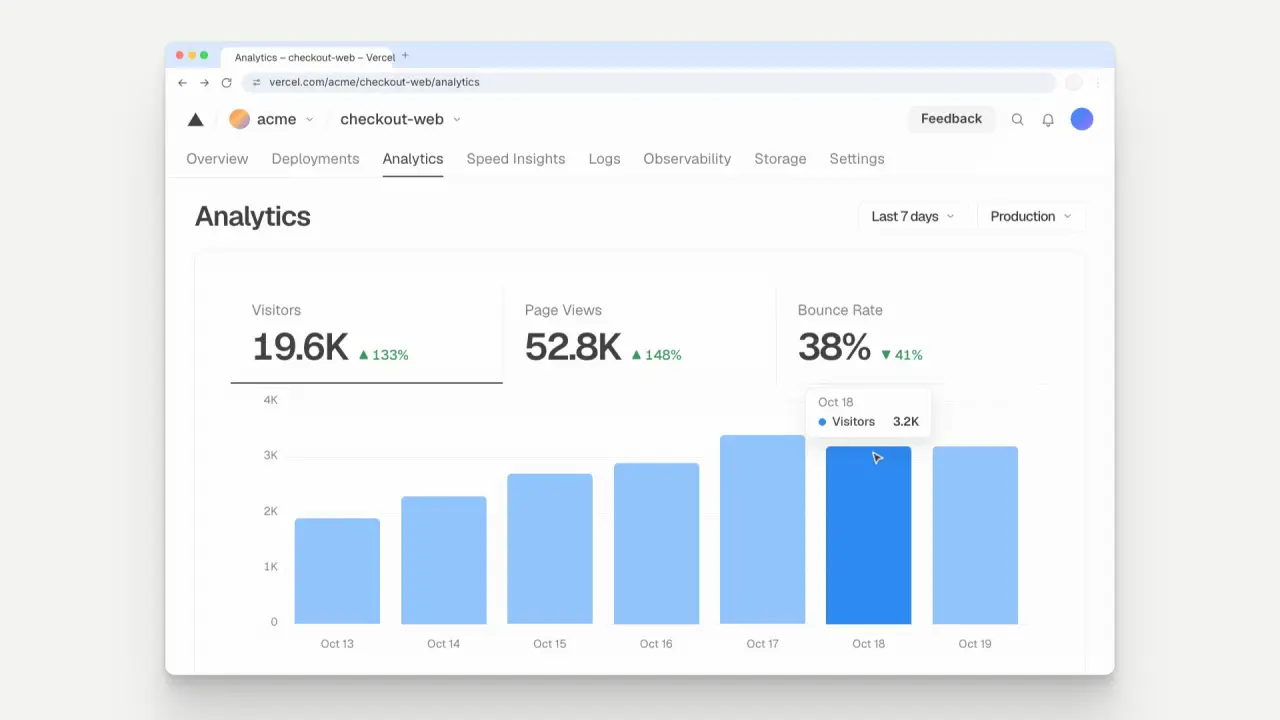
Use when the claim is a change and the change should be a picture: the same dashboard in two states, and a scan line carries the after over the before. A copy of the real Vercel Web Analytics screen (Geist, the triangle mark, the Visitors, Page Views and Bounce Rate cards, a blue bar chart) in a Chrome window. Every reading and every bar changes the moment the line is over it, so no glyph is ever half of two numbers.
The code
import { arrive, crossAt, rollSwap } from '../../prompts/moves/demo/assets/stage.js';
import { EASE } from '../../core/motion/presets.js';
const AT = 1550, MS = 700, W = card.offsetWidth;   // measure with offsetWidth: a transformed parent changes getBoundingClientRect
scan.animate([{ translate: '0 0' }, { translate: `${W}px 0` }], { duration: MS, delay: AT, easing: EASE.settle, fill: 'both' });
// each slot (a reading with both values stacked in one grid cell) swaps when the line crosses its centre
slots.forEach(({ out, in: inn, f }, i) => rollSwap(out, inn, crossAt('settle', AT, MS, f), '0.8vh', EASE.land));
// each bar grows from its before height to its after height at the same moment (fill: 'forwards' so the rise before it keeps its start)
bars.forEach(({ el, f, r }) => el.animate([{ scale: `1 ${r}` }, { scale: '1 1' }], { duration: 380, delay: crossAt('settle', AT, MS, f), easing: EASE.land, fill: 'forwards' }));
// the tooltip fades 0.12 s with no rise: arrive(tip, 2700, { ms: 120, from: '0px' })
Easing
Each ease is a pair of After Effects handles from core/motion/presets.js. Every curve as CSS.
| Ease | Leaving a key | Arriving at a key |
|---|---|---|
carry | 33% influence, speed 0 | 12% influence, speed 4.8 |
land | 12% influence, speed 4.8 | 75% influence, speed 0 |
launch | 33% influence, speed 0 | 25% influence, speed 3 |
settle | 60% influence, speed 0 | 60% influence, speed 0 |
Notes
rollSwap (in demo/assets/stage.js) rolls the old reading up and out in 0.15 s and the new one in from below in 0.26 s, after it, so two glyphs never share a spot; crossAt solves the second at which the eased line reaches a slot’s centre. The line runs the iris curve (EASE.settle): a soft start, a fast middle, a soft landing. The before week builds first: seven bars rise 70 ms apart (0.32 s each) from 0.45 s on EASE.land, as a Vercel chart draws on load; the three readings are already in place, because Vercel does not count them up. The wipe takes 0.7 s (reference moves take 0.2 to 0.4 s; a wipe across a whole card needs the longer band). After it lands a cursor travels to a bar (0.65 s, EASE.carry), the bar turns the hot blue, a tip fades in 0.12 s at 2.7 s, and the cursor steps to the next bar at 3.5 s (the hold is alive through what the real chart does on hover). Keep what did not change (breadcrumb, tabs, filters, days) outside the swap. The clip is a real-product copy (prompts/skill-combos.md, “Real product”): a Chrome window 74 percent of the frame width on the flat ground, readings 4.6 percent of the frame height, labels 1.4 to 1.8 percent. Nothing overshoots, as in the product, so the printed overshoot share is 0 percent and is waived as “real surface: Vercel does not overshoot”; the scan line and the reading swap are the move itself, a creative device the clip was asked for. The window leaves in 0.3 s at 4.6 s (leave()) and the camera stays still.
Looks (ground, window chrome) live in demo/demo.css (data-look="product"); the Vercel colours are tokens in the demo.
Sound
Sound: none in the clip. A cue for a film: whoosh at 1.55 s as the line starts, pluck at 2.30 s when the after state lands, tick at 3.00 s when the cursor stops on a bar. No bed.