Video componentsMove the camera
Lens
When to use
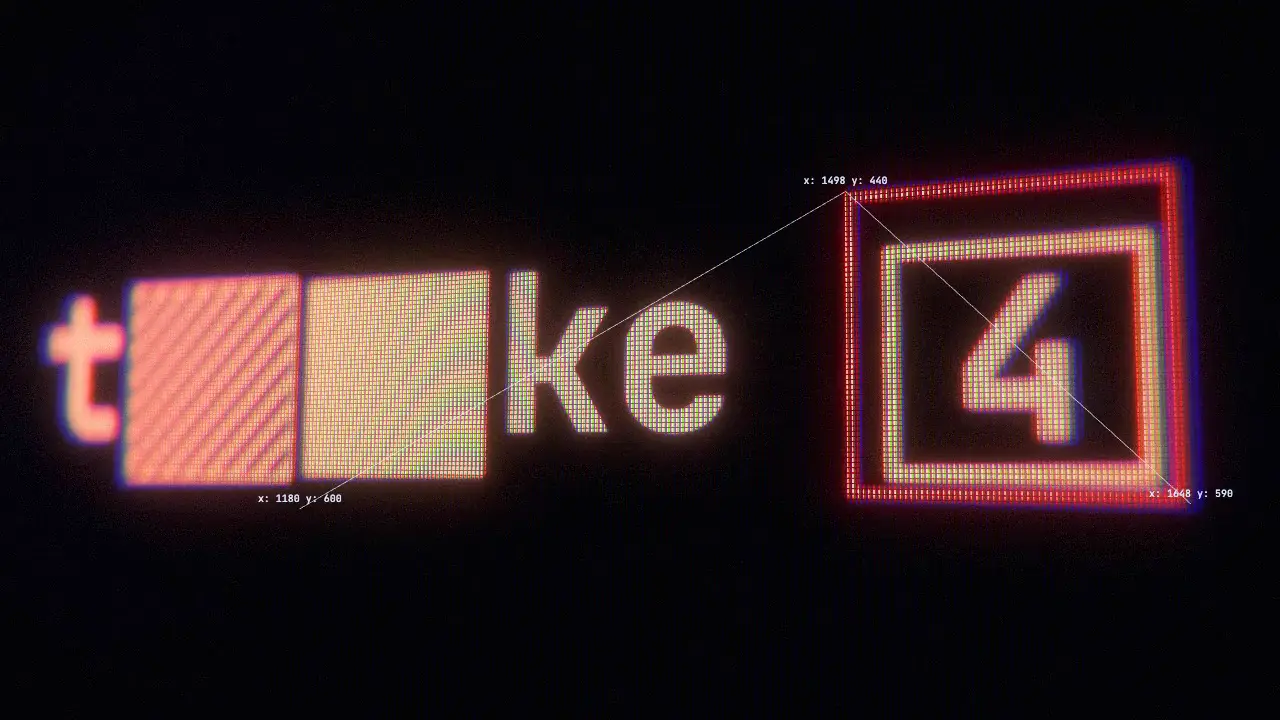
Use when a screen (a terminal, a dashboard, a tracking HUD, a type line shown as a monitor) must read as a real object filmed by a camera: tilted, soft at one end, bright glyphs blooming, LED cells and colour fringes visible when the camera pushes in. Render the flat screen, then let one shader film it.
The six stages of the clip, each turned on for one second: flat, perspective, depth of field, palette and aberration, bloom and LED grid, tear and grain with the camera tracker.
The code
import { lens, htmlSource, PALETTES, OFF } from '/core/surfaces/lens.js';
const cam = lens(htmlSource(document.getElementById('screen'), { scale: 2 }), {
  aim: (t) => [1390, 520], zoom: (t) => 1 + 1.9 * ease(t), tiltY: 0.38, tiltX: 0.1,
  dof: { blur: 0.55, focus: [1400, 520] },
  palette: { stops: PALETTES.thermal, keepColor: 0.9 },
  bloom: { strength: 0.9, radius: 42 }, grid: { amount: 0.9, cell: 3 },
  aberration: { amount: (t) => 6 + 8 * lock(t) },
  tear: { amount: (t) => (hit(t) ? 70 : 0) },
});
vawe.onFrame((t) => cam.draw(t));            // the seek awaits it
const p = cam.project(1498, 440, t);         // { x, y, scale, depth, visible } in CSS px: put a label there
Notes
What it does
- The screen is
#screen: plain HTML and CSS, 1920 by 1080 px, parked behind the lens canvas.htmlSourceinlines its computed styles and fonts into an SVG image and uploads it every seek.canvasSource(canvas)takes a 2D canvas instead. - Every option is a literal the page can change: a number, an array, or a function of the seek time. The defaults are the “filmed screen” look;
OFFflattens every effect so one can be turned on alone. perspective:tiltX,tiltY,roll,zoom(up to about 3),aim(the source point at the middle). A ray hits a tilted plane, so the far side is smaller and softer by geometry, not by a CSS skew.dof: blur grows with the depth difference tofocus(a source point: pass a function to follow a target). Bokeh takes the aperture’s shape:blades(n-gon),rotation,roundness, andcatEyesqueezes it toward the frame edge. Bright pixels weigh more in the taps.softis the lens floor. A source with adepthinput (below) blurs by each pixel’s own depth instead of the tilted plane.palette: brightness through 2 to 8 colour stops (PALETTES.thermal phosphor amber navy paper mono cyanotype).keepColorleaves saturated marks (a red lock box) in their own colour.- Light is linear from the first tap to the last pass.
gridis a panel mask on the screen plane: a soft dot per subpixel (layoutstripe, triad or dot,softness), the same shape per channel so the average colour stays untinted. It follows the plane (period changes with zoom and tilt), fades out of focus, and is applied before bloom, so bright dots bleed into each other. bloom: soft-knee threshold, then a 6-level downsample and upsample chain weighted byradius: a tight core plus a wide tail.aberration: red and blue move apart radially,amountpx at the edge.halation: the warm halo film gets where a bright edge meets dark. Pixels abovethreshold(0.6) go through the same blur chain as bloom at a widerradius(90 px), are multiplied bytint(default[1, 0.3, 0.1], a red-orange; pass[0.1, 0.4, 1]for a cold halo) and added only where the base is dark, so bright areas keep their colour.strengthis 0 by default and inOFF: turn it on with about 0.5 to 1.2.PALETTES.cyanotype: six stops measured from a reference image, dark to light:#010306 #070d13 #162432 #3b4f64 #6f8599 #ccd8e4. A near-black blue ground with a pale blue-grey top.- Optical effects, all off by default and in
OFF(strength, amount or blur 0). Each one reads like a lens part: -streaks: { strength, length, threshold, tint }: anamorphic streaks. Pixels abovethreshold(0.7) go through the same blur chain as bloom, but the chain halves only the width, so a bright point becomes a thin horizontal linelengthpx long (600), multiplied bytint(default blue) and added. Use about 0.3 to 1. -diffusion: { strength, radius }: Pro-Mist. A low-threshold wide glow (radius70 px) added over the whole image, plus a very small black lift, so the blacks beside bright areas rise. Use about 0.2 to 0.5. -softFocus: { amount, radius }: the image mixed with a blurred copy of itself (radius16 px). The core stays, the detail softens. Useamount0.2 to 0.6. -tiltShift: { center, width, blur }: a sharp band (centerandwidthare shares of the view height) with blur rising above and below it toblurpx. It uses the circle-of-confusion path ofdof, with the screen row as a synthetic depth. A source with its owndepthkeeps that depth and gets the band blur as a floor. -distortion: { amount }: a radial remap of the sample point. Above 0 is barrel (corners pulled in), below 0 is pincushion. Use -0.12 to 0.12.project()andquad()follow it. -weave: { amount }: gate weave. The whole image moves by up toamountpx, a new seeded offset every frame (seed,fps).project()follows it. tear(rows slide, seeded),grain,vignette,exposure,lift,fade. All noise is hashed fromseedandfloor(t * fps): a frame is a pure function of t, so renders match byte for byte.project(x, y, t)is the same camera on the CPU. Labels, links and brackets drawn in HTML on top of the canvas (z-index above 0) stay sharp and show real source coordinates.
The numbers
The demo was measured against a reference, 1080p: bloom 90 to 10 percent width 24.9 px (reference 20.7), panel period 6.9 px (reference 7.1), colour fringe 35 percent of edges off by 1 px or more (reference 20 to 28). At 1080p a frame costs about 17 ms on the GPU (12 ms in a draft), and a 6 s final (360 frames) captures in about 20 s.
Looks
A look is a named set of lens options, data in LOOKS (core/surfaces/lens.js, next to PALETTES). lens(source, { look: 'film-halation', ...own }) starts from a flat lens, switches on the look, then puts the page’s own options over it: a page option always wins. A page with no look keeps the filmed-screen defaults. Choose by sight: bin/vawe frames <page> --looks --at 4.5,9 [--only a,b] [--out dir] films the page frame at each second under every look and as-is, and writes one labelled grid per second (draft size, so a fine grid cell shows only in a final). The verb sets window.__vaweLensOverride before the page runs. lens() merges it over the page options, and it holds a full look: every effect the look does not name is off, while aim, zoom, tilt and dof stay the page’s. Only the verb sets it.
| look | what it does | numbers | |---|---|---| | clean | every effect off: the flat screen with the page’s camera | none | | dream-bloom | a wide, strong glow and a little soft focus | bloom 1.5, radius 120, threshold 0.22; softFocus 0.18, radius 30; vignette 0.15; lift 0.01 | | film-halation | the red-orange halo of film around bright edges | halation 1, radius 90, threshold 0.55; bloom 0.35; grain 0.05; vignette 0.25 | | anamorphic | blue horizontal streaks off bright shapes, a slight colour fringe | streaks 0.9, length 800, threshold 0.45, tint [0.35, 0.6, 1]; bloom 0.3; aberration 3; vignette 0.2 | | pro-mist | a soft veil: glow over the whole image and lifted blacks | diffusion 0.35, radius 70; vignette 0.1 | | tilt-shift | a sharp middle band, blur above and below | tiltShift center 0.5, width 0.3, blur 22 | | soft-focus | the whole image mixed half with a blurred copy | softFocus 0.5, radius 14 | | vintage | warm tone, grain, weave, strong vignette, soft halo | palette warm 4 stops at 0.4; halation 0.5; bloom 0.3; grain 0.09; weave 1.6; vignette 0.55; lift 0.02 | | cyanotype | the cyanotype palette, a cold halo, grain | PALETTES.cyanotype; halation 0.8, tint [0.1, 0.4, 1]; grain 0.07; vignette 0.3 | | crt | LED stripe grid, torn rows, colour fringe, strong bloom | grid 0.9, cell 3; tear 6, prob 0.04; aberration 5; bloom 0.7; vignette 0.5; grain 0.04 |
Depth of field for a 3D scene
A tilted plane gives depth by geometry. A three.js scene has depth per pixel, so give the lens that depth: canvasSource(color, { depth }). depth is a canvas (or ImageBitmap, ImageData) holding linear depth in the red channel, 0 near to 1 far, or a function returning one, called on every draw. It may have another size than the colour canvas. The circle of confusion is blur x |depth - focus|, so dof.focus is a depth number (0 to 1; a function of t racks it) or a source point whose depth is read. max, bokeh, blades, soft keep their meaning. A sharp near object does not smear into the blurred far one; a blurred near object spreads over the far one. Without depth the plane path runs unchanged. Depth is 8 bit here: avoid a range wider than the scene needs.
const color = Object.assign(document.createElement('canvas'), { width: 1920, height: 1080 });
const depth = Object.assign(document.createElement('canvas'), { width: 1920, height: 1080 });
const depthMat = new THREE.ShaderMaterial({   // linear view depth, not the nonlinear depth buffer
  uniforms: { near: { value: camera.near }, far: { value: camera.far } },
  vertexShader: 'varying float v; void main() { vec4 m = modelViewMatrix * vec4(position, 1.0); v = -m.z; gl_Position = projectionMatrix * m; }',
  fragmentShader: 'uniform float near, far; varying float v; void main() { gl_FragColor = vec4(vec3(clamp((v - near) / (far - near), 0.0, 1.0)), 1.0); }',
});
function renderBoth(t) {
  scene.background = beautyBackground; scene.overrideMaterial = null;
  renderer.render(scene, camera);
  color.getContext('2d').drawImage(renderer.domElement, 0, 0);
  scene.background = new THREE.Color(1, 1, 1); scene.overrideMaterial = depthMat;   // far = white
  renderer.render(scene, camera);
  depth.getContext('2d').drawImage(renderer.domElement, 0, 0);
  scene.overrideMaterial = null;
}
const cam = lens(canvasSource(color, { depth }), { dof: { blur: 0.6, focus: (t) => rack(t) } });   // rack: depth 0..1
vawe.onFrame(async (t) => { update(t); renderBoth(t); await cam.draw(t); });
Set the renderer’s preserveDrawingBuffer: true or copy right after each render, as above. Lights and fog do not touch the override material, so the depth stays a pure function of the geometry.
Rejected approximations
These faked one effect per element and never matched a camera:
text-shadoworfilter: drop-shadowas bloom: the glow follows the glyph shape, ignores the rest of the frame, and cannot be lifted by what sits next to it. Usebloom.- A repeating-gradient overlay as the pixel grid: it does not follow perspective, does not fade out of focus and tints the average colour. Use
grid. - One
filter: blur()as depth of field: a uniform blur has no depth. Usedofover a tilted plane. - Depth bands by screen height as the depth of a 3D scene: a subject that crosses a band gets the wrong blur. Pass
depthtocanvasSource. - CSS
transform: perspective() rotate3d()on the screen: a skew of the layer, one blur per plane, sharp text on the far side. UsetiltX,tiltYandzoom. mix-blend-modecolour layers as a palette: usepalette.
Never lose the screen
A tilted plane can swing its border into the frame or turn away from the target. edge: 'extend' (the default) repeats the screen’s edge pixels past the border; edge: 'black' shows outside. fit moves the camera instead: fit: { keep: [x, y], margin: 80 } pans (then zooms out) until the point holds inside the frame, and cover: true until no border shows. cam.project(x, y, t).visible and cam.quad(t) (the four screen corners in CSS px) let a check warn when a shot loses its target.
Limits
htmlSource needs everything inside the screen to be self-contained: fonts from the page’s @font-face, images and url() backgrounds are inlined; <video>, <iframe> and CSS counters are not carried. Set scale: 2 when zoom goes above 1.5, or small text turns soft. A page with a lens needs WebGL2.
Sound
Sound: a short noise tick at each tear, and a low thud on a lock (aberration peak). The lens itself is silent.