x264 preset fast vs medium: 25% faster, 15% larger
We traded 15% of file size for 25% of encode time, and we checked what the trade cost in quality: the two encodes sit 49 dB PSNR apart. That is the x264 preset fast against medium comparison from one commit. The rest of this post covers the three other encode decisions that came with it: dither, a 10-bit web copy and a size budget for clips.
The problem
Our final render captures lossless PNG frames, blends the subframes (motion blur) and encodes them. Three things bothered us.
The master encode was slow. Dark gradients banded: 8-bit x264 shows visible steps on a dark ramp. And the gallery on this site grew heavy, because every move has a clip.
What we tried
Presets
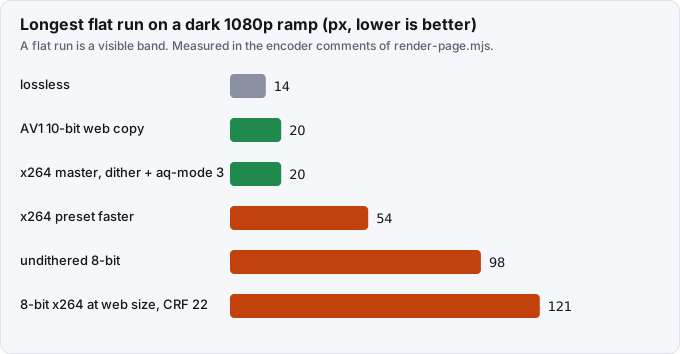
Commit b7b6c3c41 moved the master from preset medium to preset fast. Measured against medium, fast encodes 25% faster, makes a 15% larger file and lands 49 dB PSNR away from it. The next preset, faster, is about twice as quick. We rejected it because it leaves a 54 px flat run on the dark ramp in tests/media/render-banding.test.mjs. A flat run is a band you can see. Drafts use ultrafast at CRF 20.
Banding on dark ramps
The master uses CRF 16 with aq-mode=3, which spends bits on dark flat areas where 8-bit video bands. On top of that the final adds noise before the encode, noise=alls=3:allf=t:all_seed=7, which is dithering. The seed is fixed, so the master is repeatable. Drafts skip the dither so that draft pixels stay comparable run to run.
We tuned the dither on a dark ramp. Strength 3 with aq-mode=3 left a longest flat run of 20 px, at half the file size of strength 4 with -tune film. A weaker strength, 2, did not survive x264's smoothing on a test gradient.
A 10-bit web copy
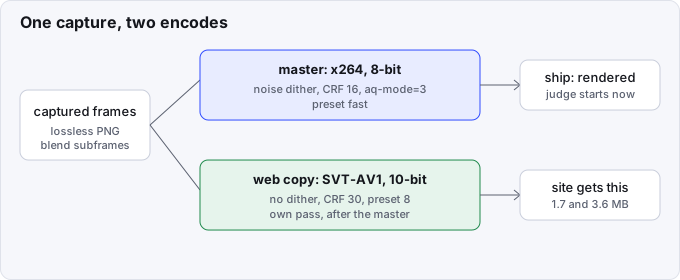
For the copy that the site serves we skipped dither and used a 10-bit encode instead, which does not band. Ship writes the master first, then a second pass encodes an AV1 web copy with SVT-AV1 at CRF 30, preset 8, in 10-bit yuv420p10le, with no dither.
The numbers in the encoder's comments come from a 1080p dark ramp and two 5-second films. The web copies came to 1.7 and 3.6 MB. The longest flat run on the ramp was 20 px for the AV1 copy, against 14 px for the lossless source and 98 px for undithered 8-bit. An 8-bit x264 copy at the same size, CRF 22, banded with a 121 px run.
Commit 394d14797 changed when the web copy happens. The render reports the mp4 as soon as the master is muxed, and the ship job starts the judge on it while the web copy encodes. ship --status --wait prints that the film is rendered but not judged, then the verdict. The extra encode no longer adds to the wait.
A budget for clips
Every move on the moves gallery has a clip. In 817edeee7 we set a 2 MB budget per clip. The render encodes at CRF 16. If the file is over budget, it is encoded again from that file at CRF 19, 22, and so on up to a cap of 31, and the first one that fits is kept. The CRF that won is written to clips.lock.json beside the source hash, so a reader can see how hard each clip was squeezed.
One more bug: dropped frames from pixel formats
Chromium saves some frames as RGBA, for example when the page uses mix-blend-mode. When the pixel format changes in the middle of a frame sequence, ffmpeg rebuilds its filter graph. That resets the trims and drops frames. Commit 958f17f9d keeps one pixel format through the whole encode, so every frame survives.
Result
| Decision | What we measured |
|---|---|
| x264 preset fast vs medium | 25% faster, 15% larger, 49 dB PSNR apart |
| preset faster | about 2x quicker, 54 px flat run, so rejected |
| dither strength 3 + aq-mode 3 | 20 px longest flat run |
| AV1 10-bit web copy | 1.7 and 3.6 MB for two 5 s films, 20 px flat run |
| clip budget | 2 MB, CRF raised in steps of 3 from 16, capped at 31 |
We did not measure absolute encode seconds for the preset change, only the ratio. If your hardware or content differs, re-run the comparison on your own dark ramp before you copy the numbers.
What we would tell someone building the same thing
- Test your encoder on the worst case for it, not on a typical frame. For us that was a dark 1080p ramp, and a single number (the longest flat run) was enough.
- Compare presets on three axes at once: time, size and a quality number. A 2x faster preset that bands is not faster in any useful way.
- Use 10 bits for the copy people watch in a browser. It avoids the dither-versus-size trade.
- Make the budget a rule, not a review comment, and write down what the encoder had to do to meet it.
- Keep the pixel format fixed through the graph. A format change mid-stream drops frames without an error.
How rendering waits are kept short is in making the wait cheap. Related work: four render workers were one worker. For a comparison with other render tools, see Remotion alternatives. Source: github.com/Vandit1604/vawe.
In the code
harness/media/render-page.mjs:x264Args,WEB_ARGS,DITHER,ffmpegWebEncode.harness/lib/clip-budget.mjs:chooseCrf.tests/media/render-banding.test.mjs.- Commit b7b6c3c41: preset fast for the master.
- Commit 086276b67: AV1 web copy, dither and
aq-mode=3measurements. - Commit 394d14797: report the master before the judge.
- Commit 817edeee7: the 2 MB clip budget.