Depth of field in the browser: a virtual lens for HTML
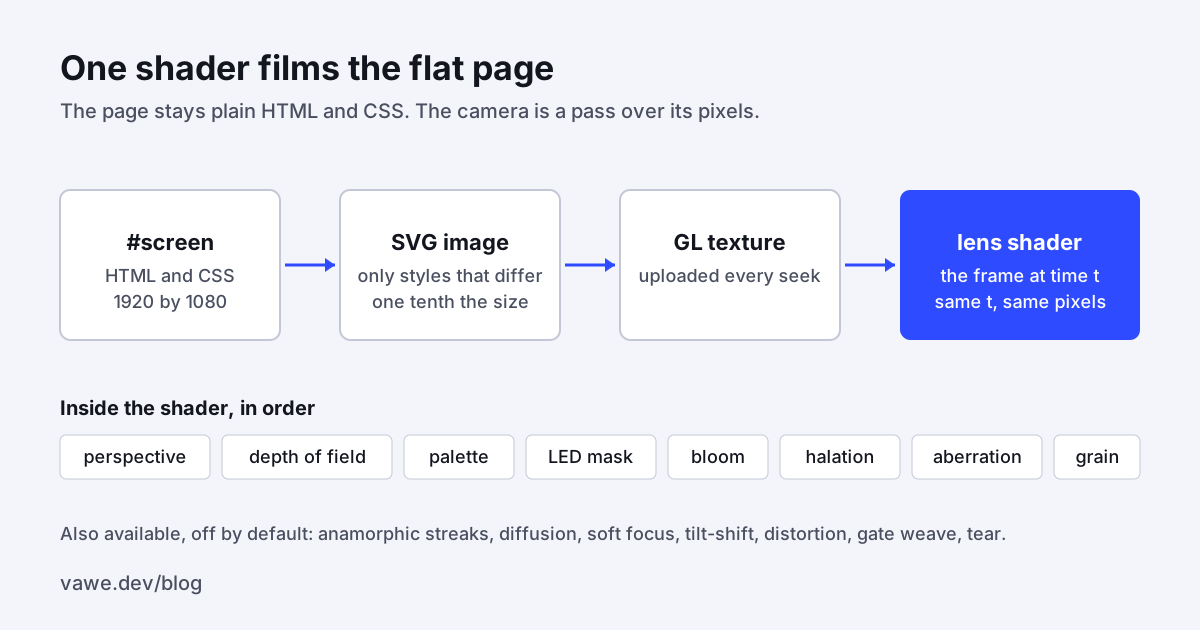
A text-shadow is not a bloom. We found that out when we put our first HUD film next to a reference that had been filmed off a real monitor. Ours read as fake, and we could point at the reason: our glow was a CSS shadow, and our depth of field was one blur per plane. This post is about how we got depth of field in the browser, along with bloom and halation, by filming the page instead of styling it.
The problem: CSS effects imitate the result, not the optics
Our early films faked light with the tools a web page has. Glow was text-shadow. Depth of field was filter: blur() on a layer, so every pixel in a plane got the same blur. Neither of those can do what a lens does. A real bloom spreads from every bright pixel and has a tight core and a wide tail. A real defocus blur depends on distance, and bright points turn into the shape of the aperture. A CSS shadow has none of that.
We made a rule from it: optical effects belong to the framework. A film that needs bloom gets one bloom, applied to the whole image the way a camera would.
What we tried
Tuning the CSS was the obvious first move, and it has a ceiling: each fake works on its own element and has its own idea of the image. So we inverted it. The page stays plain HTML and CSS. We treat it as a flat screen, and one WebGL shader films that screen. The page does not know it is being filmed.
What we built: depth of field in the browser
The first lens commit (eaa5cdf46) added core/surfaces/lens.js at 546 lines, a source adapter, a demo page, a test file and a move clip. The chain has four steps:
- The page draws a 1920 by 1080
#screenelement, parked behind the lens canvas. htmlSourceinlines the computed styles and fonts into an SVG image.- The image is uploaded as a GL texture on every seek.
- One shader applies the camera.
The shader does perspective (tilt, zoom, a ray hitting a tilted plane, so the far side is smaller and softer by geometry), depth of field with aperture-shaped bokeh, palette mapping, an LED panel mask, bloom, aberration, tear and grain. Later commits added halation, anamorphic streaks, diffusion, soft focus, tilt-shift, distortion and gate weave. Every option is a literal in the page: a number, an array, or a function of the seek time. The lens also has project(), which runs the same camera on the CPU. A label drawn in HTML on top of the canvas can sit on the right pixel of the filmed screen.
Two fixes that were not about looks
The SVG screen source was large. Commit 4821e1780 inlines only the styles that differ from a bare element and its parent clone, and the SVG image became about one tenth of its old size. That matters because the image is rebuilt and uploaded on every frame of a seek.
The second was determinism. Commit 398fd7a7c draws the SVG screen into a software canvas so that a draft's pixels match from run to run. All noise in the lens (grain, tear, weave) is hashed from a seed and floor(t * fps), so a frame is a pure function of t. We have a test that renders a lens page whose HTML changes every frame twice, on several lanes, and compares the frames. If you want the reasoning for this, see our post on deterministic rendering.
Looks instead of fifteen knobs
Once the lens worked, agents had a new problem: a long list of options. We replaced the long tail with named looks. Commit 3920d8220 added a LOOKS table with ten entries: clean, dream-bloom, film-halation, anamorphic, pro-mist, tilt-shift, soft-focus, vintage, cyanotype and crt. A look names every effect it uses and nothing else is on. The page's own options go over the look, and a preview override goes over both.
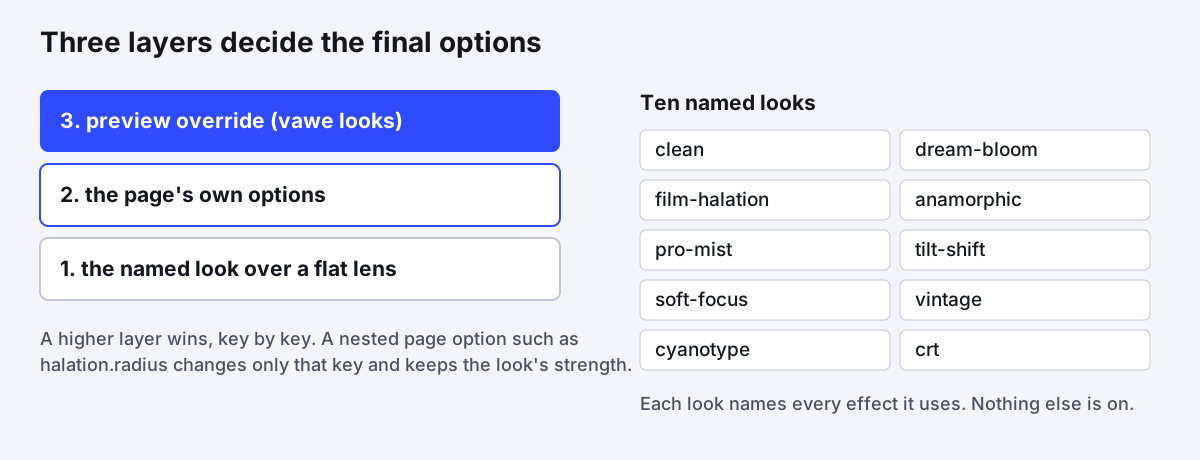
vawe looks (commit 73b687aef) renders a page frame under every named look and prints one labelled grid per second, so an agent picks by looking rather than by guessing numbers. The starter brief now has a Look line that names the command (4004bac38).
The measured result
We measured the demo against the reference at 1080p. The lens doc records these numbers:
| Measure | Lens | Reference |
|---|---|---|
| Bloom, 90 to 10 percent width | 24.9 px | 20.7 px |
| LED panel period | 6.9 px | 7.1 px |
| Colour fringe, edges off by 1 px or more | 35 percent | 20 to 28 percent |
Bloom and panel period are close. The colour fringe is further off, and we say so. A frame costs about 17 ms on the GPU at 1080p (12 ms in a draft), and a 6 second final of 360 frames captures in about 20 seconds.
What we cannot show is a score. We have no judge number that says films got better with the lens. The gain is our own side-by-side judgement against the reference, which is a weaker kind of evidence, and we want you to know that.
What we would tell someone building the same thing
- Do the optics in image space, once. Per-element fakes disagree with each other when the camera moves.
- Keep the source a normal page. The agent then writes the screen in the language it already knows, and the lens is a separate decision.
- Make the lens a pure function of time. The software-canvas fix was a one-line change to how the canvas is created, and it is what makes a draft match a final.
- Give agents named presets and a contact sheet. The options still exist, and a named look is the one that gets used.
- Shrink what you upload per frame. The style-diff change made the per-frame image a tenth of its old size.
You can see the clip and its code on the lens move page. For a framework that treats the browser as the renderer from the start, compare vawe with Remotion. A related post covers the ten token sets behind our move clips: One design system, ten looks, 70 clips. The repo is at github.com/Vandit1604/vawe.
In the code
core/surfaces/lens.js: the shader, options,LOOKS,resolveOptions.core/surfaces/lens-source.js:htmlSourceand the style-diff inlining.harness/media/looks.mjs: thevawe lookscontact sheet.- Commits:
eaa5cdf46the lens,4821e1780style-diff source,398fd7a7csoftware canvas,3920d8220the looks table.