Ink warp
When to use
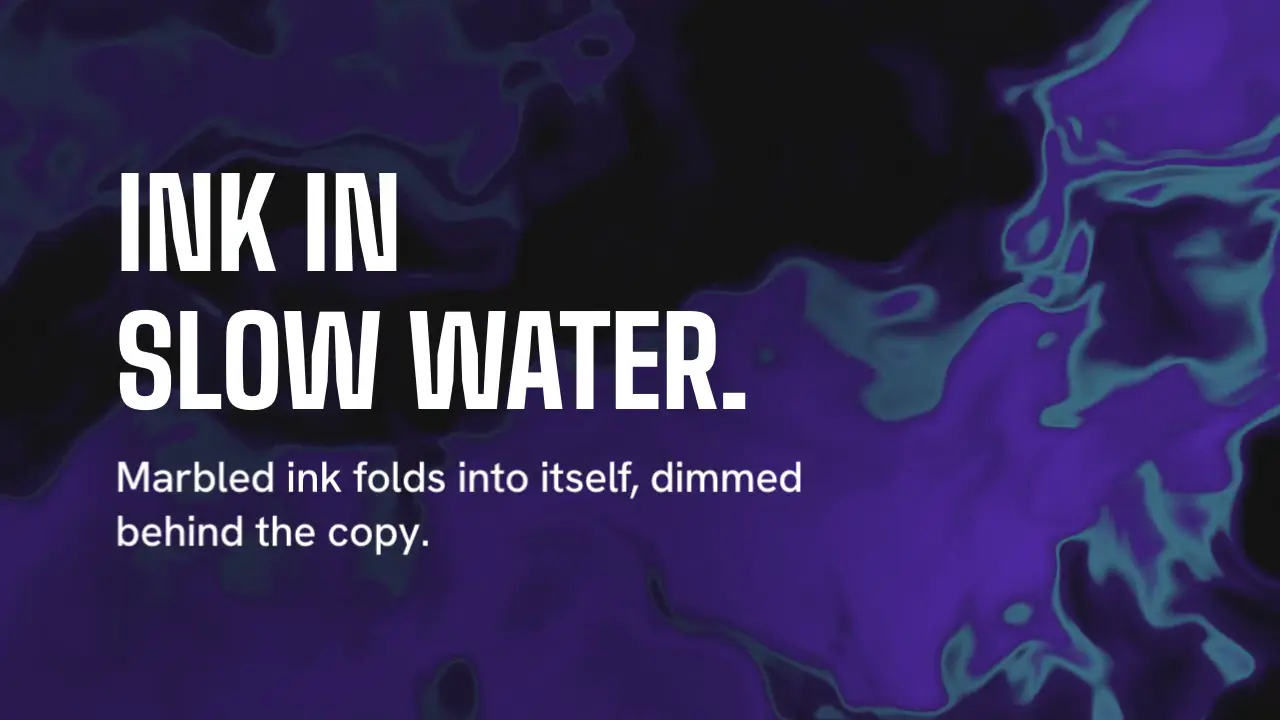
Use when the frame wants a rich, liquid ground, like ink spreading in water, and the copy is short and large. One shader folds noise into itself (a domain warp): a body colour and a thin vein colour flow in marbled shapes, thinner behind the copy. Clip: ink-warp.mp4. Demo: demo/ink-warp.html.
The code
import '../../core/engine/page-api.js';
import { shaderField } from '../../core/surfaces/shader-field.js';
const css = getComputedStyle(document.documentElement);
const rgb = (name) => { const h = css.getPropertyValue(name).trim(); return [1, 3, 5].map((i) => parseInt(h.slice(i, i + 2), 16) / 255); };
const frag = `
uniform vec3 u_ground, u_ink, u_vein;
float hash(vec2 p) { return fract(sin(dot(p, vec2(127.1, 311.7)) + u_seed * 17.0) * 43758.5453); }
float vnoise(vec2 p) {
  vec2 i = floor(p), f = fract(p); f = f * f * (3.0 - 2.0 * f);
  return mix(mix(hash(i), hash(i + vec2(1, 0)), f.x), mix(hash(i + vec2(0, 1)), hash(i + vec2(1, 1)), f.x), f.y);
}
float fbm(vec2 p) { float s = 0.0, a = 0.5; for (int i = 0; i < 4; i++) { s += a * vnoise(p); p = p * 2.03 + 11.7; a *= 0.5; } return s; }
vec3 lin(vec3 c) { return pow(c, vec3(2.2)); }
void main() {
  float aspect = u_res.x / u_res.y;
  vec2 p = gl_FragCoord.xy / u_res.y;
  float t = u_time * 0.4;                                              // the one speed: time moves the warp, not the grid
  vec2 q = vec2(fbm(p * 1.6 + vec2(0.0, t)), fbm(p * 1.6 + vec2(5.2, 1.3 - t)));
  vec2 r = vec2(fbm(p * 1.6 + 3.0 * q + vec2(1.7, 9.2) + t * 0.7), fbm(p * 1.6 + 3.0 * q + vec2(8.3, 2.8) - t * 0.6));
  float n = fbm(p * 1.6 + 3.2 * r);                                    // noise of noise of noise: the marbling
  float body = smoothstep(0.35, 0.80, n);
  float vein = 1.0 - smoothstep(0.0, 0.035, abs(n - 0.52));            // a thin line where n crosses 0.52
  float keep = 1.0 - 0.7 * smoothstep(0.86 * aspect, 0.50 * aspect, p.x);   // thin the ink behind the copy
  vec3 col = lin(u_ground) + lin(u_ink) * 0.42 * body * keep + lin(u_vein) * 0.16 * vein * keep * keep;
  gl_FragColor = vec4(pow(col, vec3(1.0 / 2.2)) + (hash(gl_FragCoord.xy) - 0.5) * 0.012, 1.0);   // static dither
}`;
const field = shaderField(frag, { seed: 4, uniforms: { u_ground: rgb('--ground'), u_ink: rgb('--tile-alt'), u_vein: rgb('--accent') } });
vawe.onFrame((t) => field.draw(t));
Easing and timing
The clip runs 4 s. The look is signal.
The clip uses one named ease from core/motion/presets.js. Each is a pair of After Effects handles: influence is how far along the segment the handle reaches, and speed is how fast the value moves at the key, as a multiple of the segment's average speed. Motion in the docs explains both.
| Ease | Leaving a key | Arriving at a key |
|---|---|---|
land | 12% influence, speed 4.8 | 75% influence, speed 0 |
Notes
Measured on the 4 s demo clip at 640 x 360 on the signal look (ground, --tile-alt violet body, mint accent veins): the mean luma change is 1.3 per frame at 60 fps, 1.1 once the copy has settled, and the worst contrast of white ink against the lightest pixel behind the text box is 10.9:1 over 12 frames. This is the busiest ground of the group, so it is the one to keep dim. The first render ran at t * 0.55 with ink at 0.55 and measured 2.2: close to the 3.0 ceiling and loud on the sheet, with the violet reading as a subject. Slowing to 0.4 and dimming the ink to 0.42 kept the marbling and took the change to 1.3. Use a body colour with no more luma than a mid purple; a mint body would break the 4.5:1 rule under white type. The veins are the brightest pixels, so they fade twice as fast as the body behind the copy (keep * keep). Looks (ground, type, radius, accent) live in demo/demo.css; this snippet keeps neutral tokens.
Sound
Sound: none; a held ground is quiet.
Related moves

See all 125 moves. Learn how a page becomes a film in the docs, copy chains of moves from the recipes, or read the motion guide.