Avatar world
When to use
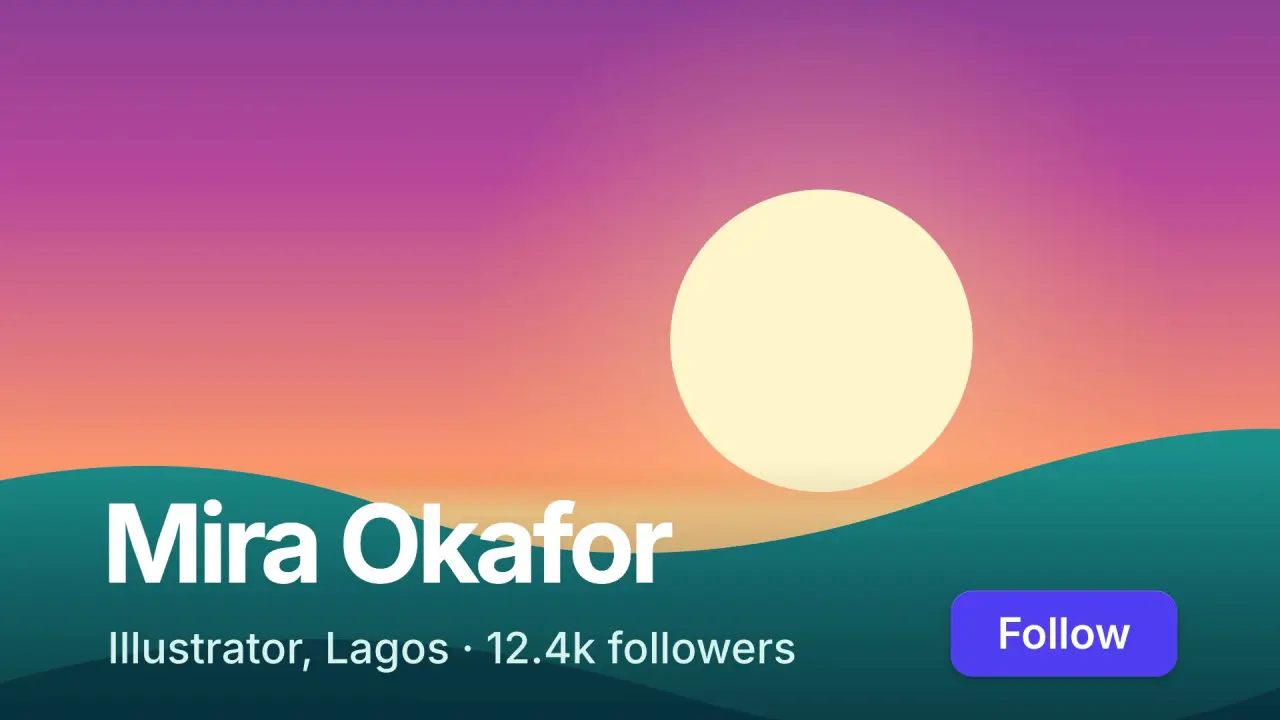
Use when a person, a brand or a place is the way into the next scene: a profile, a creator page, a case study. A round avatar in a card grows until its circle is larger than the frame, and its picture becomes the ground of the next scene. The avatar art is vector (an SVG illustration or a gradient), so it stays sharp at 12 times its size. Clip: avatar-world.mp4. Demo: demo/avatar-world.html.
The code
const D = 24 * u;                                                          // the avatar in the card
const SMAX = (Math.hypot(W, H) / 2 / (D / 2)) * 1.03;                      // its radius reaches the farthest corner from the frame centre
avatar.style.cssText = `width:${D}px; height:${D}px; border-radius:50%; overflow:hidden`;   // the svg inside is the art
vawe.onFrame((t) => {
  const k = clamp((t - T.grow) / 0.95), g = 0.3 * k * k * (3 - 2 * k) + 0.7 * easeFn('swap')(k);
  const cx = lerp(START.x, W / 2, g), cy = lerp(START.y, H / 2, g);        // the circle travels to the middle while it grows
  avatar.style.transform = `translate(${cx - D / 2}px, ${cy - D / 2}px) scale(${lerp(1, SMAX, g)})`;
  card.style.opacity = 1 - swap(clamp(g / 0.8));                           // the card leaves under the circle
});
Easing and timing
The clip runs 3.8 s. The look is daylight.
The clip uses 4 named eases from core/motion/presets.js. Each is a pair of After Effects handles: influence is how far along the segment the handle reaches, and speed is how fast the value moves at the key, as a multiple of the segment's average speed. Motion in the docs explains both.
| Ease | Leaving a key | Arriving at a key |
|---|---|---|
land | 12% influence, speed 4.8 | 75% influence, speed 0 |
launch | 33% influence, speed 0 | 25% influence, speed 3 |
settle | 60% influence, speed 0 | 60% influence, speed 0 |
swap | 75% influence, speed 0 | 75% influence, speed 0 |
Notes
- The art must be drawn for the end frame too. At the end the frame is a window onto the middle of the art: for 16:9 it shows about half of the art's height and 87 percent of its width. Keep the horizon, the sun and the main shapes in the middle half; sky and floor at the top and bottom are cropped away. The
slicesetting on the SVG keeps the art square. - Do not set
will-change: transformon the avatar. Chromium keeps the first raster and scales it, and the ground is soft. Without it the vector is drawn again at each scale and stays crisp. - The press has a cause: a cursor lands on the avatar, the avatar dips to 95 percent, and the growth starts 0.12 s later. The cursor leaves faster than it came (0.3 s,
EASE.launch). - Growth takes 0.95 s: 30 percent smoothstep and 70 percent
EASE.swap, so it starts slow and is fastest in the middle. The card fades out by 80 percent of the growth. Scene B text arrives 0.83 s after the growth starts, 0.15 s apart (name, role and count on one line, button), each rising from 4 to 6 u onEASE.land. A scrim over the lower 36 percent keeps it readable; keep text off the bright horizon band. - The ground keeps living after the handoff: the sun climbs 3.5 percent of the art height over 2.6 s. It is the same element that was in the avatar, so the ground is the avatar, not a copy.
- Z-order: card z 1, avatar z 3, scene B text z 4, cursor z 10. Use an illustration or a generated gradient, never a photo of a real person.
- What goes wrong: a circle clip over a static background is an iris (iris-wipe). Here the picture grows with the circle. If the avatar does not move to the centre while it grows, the frame shows an off-centre part of the art.
Looks (ground, type, radius, accent) live in demo/demo.css; this snippet keeps neutral tokens.
Sound
Sound: one soft pluck on the press; a rising swell under the growth that stops when the circle covers the frame.
Related moves


See all 125 moves. Learn how a page becomes a film in the docs, copy chains of moves from the recipes, or read the motion guide.