Progress timeline
When to use
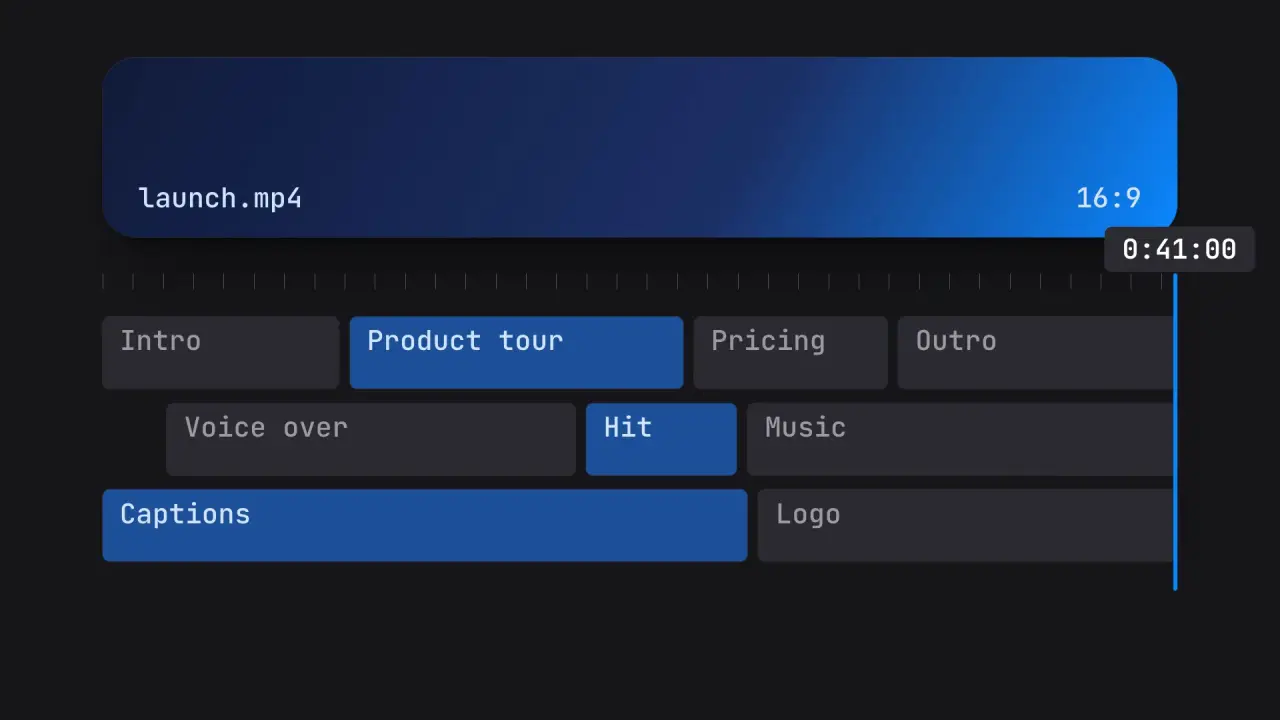
Use when an export, a render or an upload ends and the product shows the result in an editor. A loading bar fills and does not stop at its end: the fill keeps going, its tail catches up with its head, the head stands up into a thin vertical line, and that line is the scrubber of a video timeline. The scrubber reveals the timeline as it moves, and it keeps the speed the fill had. One object, one speed, two screens. Clip: progress-timeline.mp4. Demo: demo/progress-timeline.html.
The code
// one speed curve for the whole move: accelerate, run at V, brake at the end of the timeline
const X0 = 10 * vw, END = 50 * vw, REST = 92 * vw, V = 44 * vw, T0 = 0.4, ACC = 0.5, BRAKE = 0.6;
const x = xAt(t);                                                          // piecewise integral of that speed
const past = clamp((t - tEnd) / 0.9);                                      // tEnd: the second x passes the end of the track
const tail = lerp(X0, x - LINE_W, swap(clamp(past / 0.55)));               // the tail catches up with the head
const h = lerp(1.4 * u, 50 * u, land(clamp((past - 0.4) / 0.6)));          // then the head stands up
head.style.cssText = `left:${tail}px; width:${Math.max(x - tail, LINE_W)}px; height:${h}px; top:${CY - h / 2}px`;
const e = swap(clamp((past - 0.5) / 0.5)), v = ((H - h) / 2) * (1 - e);   // the window opens from the line
timeline.style.clipPath = past > 0.5 ? `inset(${v}px ${W - x - LINE_W}px ${v}px ${lerp(x, 0, e)}px)` : 'inset(0 100% 0 100%)';
Easing and timing
The clip runs 3.6 s. The look is vawe.
The clip uses 2 named eases from core/motion/presets.js. Each is a pair of After Effects handles: influence is how far along the segment the handle reaches, and speed is how fast the value moves at the key, as a multiple of the segment's average speed. Motion in the docs explains both.
| Ease | Leaving a key | Arriving at a key |
|---|---|---|
land | 12% influence, speed 4.8 | 75% influence, speed 0 |
swap | 75% influence, speed 0 | 75% influence, speed 0 |
Notes
- The speed matches because there is one
xAt(t). The fill and the scrubber read the same function, so the head never jumps in speed at the end of the track. 44 vw per second at the end of the track is the number that read well; slower looks stuck, faster loses the stand-up. - Order inside the stand-up (0.9 s): first the width collapses (
EASE.swap, 0 to 55 percent), so the fill is a dash, then the height grows (EASE.land, 40 to 100 percent). Both at once make a fat pill; the dash is the beat that says "the bar is becoming a line". - The timeline is revealed to the left of the scrubber only: its right edge is the line. The window opens from the line in the second half of the stand-up: first as tall as the line, then wider to the left (to 0) and taller (to the full frame) on
EASE.swap, so it is never a column taller than the line. Anything to the right of the line is still shot A (the thumbnail), so the scrubber visibly plays across it. Keep the thumbnail dim: a thumbnail in the accent colour hides the line. - Z-order: A z 1, B z 2, scrubber and time code z 8 and 9. The time code is a function of the same
x, in a pill so it reads on both sides. - The scrubber brakes on
0.6 sand rests at 92 vw, so B is fully shown. Shot A and shot B share the ground colour, so the 8 vw right of the line shows no seam. The time code sits above the line, centred on it and held inside the frame, and fades in with the stand-up. - What goes wrong: a horizontal bar that rotates 90 degrees is a spin, not a handoff, and it breaks the speed. A scrubber line that is thicker than 0.7 u reads as a bar. Do not fade the bar out.
Looks (ground, type, radius, accent) live in demo/demo.css; this snippet keeps neutral tokens.
Sound
Sound: a soft tick when the line is up (past 1), a low tone under the scrub that stops when the line brakes.
Related moves


See all 125 moves. Learn how a page becomes a film in the docs, copy chains of moves from the recipes, or read the motion guide.