Toggle horizon
When to use
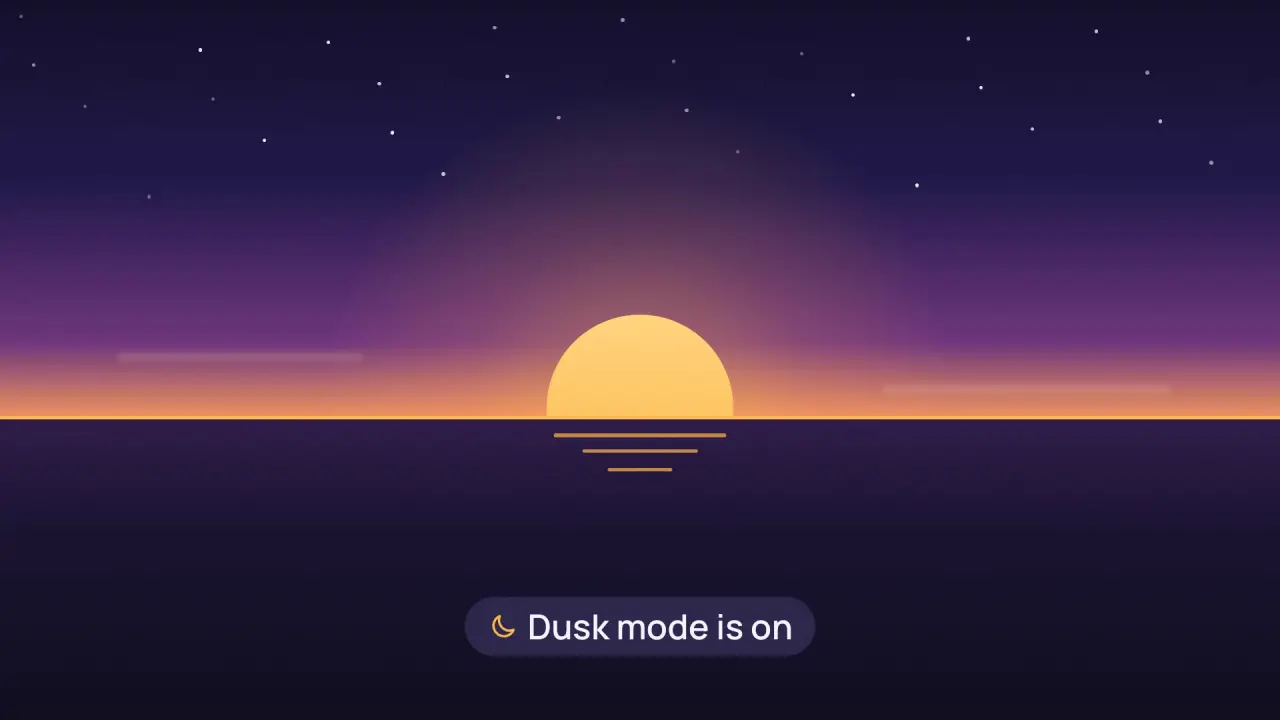
Use when a setting switches the whole product into a new state (dark mode, night, focus) and the next scene is a world with a horizon. A toggle switches on, its track stretches sideways past both frame edges and thins to a hairline, and that line is the horizon of the next scene. Scene A opens away from the line, up and down, and scene B is already behind it. No cut and no crossfade: the line is the seam and it never leaves the screen. Clip: toggle-horizon.mp4. Demo: demo/toggle-horizon.html.
The code
import { easeFn } from '../../core/motion/presets.js';
import { spring } from '../../core/motion/springs.js';
const land = easeFn('land'), swap = easeFn('swap'), launch = easeFn('launch');
const LINE_Y = 0.58 * H;                                                   // the toggle sits on the horizon of scene B
vawe.onFrame((t) => {
  const on = spring(t - T.press - 0.02, 380, 26);                          // the knob after the press
  const sk = clamp((t - 1.5) / 0.7);
  const l = lerp(L0, -0.03 * W, land(sk)), r = lerp(R0, 1.03 * W, land(sk)), h = lerp(TH, 0.5 * u, swap(clamp(sk * 1.25)));
  track.style.cssText = `left:${l}px; top:${LINE_Y - h / 2}px; width:${r - l}px; height:${h}px`;
  const wk = launch(clamp((t - 2.0) / 0.65));                              // A leaves the line, accelerating
  topHalf.style.clipPath = `inset(0 0 ${H - LINE_Y * (1 - wk)}px 0)`;
  bottomHalf.style.clipPath = `inset(${LINE_Y + (H - LINE_Y) * wk}px 0 0 0)`;
});
Easing and timing
The clip runs 3.8 s. The look is dusk.
The clip uses 4 named eases from core/motion/presets.js. Each is a pair of After Effects handles: influence is how far along the segment the handle reaches, and speed is how fast the value moves at the key, as a multiple of the segment's average speed. Motion in the docs explains both.
| Ease | Leaving a key | Arriving at a key |
|---|---|---|
land | 12% influence, speed 4.8 | 75% influence, speed 0 |
launch | 33% influence, speed 0 | 25% influence, speed 3 |
settle | 60% influence, speed 0 | 60% influence, speed 0 |
swap | 75% influence, speed 0 | 75% influence, speed 0 |
Notes
- Scene A is two copies of the same layer, each clipped to its side of the line (
bottom.innerHTML = top.innerHTML). One clipped layer would cut the card in half and show the cut half. The toggle sits on the line, so the card spans both halves. The track grows from the toggle's own left and right edges (the toggle sits right of centre in its row), and the row label fades out 0.1 s before the track reaches it, so the line never runs through text. - The horizon is the track, in the accent colour: it stays at
LINE_Yfor the whole of scene B. Put the horizon of B (the sky edge, the sea line) on the same y. A line that moves after the handoff is a second object. - Order: the knob switches first (spring k 380, d 26, about 0.3 s), 0.2 s of dwell, then the track stretches 0.7 s on
EASE.land: width to 105 percent of the frame, height 10 u to 0.5 u onEASE.swap, 1.25 times faster than the width, so the pill is long before it is thin. The knob rides the right end and shrinks with the track height. - The wipe starts 0.5 s into the stretch, when the line is nearly full width: 0.65 s on
EASE.launch, so the two halves accelerate away. It overlaps the stretch, so the line never waits. The wipe is the exit of A: shorter and faster than the stretch plus the dwell. - The world arrives after the seam: the sun climbs from under the line 0.5 s after the wipe starts (1.1 s,
EASE.land) with a warm halo, a reflection lengthens under it, the caption rises 0.25 s later and holds, and two thin clouds drift. The sky ends in the horizon colour at the line, so the amber line reads as the edge of the light. The camera does not move. - What goes wrong: a cursor that leaves slowly stays on screen over the new world, so send it off the frame. Stars and sun must be in B only. A line thicker than 0.6 u reads as a bar, not a horizon.
Looks (ground, type, radius, accent) live in demo/demo.css; this snippet keeps neutral tokens.
Sound
Sound: one short tick on the press, a low swell on the stretch that ends when the line is thin; nothing on the wipe.
Related moves


See all 125 moves. Learn how a page becomes a film in the docs, copy chains of moves from the recipes, or read the motion guide.