Video componentsProduct moments
Panel live sync
When to use
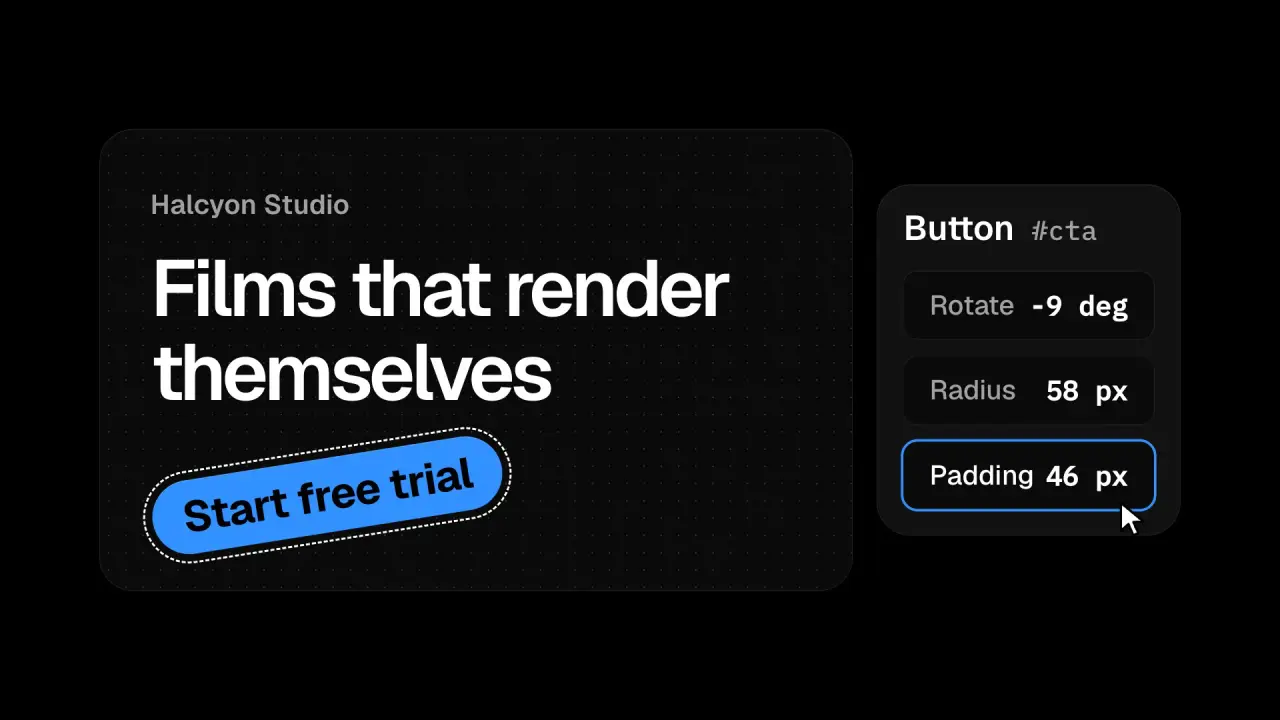
Use when the feature is editing with instant feedback: a visual editor, an inspector, a design tool. The page holds two surfaces in one frame, a target (a button on a page) and a panel of controls. A cursor presses a field and scrubs it, and the field’s number and the target change in the same frame, three beats in a row (rotate, radius, padding). The claim is the causality: one gesture, two surfaces, no lag.
The code
import '../../core/engine/page-api.js';
const smooth = easeFn('settle'), clamp = (u) => Math.min(1, Math.max(0, u)), lerp = (a, b, u) => a + (b - a) * u;
const seg = (t, a, b) => smooth(clamp((t - a) / (b - a)));
// one gesture per beat: glide to a field, press, scrub, release (seconds); values hold between beats
const beats = [
  { k: 'rot', glide: [0.35, 0.8], press: 0.86, scrub: [0.9, 1.45], release: 1.55 },
  { k: 'rad', glide: [1.55, 1.9], press: 1.95, scrub: [2.0, 2.55], release: 2.65 },
];
const value = { rot: (t) => lerp(0, -9, seg(t, ...beats[0].scrub)), rad: (t) => lerp(14, 58, seg(t, ...beats[1].scrub)) };

vawe.onFrame((t) => {
  const rot = value.rot(t), rad = value.rad(t);
  // the control and the target read the same numbers in the same frame, so they cannot drift apart
  target.style.rotate = `${rot}deg`;
  target.style.borderRadius = `${rad / 10.8}vh`;
  fields.rot.textContent = `${Math.round(rot)} deg`;
  fields.rad.textContent = `${Math.round(rad)} px`;
  for (const b of beats) fields[b.k].classList.toggle('on', t >= b.press && t < b.release);   // accent ring while pressed
  const [x, y] = cursorAt(t);   // glide on a smoothstep, then ride the scrub to the right
  cursor.style.translate = `${x}px ${y}px`;
  cursor.firstChild.style.scale = beats.some((b) => t >= b.press && t < b.release) ? 0.86 : 1;
});
Easing
Each ease is a pair of After Effects handles from core/motion/presets.js. Every curve as CSS.
| Ease | Leaving a key | Arriving at a key |
|---|---|---|
land | 12% influence, speed 4.8 | 75% influence, speed 0 |
pop | 12% influence, speed 4.8 | 35% influence, speed -1.5 |
settle | 60% influence, speed 0 | 60% influence, speed 0 |
Notes
Drive the cursor, the field text and the target from one vawe.onFrame, not from separate animations: two tweens that share a start time still drift when one is edited, and one function cannot. Keep both surfaces fully in frame for the whole clip; a zoom that crops the target out breaks the claim. Show the value with its unit (-9 deg, 58 px) in a mono face with tabular figures so the digits do not jitter. Scrub to the right by about 7 percent of the frame width so the drag is visible on the cursor. Measure the field positions with getBoundingClientRect before any animation starts, since an entrance translate would shift them. The target wears a dashed outline (selection chrome) so the viewer knows what is bound.
Looks (ground, type, radius, accent) live in demo/demo.css; this snippet keeps neutral tokens.
Sound
Sound: none; a scrub is silent, and a tick per value reads as a machine.