Marquee along path
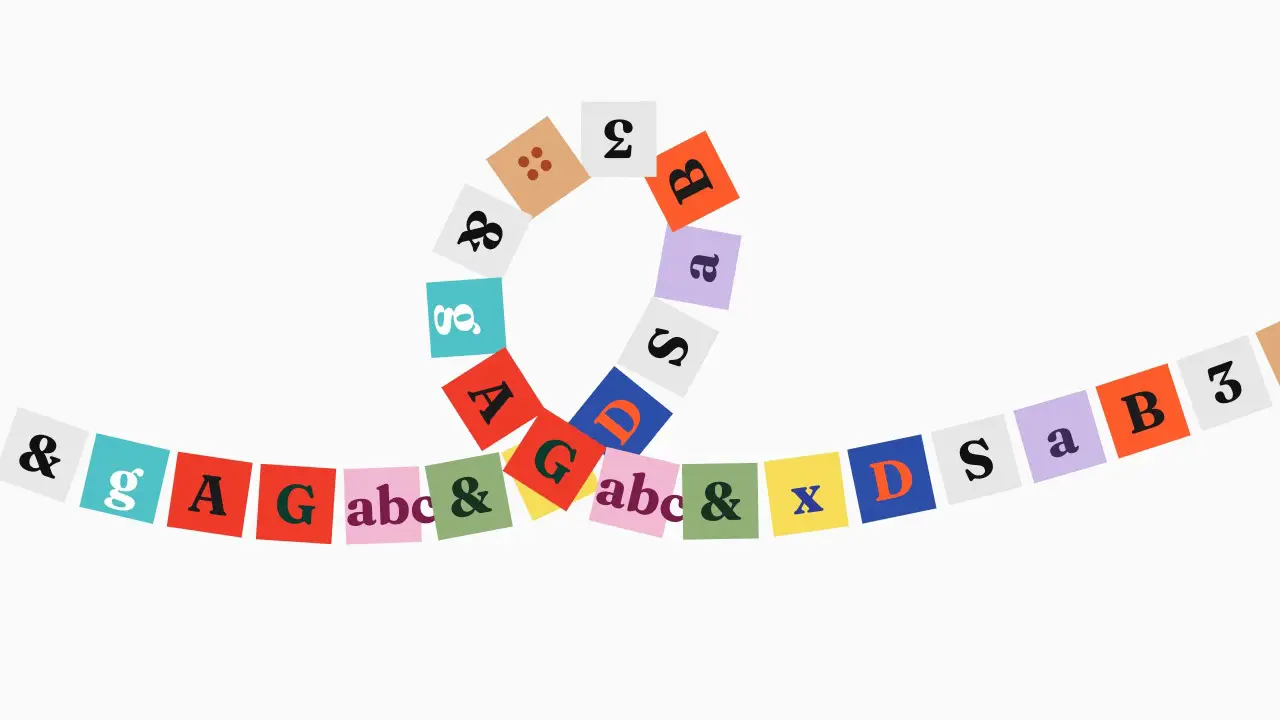
When to use
Use when a row of things must travel a curve for a whole beat: a loop-the-loop of tiles, a ribbon of logos or posters, a stream that rides an S-curve behind a title. Every item sits on the same SVG path at an even gap and moves forever; the path can show or hide. Clip: marquee-along-path.mp4. Demo: demo/marquee-along-path.html.
Credit: port of fancy by Daniel Petho, MIT. Source: marquee-along-svg-path and element-along-svg-path (repo). The maths and the demo path are the originals'.
Each item is a box with offset-path: path(...) and an offset-distance that the page sets from the time. offset-rotate stays at its default auto, so each tile turns with the curve and its centre sits on the path.
The code
const BASE_VELOCITY = 8;            // percent of the path per second
const REPEAT = 2;                   // copies of the child list: 13 tiles x 2 = 26 items, 100/26 percent apart
const SCROLL_FACTOR = 5 / 1000;     // the original maps a constant 1 through [0, 1000] -> [0, 5]: speed x 1.005
const wrap = (v) => ((v % 100) + 100) % 100;
window.seek = (t) => items.forEach((el, i) => {
  const pct = wrap(BASE_VELOCITY * (1 + SCROLL_FACTOR) * t + (i * 100) / items.length);  // direction reverse: negate the first term
  el.style.offsetPath = `path('${PATH}')`;                                              // viewBox px, same box as the svg
  el.style.offsetDistance = `${easing ? easing(pct / 100) * 100 : pct}%`;                // optional easing of the lap
  el.style.zIndex = Math.floor(1 + (pct / 100) * 10);                                   // rolling z: the lead item is on top
});
Easing and timing
The clip runs 5 s. The look is vawe.
Notes
The stage is the original's responsive mode: the 996 x 330 box scales by min(vw/996, vh/330) * 1.05 and is centred. The tiles are 56 x 56 box px. The path is M1 209.434C58.5872 255.935 387.926 325.938 482.583 209.434C600.905 63.8051 525.516 -43.2211 427.332 19.9613C329.149 83.1436 352.902 242.723 515.041 267.302C644.752 286.966 943.56 181.94 995 156.5.
Option: one element along the path (the original's element-along-svg-path). One item, no repeat. Its progress is duration 4 s, linear, looping: offsetDistance = ((t / 4) % 1) * 100 + '%'. The original demo runs it once, 3 s, on cubicBezier(0.757, -0.002, 0.123, 0.993): offsetDistance = cubicBezier(0.757, -0.002, 0.123, 0.993)(clamp01(t / 3)) * 100 + '%'. direction: reverse runs 100 to 0.
The numbers that make it look expensive
- 8 percent per second: one lap in 12.4 s. The loop of the path crosses itself, so the tiles overlap and the rolling z-index decides who is above.
- Even gap: 100 divided by the item count, so adding items tightens the chain without changing the speed.
- Tiles are 56 px in a 996 px wide box (5.6 percent of the box width): small enough that the curve, not the tile, is the picture.
- The ground is
#fafafa(zinc-50) and the rail is invisible (showPathis off). Show it withstroke: currentColoronly for a diagram. - Drag and hover slow-down are not ported: at rest the original has neither.
The common mistake
Moving the tiles with transform and a hand-built tangent: offset-path does the rotation and the arc length for free. Also forgetting the viewBox scale: the path is in box px, so the items and the path must share the same scaled parent. Wrap with a modulo, never reset: a reset at 100 percent shows as a jump.
Difference from the original: the tiles are lettered colour squares in place of the demo's poster images.
Sound
Sound: none; or one tick as the lead tile crosses the loop.
Related moves


See all 125 moves. Learn how a page becomes a film in the docs, copy chains of moves from the recipes, or read the motion guide.